
AI receptionist software
The AI receptionist for contractors and small service businesses that books real jobs.
It answers the calls you would otherwise miss, after hours and when the office is busy, knows the customer and their jobs, books straight into your technicians' actual schedule and hands off to a person when it should. Built into Fieldproxy's field service software, set up to how you already work.
Short answer
Which field service platforms offer AI voice agents that answer calls and schedule jobs?
Several field service platforms now offer an AI phone agent, and stand-alone AI receptionists can be connected to most of them. The difference is whether the agent can see your jobs. Fieldproxy's AI voice agent is built into its field service software: it recognises existing customers by number, sees their sites and open jobs, offers times that are actually free on your technicians' schedule, reads the booking back and creates the job. It answers after hours by your rules, hands emergencies to a person, and leaves a summary on the record. Text and email agents work from the same records.
What it does
Every call answered, every job booked.
Missed calls are missed jobs. The receptionist picks up, recognises the customer and does the booking, inside the same system your crews work from.
Answers the calls you'd miss
Knows who's calling
Books into the real schedule
Answers where's-my-tech
Hands over to a person
Writes it all down
A call, start to finish
From ring to booked.
It picks up
Recognises the number, greets the customer by name and sees their sites and open jobs.It sorts the request
New job, reschedule, ETA, quote question or emergency. Emergencies and anything you choose go to a person.It books and confirms
Offers a real slot, reads the booking back, puts the job on the board and logs a summary on the record.
See it built around how your team already works.
Get DemoAI receptionist for small business
Where an AI receptionist fits, and where it doesn't.
Small service businesses lose work to missed calls, but plenty of owners don't want an AI talking to their customers all day, and they are right to be careful. Use it where it helps: the calls nobody would have answered, the bookings that are only a time slot, and a clean handoff to a person for everything else.
After hours
Overflow
Booking and rescheduling
Handoff to a person
Keep it away from
Replacing the people your customers know
Calling customers who did not ask
Judgement calls
You can start with after-hours only, or with text and email agents and no voice at all. The rest of Fieldproxy, from scheduling to invoicing, works the same either way.
Why inside the FSM
A receptionist that can see your schedule.
Most AI receptionists are a separate tool that takes a message or books into a calendar. Ours is part of the field service software, so the booking it makes is a real job on a real technician's day.
Your hours, your rules
Calls, texts and email
Joined to scheduling
Set up with your own rules, on your own jobs.
Get DemoWorked example
A Saturday call, booked without anyone in the office
An existing customer calls at 4:40 pm on a Saturday because their AC is blowing warm air. This is what the AI receptionist does on that call.
Step 1
It recognises the caller
The number matches Melissa Coleman's customer record. Before speaking, the agent can see her site, the 12-year-old system on file, her care plan and that her last visit was a spring tune-up.
Step 2
It works out what she needs
Warm air, system running, nobody unwell in the house. Your after-hours rules say that is next-day priority, not an emergency call-out. Had she said there was no cooling and an elderly person at home, your emergency rule would have sent the call straight to the on-call technician.
Step 3
It offers real times and books the job
The agent offers two windows on Monday that are actually free on the board for a technician with the right skill, reads the booking back, and puts the job on the schedule with her description of the problem.
Step 4
Everything is on the record for Monday
The call summary and outcome sit on her record and in the Front Desk inbox, so the office sees the booking first thing. On Monday morning she gets the visit window and a tracking link when the technician is on the way.
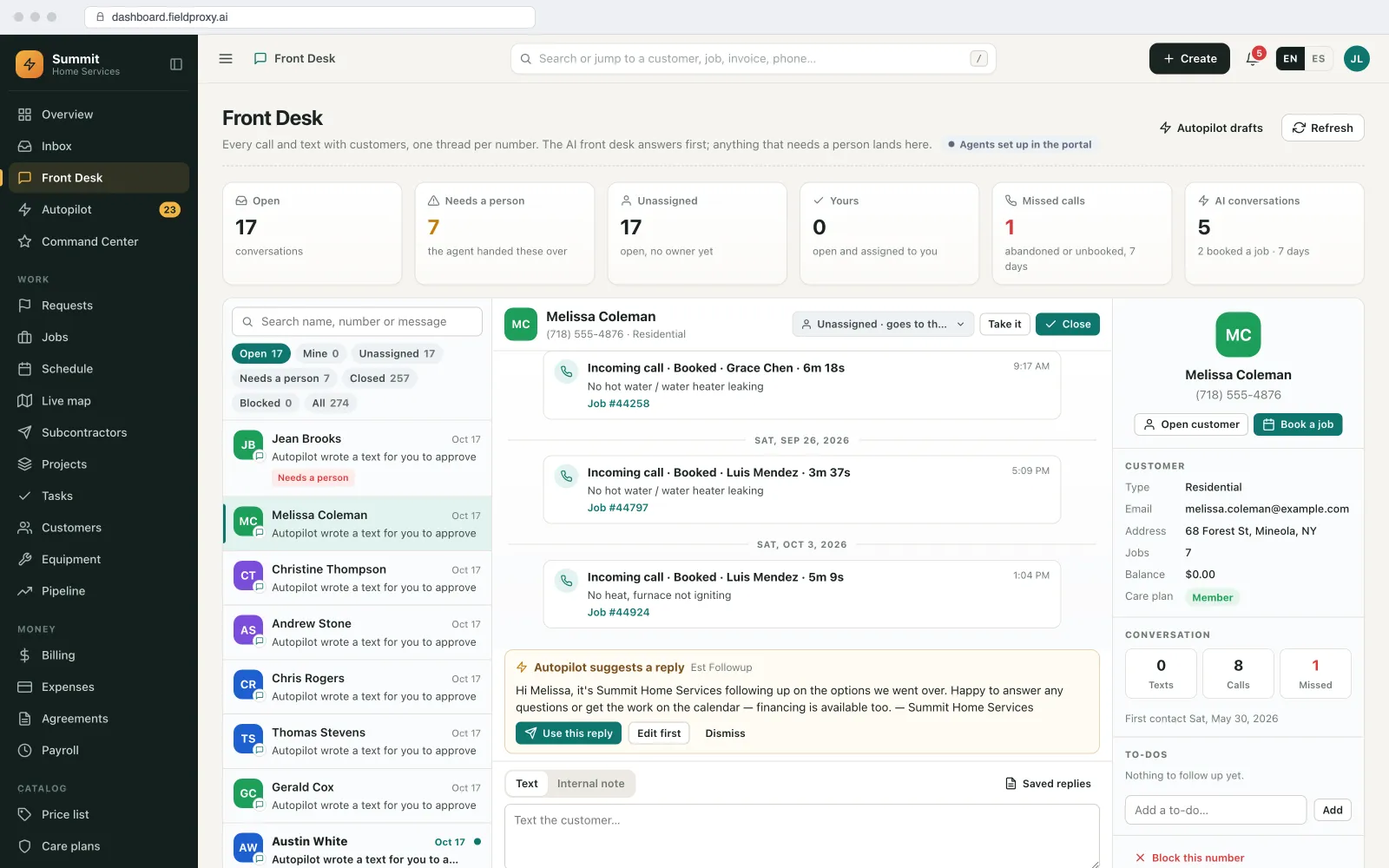
Front Desk: the customer's calls and texts in one thread, with a suggested reply waiting.
Names, sites and amounts in this example are demo data. Screens are from the Fieldproxy demo account.
In the product
What the customer sees next, and how the office can change it
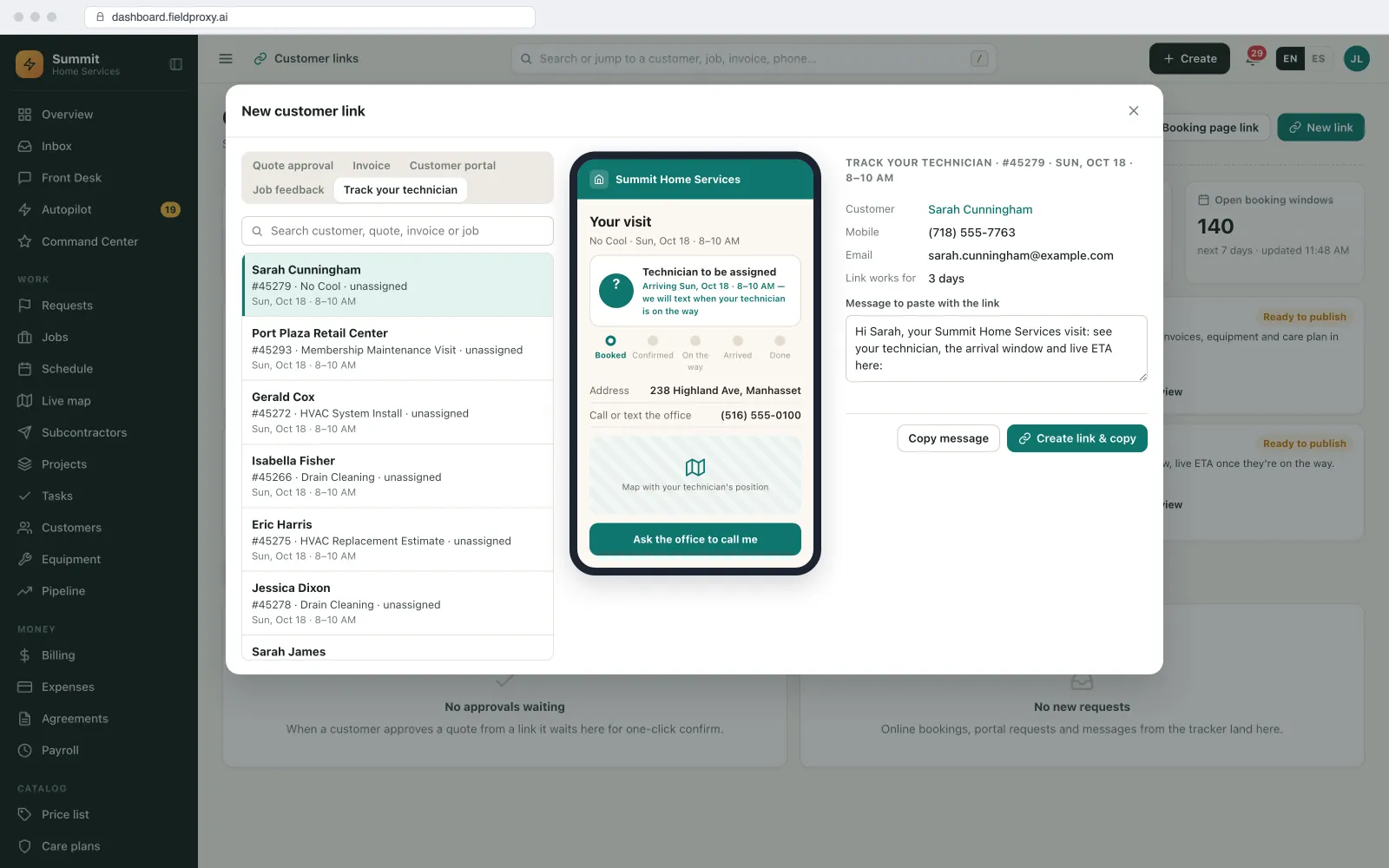
New customer link screen with a phone preview of the technician tracking page with the visit window and status steps
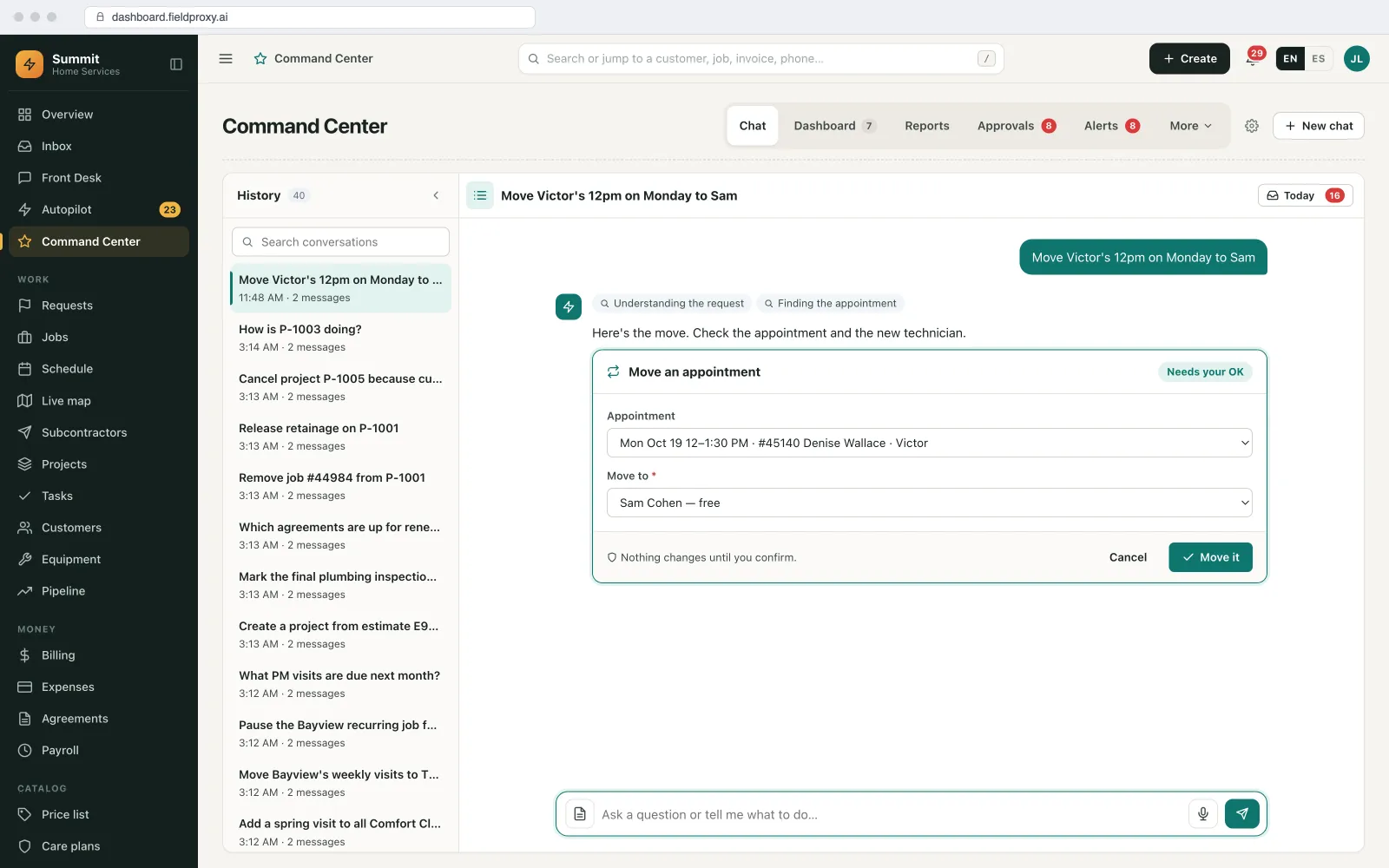
Command Center confirm card: move Victor's 12pm Monday appointment to Sam Cohen, with nothing changed until Move it is clicked
Control
What runs on its own, and what waits for you
| Task | Who acts | Detail |
|---|---|---|
| Answering the call and identifying the caller | Runs on its own | Inside or outside business hours, by your settings. |
| Booking routine work into a free slot | Your rule decides | Allowed job types and windows are yours to set; others are taken as a request for the office. |
| Emergencies, complaints, anything you name | A person does it | Handed to a person on your team with the context, by warm transfer or on-call routing. |
| Rescheduling an existing visit | Your rule decides | Within limits you set, or passed to the office. |
| Quoting prices on the phone | Your rule decides | Only the prices you allow it to state, such as a call-out fee; otherwise it books an estimate visit. |
| Recording and summarising the call | Runs on its own | With a consent notice where you choose to record. |
Getting started
Setup, connections and fit
How it is set up
- A 30-minute call to walk through how your office runs today: job types, who approves what, and where work comes in from.
- Forward your business number, or move it, to the agent's line. Your existing number stays the one customers know.
- Set business hours, after-hours rules, on-call routing and what counts as an emergency.
- We set it up on your own data and rules, and it is live within a day.
- Listen to the first calls in the call log and adjust what it says and books.
What it connects to
- Your phone number: forwarded or moved, so customers call the number they already have
- SMS and email agents: the same rules answer texts and emails
- Your schedule in Fieldproxy: it only offers times that are actually free
- Google Calendar or Outlook: for office staff who work from a calendar
When it is not a fit
- Most of your calls are long technical consultations that need a senior engineer from the first minute.
- You do not want any job booked without a person speaking to the customer first. It can take messages only, but then a basic answering service may be enough.
- Your schedule is not kept in Fieldproxy, so there are no real free times for it to offer.
Questions
AI receptionist for contractors and small businesses, answered.
Which field service platforms offer AI voice agents that answer calls and schedule jobs?
Several field service platforms now offer an AI phone agent, and stand-alone AI receptionists can be connected to most of them. The difference is whether the agent can see your jobs. Fieldproxy's AI voice agent is built into its field service software: it recognises existing customers by number, sees their sites and open jobs, offers times that are actually free on your technicians' schedule, reads the booking back and creates the job. It answers after hours by your rules, hands emergencies to a person, and leaves a summary on the record. Text and email agents work from the same records.
What is the best AI receptionist for a small business?
For a small service business, the best AI receptionist is one that can see your schedule and customers, so it books a real appointment instead of taking a message, and hands the call to a person when it should. Stand-alone AI receptionist software works for businesses that mainly need messages taken. Fieldproxy's receptionist is built into its field service software, which suits contractors and service businesses that book jobs onto technicians' days.
What is AI receptionist software?
AI receptionist software answers your business phone with an AI voice agent: it greets the caller, works out what they need, answers simple questions, books or changes appointments and passes the call to a person when needed. Some are separate tools; Fieldproxy's is part of the system your office and technicians already use.
Will my customers mind talking to an AI?
Some will. That is why most service businesses start it on the calls that would otherwise go to voicemail: after hours and when the office is busy. It can hand any caller to a person, and you can keep it to texts and email, or off, if your customers prefer to talk to your team.
What is an AI receptionist for contractors?
An AI receptionist for contractors is an AI voice agent that answers your business phone, works out what the caller needs, and books or updates jobs. Fieldproxy's AI receptionist is part of its field service management software, so it recognises existing customers, sees their jobs and books into your real schedule instead of just taking a message.
How is it different from a generic AI receptionist or answering service?
A generic AI receptionist takes messages or books into a calendar it cannot see past. Fieldproxy's receptionist works inside your field service software: it knows the caller's sites and job history, offers times that are actually free on your technicians' schedule, and leaves a summary on the job record.
Can the AI receptionist book jobs after hours?
Yes. You set business hours and after-hours rules. Out of hours it can book routine work, take the details for the morning, or route genuine emergencies to your on-call person.
What happens when a caller needs a real person?
The AI hands the call over to someone on your team, with the context of the conversation, for emergencies, complaints or any situation you choose.
Does it answer texts and emails too?
Yes. Fieldproxy has text and email agents as well as the voice agent, working from the same customer records and schedule.
How much does an AI receptionist cost with Fieldproxy?
The AI receptionist is included in Fieldproxy's field service software, one price per company with unlimited users. AI usage runs on the plan's monthly AI credits.
Can an AI receptionist tell an emergency from a routine call?
Yes, using the rules you give it. You define what counts as an emergency for your trade and what should happen: a warm transfer, a page to the on-call person, or a priority job. Everything else follows your normal booking rules.
Does the caller know they are talking to AI?
You choose how it introduces itself. Most contractors have it say it is the company's assistant and offer a person at any time.
Can I keep my existing business phone number?
Yes. You forward the number to the agent or move it over, and customers keep calling the number they know.
What does the office see after an AI-handled call?
A summary and outcome on the customer's record and in the Front Desk inbox, with the job it booked or the request it took, so nobody has to ask the customer again.
Hear it answer your phone.
A 30-minute call on how your calls come in today. We configure it within a day and show the receptionist booking into your real schedule.