
Scheduling and dispatch software
Field service scheduling and dispatch software, with AI that plans the day.
Schedule and dispatch every job from one board and map, get it to the right technician's phone, and keep customers told. The AI builds tomorrow's board and rebuilds the day when someone calls in sick or the weather turns, and you approve every change. Part of Fieldproxy, set up to how you already work and live within a day.
Scheduling and dispatch
Field service scheduling software and dispatch software, on one board.
Before any AI: the service scheduling and dispatching your office does every day. Book jobs into real availability, dispatch the right technician, see where every job stands and keep the customer told. Set up to your own job types, areas and rules.
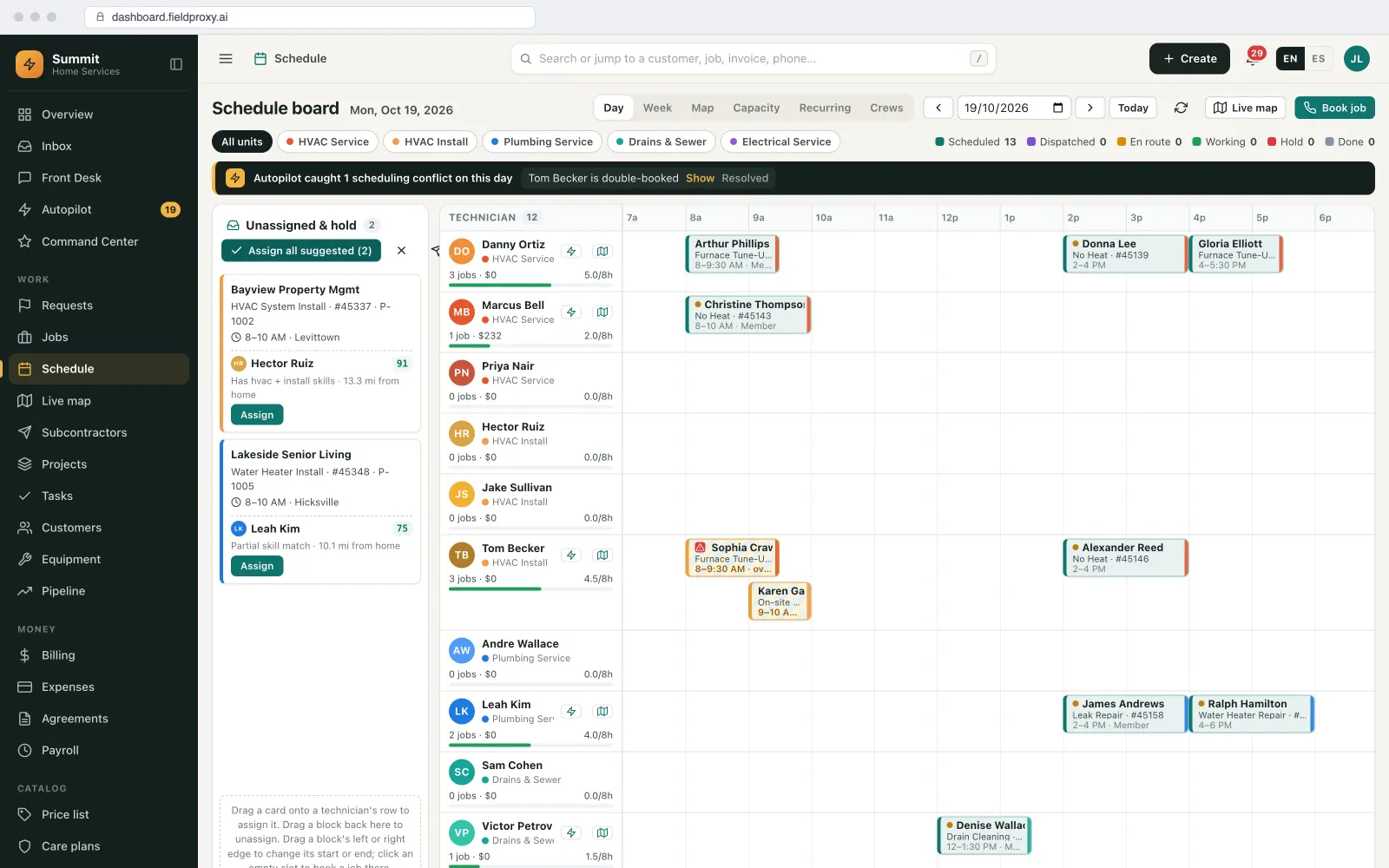
Schedule jobs on one board
Dispatch the right technician
Emergencies and routine on the same board
Status the office can see
Customers told automatically
Undo the wrong move
Short answer
Which field service software uses AI to schedule and dispatch technicians?
Most field service platforms now offer some AI scheduling: ServiceTitan and Salesforce Field Service add optimisation to their dispatch boards, and other tools are adding AI suggestions to their boards. Fieldproxy is AI-native: its dispatch agent assigns each job by skills and certifications, availability, live location and drive time, parts in the van and overtime cost, builds tomorrow's board, and rebuilds the day when a technician calls in sick or the weather turns. A person approves every change, and you can run it from ChatGPT or Claude. It is set up to your own dispatch rules and live within a day.
Watch it work
Dispatch from one board, and let AI change the schedule with your approval
Two short walkthroughs on a working account: dispatching technicians from the schedule board, then asking the AI to move jobs, approving the change, and undoing it.
What the AI adds
The dispatcher's morning, done before 7am.
On top of the board, AI scheduling and dispatch works on your real jobs, crews and rules, not a demo dataset. These are the jobs it takes off the office.
Builds tomorrow's board
Picks the right technician
Rebuilds the day when someone's out
Reschedules around the weather
Plans the route
Tells the customers
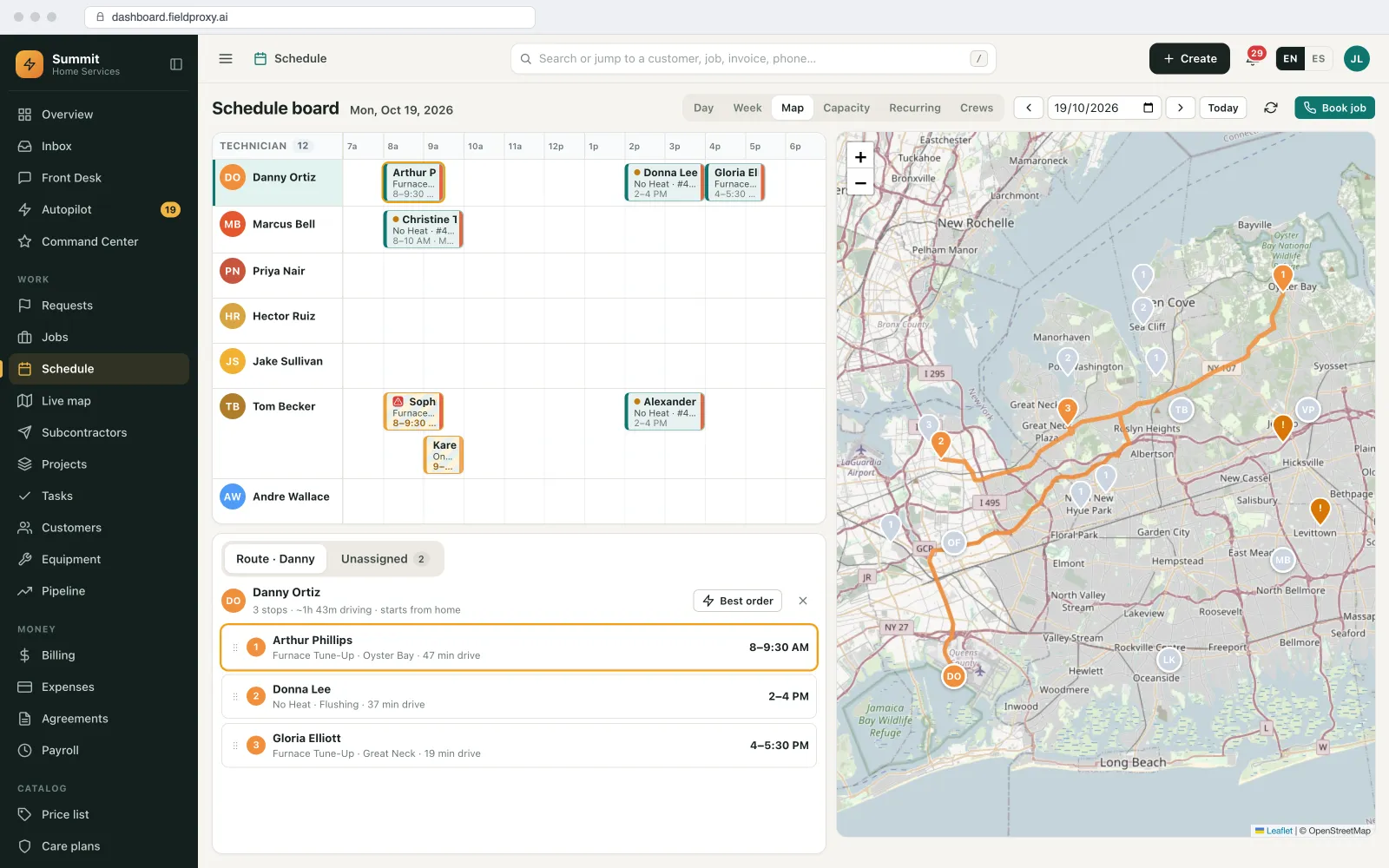
Schedule and map side by side
The board and the map, on one screen.
The day's schedule on one side, the same jobs on a map on the other, with real road routes between stops. Change one and the other follows.
Road routes and drive times
Reorder stops
Drag to retime or reassign
Best-tech suggestion, with the reason
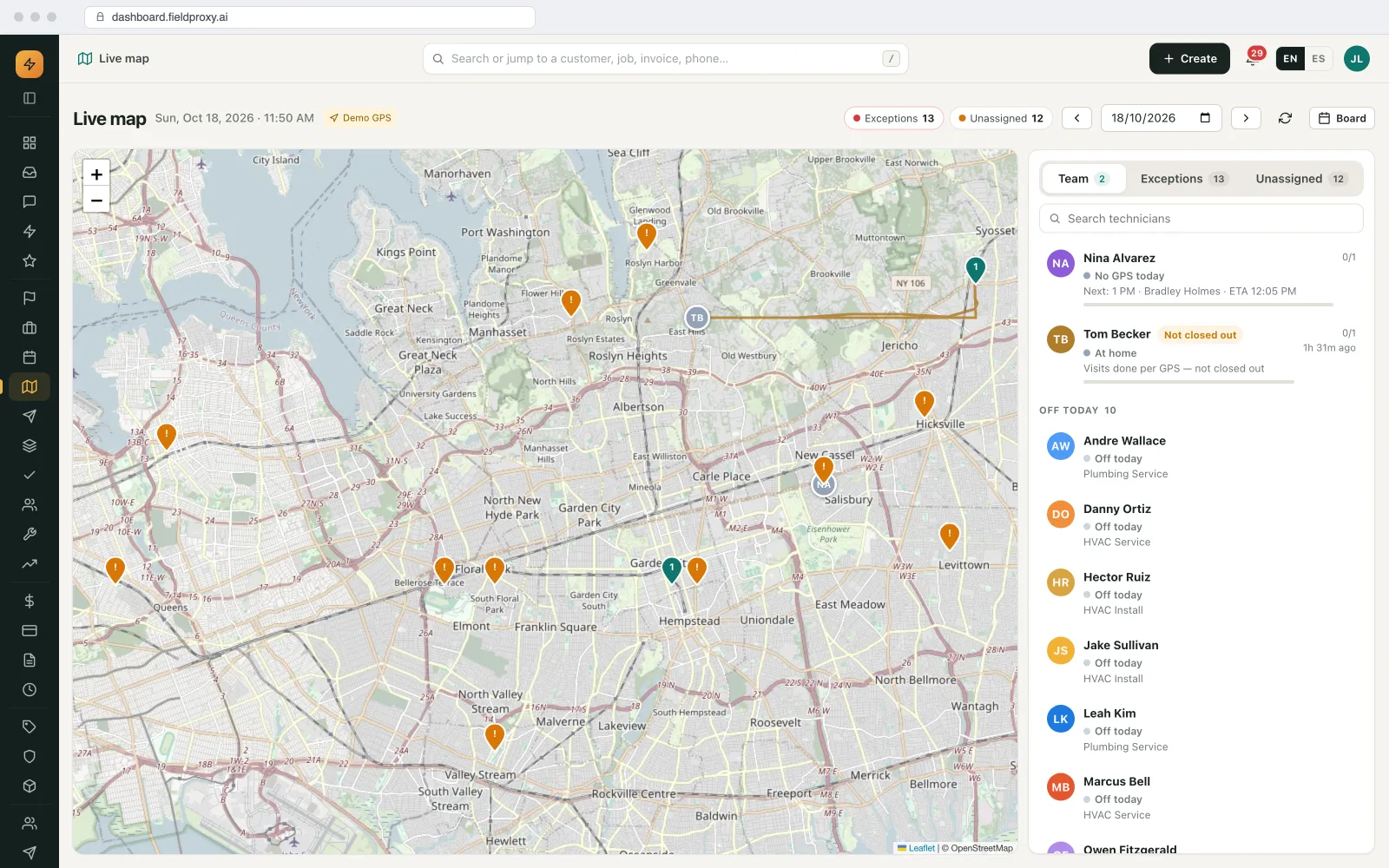
Live map
Your rules first
How a change happens
It proposes. You approve.
Nothing moves on the board until a person says so.
Something changes
A sick call, an emergency job, a storm, or just tomorrow's open jobs waiting to be planned.The AI proposes the new day
Who goes where and in what order, with the reasoning: skills, distance, parts, workload and cost.You approve, everyone's told
Techs get the update on their app and customers get their new time.
See it built around how your team already works.
Get DemoThe rules it follows
Your dispatch rules, not a generic optimiser.
Because Fieldproxy is set up to your process, the AI schedules by the rules you already use.
Skills and certifications
Areas and time windows
Contracts and SLAs
Set up with your own rules, on your own jobs.
Get DemoWorked example
A sick call at 7:10 am, and the day rebuilt by 7:15
Sam calls in sick with five visits on his route, including a maintenance contract visit with an SLA due today. Here is how the dispatcher handles it.
Step 1
Sam's visits go back to unassigned
The dispatcher marks Sam out for the day. His five visits move to the unassigned list, each keeping its SLA deadline, required skill and customer window.
Step 2
Suggestions appear for each visit
For each unassigned visit the board shows the technicians who could take it, ranked on skill, distance from where they will be, free time and the SLA, with the reason. The contract visit goes to Victor, who is certified for that equipment and finishes nearby at 11.
Schedule board: suggested technicians with scores for unassigned visits, each with Assign.
Step 3
Routes are re-ordered with new start times
Best order previews the new sequence for each affected technician, with drive times and new start times, before anything changes. The dispatcher applies it.
Map mode: each technician's road route and stops in order, with drive times.
Step 4
Customers are told
Customers whose window moved get the new time and a tracking link, by the messages you have switched on. The one customer who can no longer be seen today gets a card for the office to call and rebook.
Names, sites and amounts in this example are demo data. Screens are from the Fieldproxy demo account.
In the product
The live map and recurring work
Live map with technician positions, unassigned visits and a team panel with status and next stop
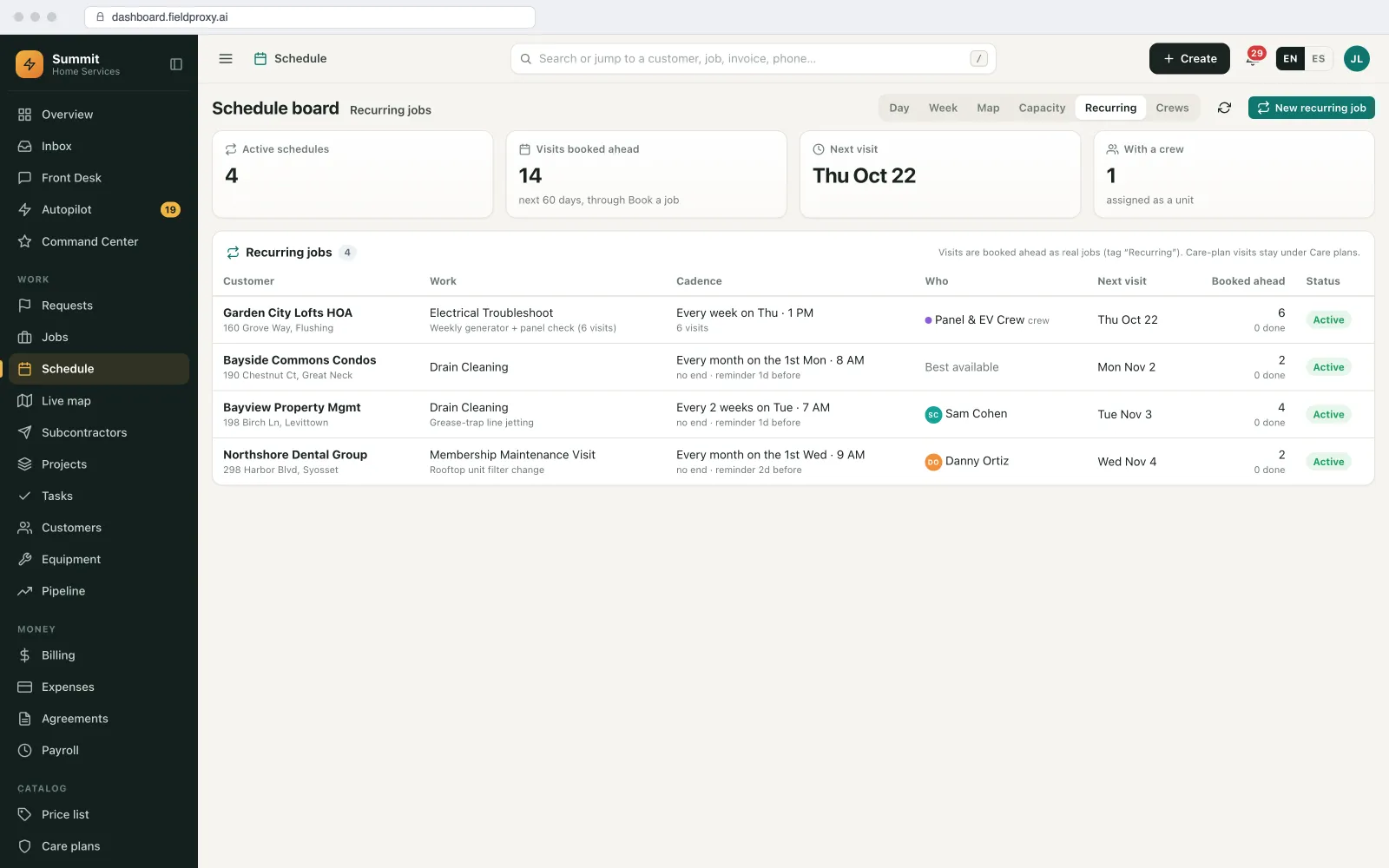
Schedule recurring jobs tab with cadence, assigned technician or crew, next visit and visits booked ahead
Control
What runs on its own, and what waits for you
| Task | Who acts | Detail |
|---|---|---|
| Suggesting a technician for each visit | Runs on its own | Ranked on skills, location, availability and SLA, with the reason shown. |
| Assigning the visit | Your rule decides | A dispatcher clicks Assign by default; can be automatic for job types you choose. |
| Re-ordering a route | Waits for your OK | Best order previews new start times; nothing moves until Apply. |
| Moving or swapping appointments by asking | Waits for your OK | Command Center shows a confirm card, and every change has Undo. |
| Creating recurring maintenance visits | Runs on its own | Booked ahead from the contract's cadence. |
| Telling customers about a new time | Your rule decides | Automatic messages you switch on, or drafted for the office. |
Getting started
Setup, connections and fit
How it is set up
- A 30-minute call to walk through how your office runs today: job types, who approves what, and where work comes in from.
- Import technicians with skills, certifications, home base and working hours, and your job types with durations.
- We set it up on your own data and rules, and it is live within a day.
- Set the rules dispatch should respect: which skills each job needs, SLA windows, zones, overtime limits.
- Run a week with suggestions only, then switch on automatic assignment where you trust it.
What it connects to
- Technician mobile app: status, location and on-my-way, which feed the live map
- Google Calendar or Outlook
- Customer messages: SMS and email visit windows and tracking links
- Claude and ChatGPT: ask about and update your data from the assistant you already use
When it is not a fit
- You run one or two technicians and the schedule fits in your head. A shared calendar may be all you need.
- Your technicians cannot carry a phone on the job, so there is no live location or status to plan around.
- You need a solver for hundreds of identical delivery stops a day rather than service jobs with skills and SLAs.
Questions
Scheduling and dispatch software, answered.
Which field service software uses AI to schedule and dispatch technicians?
Most field service platforms now offer some AI scheduling: ServiceTitan and Salesforce Field Service add optimisation to their dispatch boards, and other tools are adding AI suggestions to their boards. Fieldproxy is AI-native: its dispatch agent assigns each job by skills and certifications, availability, live location and drive time, parts in the van and overtime cost, builds tomorrow's board, and rebuilds the day when a technician calls in sick or the weather turns. A person approves every change, and you can run it from ChatGPT or Claude. It is set up to your own dispatch rules and live within a day.
What is field service scheduling software?
Field service scheduling software puts every job, technician and time window on one board so the office can book work into real availability: who is free, who has the skills, and how far they are from the job. It also books recurring maintenance visits, reminds customers and moves jobs when the day changes. Fieldproxy's scheduling board sits next to a map with road routes, and its AI can build tomorrow's board for you to approve.
What is dispatch software?
Dispatch software gets the right technician to each job: it assigns the work, sends the job to the technician's phone with everything they need, and shows the office where each job stands. Service dispatching software for field service also handles emergencies, reassignments and customer updates. In Fieldproxy dispatch runs on your own rules (skills, areas, time windows, contracts), and the AI proposes assignments with its reasons for a person to approve.
What is the difference between scheduling and dispatch?
Scheduling decides when a job happens and roughly who does it, usually a day or more ahead. Dispatch is the same-day work of sending a technician, handling the emergency that just came in and reassigning when someone runs late. Most service businesses need both in one place, which is why scheduling and dispatch software keeps them on the same board.
What software can automatically assign service jobs to technicians based on availability, skills and location?
Fieldproxy's dispatch agent does this. For each job it checks who is qualified (skills and certifications), who is free in the time window, where each technician actually is and how long the drive is, what parts they carry and the overtime cost, then proposes the assignment with its reasoning. A person confirms it, and the technician gets the job on their app.
How can AI reduce manual work for dispatchers?
The work it takes off the dispatcher is the repetitive part of the day: laying out tomorrow's board, choosing a technician for each new job, re-planning when someone is out or an emergency comes in, ordering each route, and telling customers their new time. In Fieldproxy the AI does those steps and the dispatcher reviews and approves the result instead of building it by hand.
Can AI schedule HVAC emergency calls and preventive maintenance together?
Yes. Fieldproxy keeps recurring maintenance visits and contract SLAs on the same board as emergency calls. When an emergency comes in, the AI proposes who to send and which planned visits to move, keeping contract customers and SLA deadlines first, and you approve the change.
What is AI scheduling software for field service?
AI scheduling software builds and maintains the technician schedule for you: it lays out tomorrow's jobs by crew, area and time window, and rebuilds the plan when something changes, such as a sick technician, an emergency call or bad weather. In Fieldproxy you review and approve the changes before they go to the team.
What is AI dispatch?
AI dispatch means software choosing which technician goes to which job. Fieldproxy's dispatch agent weighs each technician's skills and certifications, current location and drive time, the parts in their van, workload and overtime cost, then assigns the job and logs why it chose that person.
Does the AI change the schedule without asking?
No. Fieldproxy proposes the new board or assignment, shows why, and a person confirms it before anything reaches the team.
Can AI reschedule jobs when a technician calls in sick?
Yes. Tell it who is out and it redistributes that technician's jobs across the rest of the team based on skills, location and capacity, shows the proposed day, and texts the affected customers once you approve.
Is AI scheduling a separate product?
No. It is part of Fieldproxy's field service management software, alongside jobs, the technician app, quotes and invoices. One price per company with unlimited users, and each plan includes a monthly allowance of AI credits.
Can I schedule and dispatch from ChatGPT or Claude?
Yes. Through Fieldproxy's MCP server you can ask ChatGPT, Claude or Microsoft Copilot to plan routes, find the nearest available technician or reschedule a batch of jobs, and every change is confirmed before it is made.
Can AI rebuild the schedule when a technician calls in sick?
Yes. The technician's visits go back to unassigned, Fieldproxy suggests who can take each one by skill, location, availability and SLA, and Best order previews the new routes and start times before the dispatcher applies them.
Does AI dispatch take certifications into account?
Yes. Skills and certifications are on each technician, required skills are on each job type, and suggestions only include technicians who qualify. Expiring certifications show up on the team compliance list.
Can the dispatcher override the AI?
Always. Suggestions are suggestions, every change through Command Center has a confirm card and Undo, and you choose which job types, if any, are assigned automatically.
See it schedule your day.
A 30-minute call on how you dispatch today. We configure it within a day and show the AI planning your real board.