
Autopilot
Hand off the follow-ups. Approve the cards.
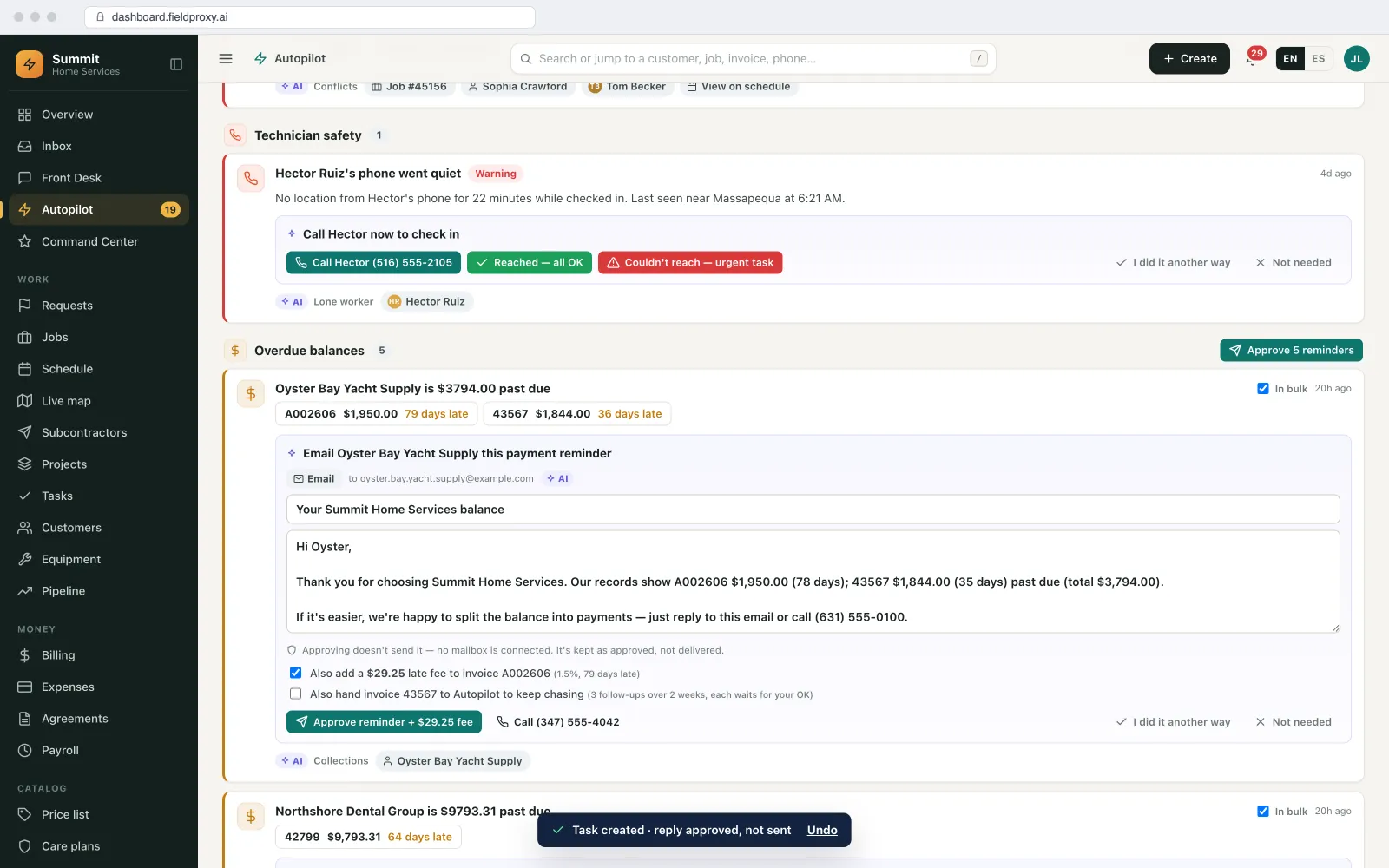
Give Autopilot a goal and it works on it in the background. For each customer it posts a card with the exact action, like “Reschedule to Tue 10–12 with Sam”. You tap Do it or Not needed, and anything done can be undone.
Goals you can hand off
The follow-ups your office never gets to.
Switch on the goals you want. Each one runs on your own data and your own rules, set up around your workflows.
Estimate approval
Follows up on estimates that are waiting for the customer's yes.
Invoice collection
Chases unpaid invoices with a reminder and a payment link.
Booking
Turns a request into a booked visit at a time that fits the schedule.
Fill a schedule gap
Finds work that can move into an open slot on a technician's day.
Deposit
Collects the deposit before the job is scheduled.
Review request
Asks happy customers for a review once the job is closed.
Renewal
Brings up agreements that are due to renew, with the renewal ready.
Care-plan signup
Offers a care plan to customers who would benefit from one.
No-show rebook
Rebooks a missed visit with the customer.
Missing information
Asks for the photo, address or detail a job still needs.
Lead follow-up
Keeps new leads moving toward a booked visit or an estimate.
Maintenance due
Books the maintenance visits that are coming due.
Project next step
Moves a project to its next phase, change order or invoice.
Your own goal
Describe a goal in plain English and Autopilot works on it the same way.
How it works
A card with the exact action, for you to approve.
Pick the goals
Choose what Autopilot works on, from estimate approvals to renewals, or write your own goal.It works the goal
Autopilot looks at your jobs, estimates, invoices and schedule and finds who needs what.You get a card
Each card names the customer and the exact action, for example “Send the invoice reminder with a payment link”.Do it, Not needed, or Undo
Tap Do it and it is done. Tap Not needed and it is cleared. Changed your mind? Undo.
Drafts wait for an OK
Messages are drafted for you and wait until someone in the office approves them.
Only the goals you choose
Every goal can be switched on or off on its own.
Every action can be undone
A done card keeps its Undo, so nothing is final until you are happy with it.
Built around your workflows
Your job types, prices and stages, so the cards fit how your team already works.
Front Desk
Every call, text and chat, in one inbox.
Front Desk: every call, text and chat in one inbox, answered by AI agents and matched to the customer and their jobs, with replies drafted for your office to check and send.
One place for every conversation
Calls, texts and web chat together, so nothing waits in someone's personal phone.
A reply drafted for you
Written from the customer's jobs and your schedule. Someone checks it and sends.
Triage with a suggested job type
New calls and messages are sorted, with the job type suggested.
You stay in charge
Nothing is sent without a person approving it, unless you turn that step on.
Part of Fieldproxy AI agents
Command Center you ask. Autopilot that keeps going.
Autopilot sits beside Command Center and the specialist agents for calls, texts, photos and documents, all inside your own field service management, live within a day.
FAQ
Autopilot questions
Does Autopilot send messages or change jobs on its own?
Not unless you turn that on. Autopilot prepares the action and posts it as a card. Drafted messages wait for someone to approve them, and nothing is sent or changed until a person taps Do it.
Can I undo something Autopilot did?
Yes. When a card is done you get an Undo, the same as every change Command Center makes.
Which goals can it work on?
Estimate approval, invoice collection, booking, filling a schedule gap, deposits, review requests, renewals, care-plan signups, no-show rebooking, missing information, lead follow-up, maintenance due and the next step on a project. You can also describe your own goal in plain English.
Do I have to switch on every goal?
No. You choose which goals Autopilot works on, and you can switch any of them off again.
How does Autopilot relate to Command Center?
Both are part of Fieldproxy's AI agents. Command Center is what you ask; Autopilot works in the background and brings you cards. Front Desk holds every customer call, text and chat in one inbox, answered by AI agents, with replies drafted for you.
Your own custom field service management, within a day.
Tailored to your workflows, with Command Center, Autopilot and Front Desk set up around how you work.