
AI-Powered Platform
Build Field Service Apps By Simply Describing Them
Stop wrestling with complex software configurations. Fieldproxy's AI Builder understands plain English and creates custom workflows, forms, reports, and automations in seconds. What takes months in traditional FSM takes minutes with AI.
 Workspace · Meridian Facility Services180 technicians online
Ask for a change, in plain English
Describe how the work should run...
Form · Roof inspection
v12 · liveValidation rule
IF Moisture reading < 30% THEN block Technician sign-off
Applies to every roof inspection, on every site, from the next job opened.
Rules · Response SLAs
3 rulesOpen jobs re-timed from when they were logged, not from now.
What changed
WO-90533 · Roof inspection
Harbor Point · Northwind
Roof type
Membrane condition
Photos, minimum 4
Today · Luis M.
My jobs
Riverside Plaza
Northwind
Oak Street Depot
Halden Retail
Harbor Point
Northwind
SLA shown is the time left to respond
How AI Builder Works
Three simple steps to go from idea to working software
- 1. Describe
Tell AI What You Need
"Create a preventive maintenance workflow that schedules HVAC inspections every 6 months and alerts customers 2 weeks before."
No menus. No forms. Just describe your process in plain English.
- 2. AI Builds
Watch It Come to Life
AI analyzes your request, designs the workflow, creates database tables, builds forms, sets up notifications, and tests everything.
Complete configuration in 30-60 seconds, not 3-6 months.
- 3. Use
Go Live Immediately
Your new workflow is live and ready. Need changes? Just tell the AI. "Add photo attachments" or "Change frequency to 3 months." Done.
Continuous improvement through conversation, not change requests.
What AI Builder Creates
From simple automations to complete business systems
Custom Workflows
Dynamic Forms
Smart Reports
Automation Rules
Customer Communications
Scheduling Logic
See it built around how your team already works.
Get DemoReal AI Builder Examples
See what businesses have built using plain English
Customer Request:
"Create a priority dispatch system where emergency calls go to certified techs within 10 miles, and if no response in 15 minutes, escalate to all available techs"
AI Builder Created:
- Emergency job classification
- Certification-based tech filtering
- Geo-radius assignment logic
- Time-based escalation rules
- Multi-notification system
45 seconds
Build Time
Customer Request:
"Build an equipment maintenance tracker that alerts us 30 days before warranty expiration and automatically creates a service job"
AI Builder Created:
- Equipment database with warranty fields
- Automated expiration monitoring
- 30-day advance notifications
- Auto-generated service jobs
- Warranty status dashboard
52 seconds
Build Time
Customer Request:
"Set up a customer satisfaction workflow that sends an SMS survey 2 hours after job completion and alerts management if rating is below 4 stars"
AI Builder Created:
- Post-job completion triggers
- SMS survey delivery system
- Rating collection and storage
- Conditional alert logic
- Management dashboard for trends
38 seconds
Build Time
Traditional Configuration vs AI Builder
Old Way - Manual Configuration
- Hire consultants at $200-$400/hour
- Attend 3-week training bootcamp
- Navigate complex admin panels
- Write custom code for special cases
- Wait weeks for vendor to make changes
- Pay extra for 'advanced' customization
- 3-6 months to go live
- $50k-$200k implementation cost
New Way - AI Builder
- Describe what you need in plain English
- AI builds it in 30-60 seconds
- See it working immediately
- No code required - ever
- Change anything with conversation
- Unlimited customization included
- 1-2 days to go live
- One scoped implementation, quoted up front
AI Builder Impact
100x
Faster Than Manual Setup
Unlimited
Users On Every Plan
95%
First-Time Accuracy
24/7
AI Availability
Worked example
Changing the software by asking: a worked example
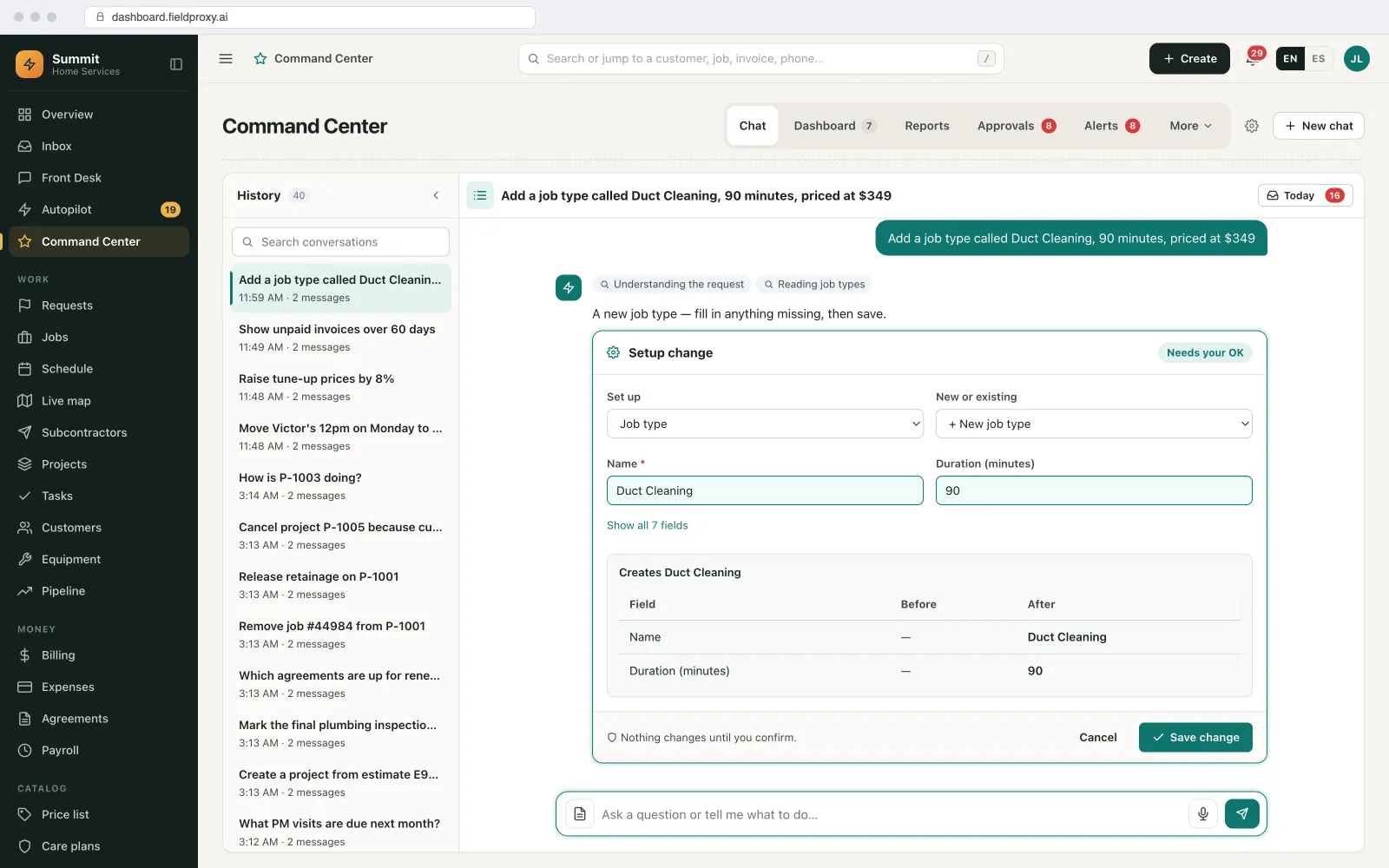
An HVAC contractor starts offering duct cleaning. Here is how the new service is added to the software in one conversation, and what is checked before anything changes.
- 1
Ask for the change
In Command Center the office manager types: 'Add a Duct Cleaning job type, 90 minutes, with a before-and-after photo checklist.'
- 2
See it before it happens
Fieldproxy shows a setup card with the before and after: the new job type, its duration and the checklist. Nothing changes until Save is clicked.
- 3
It is live
Once saved, the job type is bookable, the checklist appears on the technician app on next sync and the portal can offer it. No app store update and no ticket.
- 4
A price change waits for approval
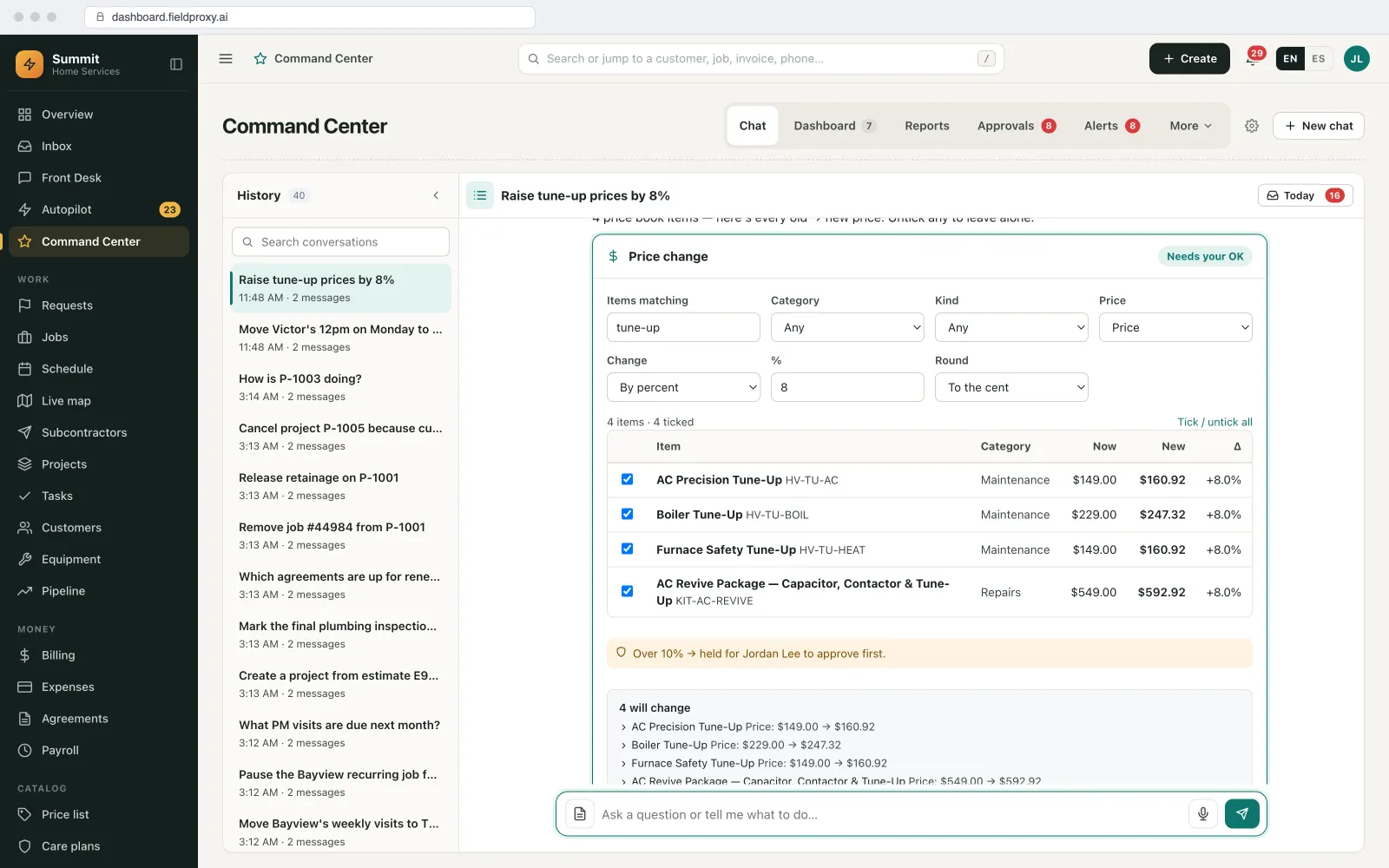
The manager then asks to raise tune-up prices. The card lists every old and new price with a tick box, and changes over 10% wait for an owner to approve.
- 5
Undo if it was wrong
Every change is logged with who made it. If a change was a mistake, it can be undone.
The software changes the same day the business does, and a person approves every change before it goes live.
Names and figures in this example are demo data.
Screens from our demo account
What you can change, and how
What can be built
Job types, fields, checklists, forms, stages, screens, notifications, automations and reports.
Who can change what
Decide which roles can make setup changes and which need approval.
Approval thresholds
For example, price changes above a percentage wait for the owner.
From outside Fieldproxy
Connect ChatGPT, Claude or Copilot and make the same requests from there.
How it connects to the rest of Fieldproxy
Ask questions and make changes in plain English.
New tables and fields land in your data model.
Why being able to change the software matters.
Every action is also available to AI assistants through MCP.
When this is not the right fit
- Large changes to how your whole business runs are best planned with us first, even if the build itself takes minutes.
- The builder works inside Fieldproxy's platform. It does not write code for systems outside it; those connect through the API.
- Every change needs a person to approve it. If you want changes made with nobody checking, this is deliberately not that.
Questions
Straight answers.
Can I change field service software without a developer?
Yes. In Fieldproxy you describe the change in plain English, such as a new job type, field, checklist or rule, see it before it is saved, and it is live the same day.
Is every AI change checked before it goes live?
Yes. Changes are shown as a card with the before and after and nothing changes until someone saves it. Changes above your thresholds need an approver.
Can we use ChatGPT or Claude to change Fieldproxy?
Yes. Connect ChatGPT, Claude or Copilot and make the same requests from there.
Can a change be undone?
Yes. Every change is logged with who made it, and can be undone.
Ready to Experience AI-Powered Configuration?
See how AI Builder can create your custom field service workflows in minutes. No consultants, no complex training, no months-long implementations.
Build it from ChatGPT, Claude or Copilot too
The same AI builder works from the assistant your team already uses: ask for a field, screen or automation, review it in a sandbox, approve it live.