
Document Intelligence Agent
PDF to Workflow Automation - Zero Manual Entry
Work orders arrive by email, fax, or portal. Our AI reads them instantly - extracting customer info, problem descriptions, SLAs, and price limits. Then it decides: accept, escalate, or flag for review.
 Work-order intake · Document IntelligenceReading PO
Northwind AP · PO NW-PO-7730, Q4 PPM for 3 sites
to workorders@meridian · 10:41 AM
NORTHWIND PROPERTY GROUP
Facilities procurement
PURCHASE ORDER
PO number
NW-PO-7730
Date
22 Sep 2026
Contract ref.
MSA-2291
Vendor: Meridian Facility Services · Vendor no. 00418
Service sites
1. Riverside Plaza, Boston MA
2. Harbor Point, Quincy MA
3. Elm Street Depot, Cambridge MA
Service window
1 Oct to 31 Oct 2026
Terms: Net 30 · Invoice against PO, one invoice per site
Approved by K. Adeyemi, Facilities Director
Page 1 of 1
Extracted record
Purchase order NW-PO-7730
Intake today
Two documents in, two jobs out.
Checked against the contract first. Nobody re-typed a field.
One work order
See It In Action
Watch AI process an incoming work order and trigger automated dispatch
Incoming Work Order
Location
Northwind Property Group, Harbor Point
Description
Freezer leaking water. Slip hazard. Requires immediate attention.
NTE (Not to Exceed): $500.00
Response SLA: 4 Hours
Smart Extraction
Commercial Logic Check
Workflow Triggered
The Problem With Manual Document Processing
- Staff manually re-type work order details from PDFs and emails
- Price caps and SLAs get missed - leading to margin erosion
- Hours delay between document arrival and job dispatch
- Typos in addresses cause missed appointments
The Document Intelligence Solution
- AI reads and extracts all fields automatically from any format
- Highlights NTE limits and SLA requirements for techs
- Instant job creation and dispatch - minutes, not hours
- Address validation ensures techs arrive at the right location
How it works
How Document Intelligence Works
From email attachment to dispatched job in under 60 seconds
Document Arrives
Work order lands in email, FM portal, or shared inbox. AI automatically detects new documents and begins processing - no human trigger needed.Smart Extraction
AI identifies and extracts: customer name, location, problem description, urgency level, NTE amount, SLA deadline, and special instructions.Logic & Dispatch
Business rules check profitability, tech availability, and SLA feasibility. If approved, job is created and dispatched automatically with all extracted details.
See it built around how your team already works.
Get DemoFormats
Supported Document Types
Process any format your customers send
PDF Work Orders
Email Requests
Scanned Documents
Contracts & Proposals
Inspection Reports
Purchase Orders
Results
Document Intelligence Results
60sec
Document to Dispatch
PDF + email
Read into jobs
Zero
Manual Data Entry
NTE
Captured from the PO
See it built around how your team already works.
Get DemoYour rules
Smart Business Logic
AI applies your rules before accepting work
Profitability Check
SLA Feasibility
Scope Validation
Urgency Assessment
The suite
Explore More AI Agents
Document Intelligence works seamlessly with our other intelligent agents
Worked example
A facilities work order PDF, read into a job
Demo data. A property manager emails a PDF work order for a blocked drain at a retail unit, with a not-to-exceed amount and a 24-hour response SLA.
Step 1
The email arrives
It lands in the shared service inbox, which Fieldproxy watches. The PDF is opened automatically.
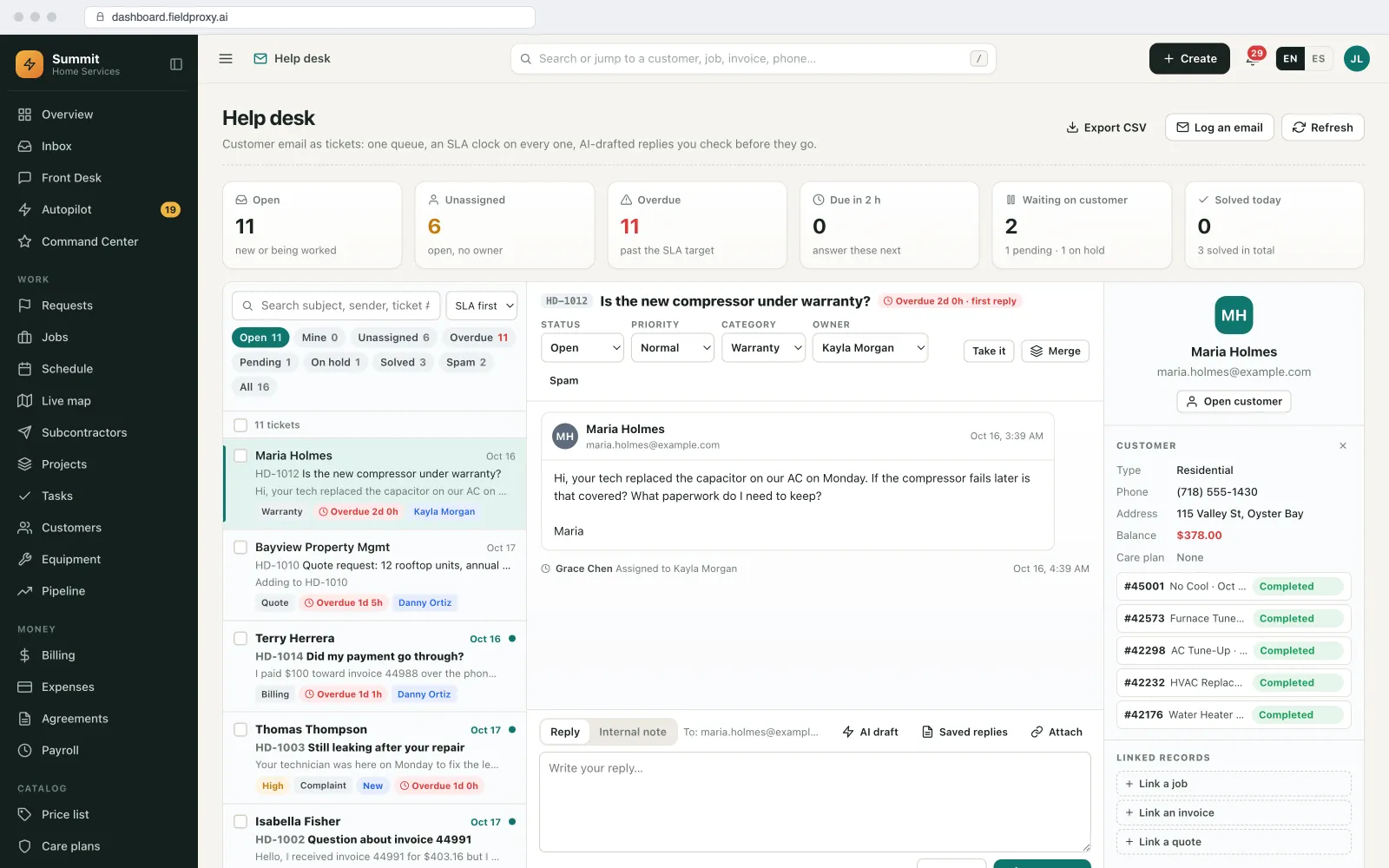
Help desk: incoming customer emails as tickets, each with an owner and an SLA clock.
Step 2
The fields are read
Customer, site address, unit, problem description, priority, the NTE amount, the PO number and the 24-hour SLA deadline are filled on a new job. A field it could not read confidently is highlighted for a person.
Step 3
Your checks run
Is this a known customer and site? Is the NTE above your minimum? Is a qualified technician free inside the SLA? If every check passes, the job is created and dispatched; if not, it waits for the office with the reason.
Step 4
Costs stay under the NTE
As parts and labour go on, the job's costing shows what has been spent against the NTE, so the office knows before the limit is reached.
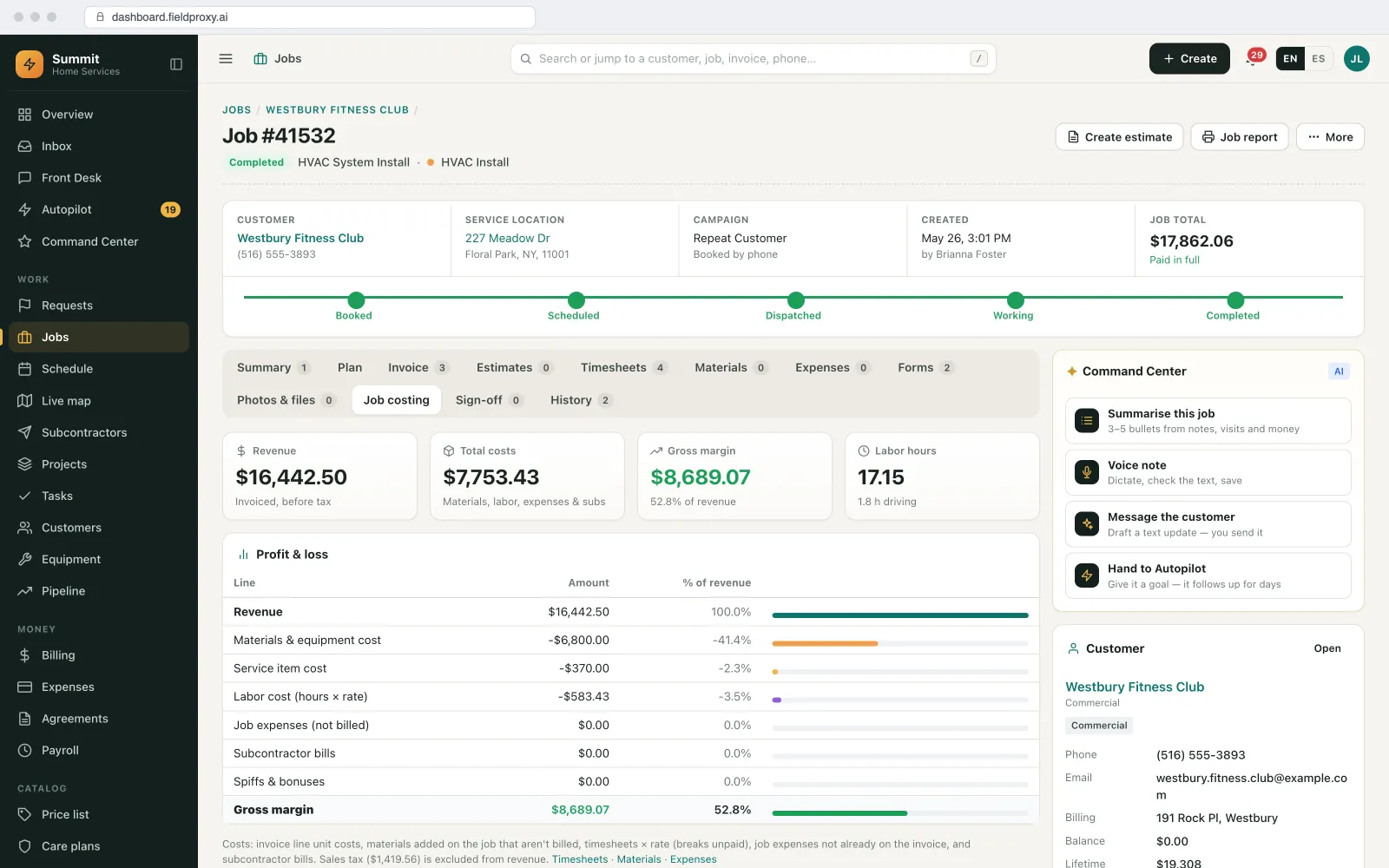
Job costing tab: revenue, costs, gross margin and labour hours.
Names, sites and amounts in this example are demo data. Screens are from the Fieldproxy demo account.
In the product
Supplier documents too: purchase orders and receiving
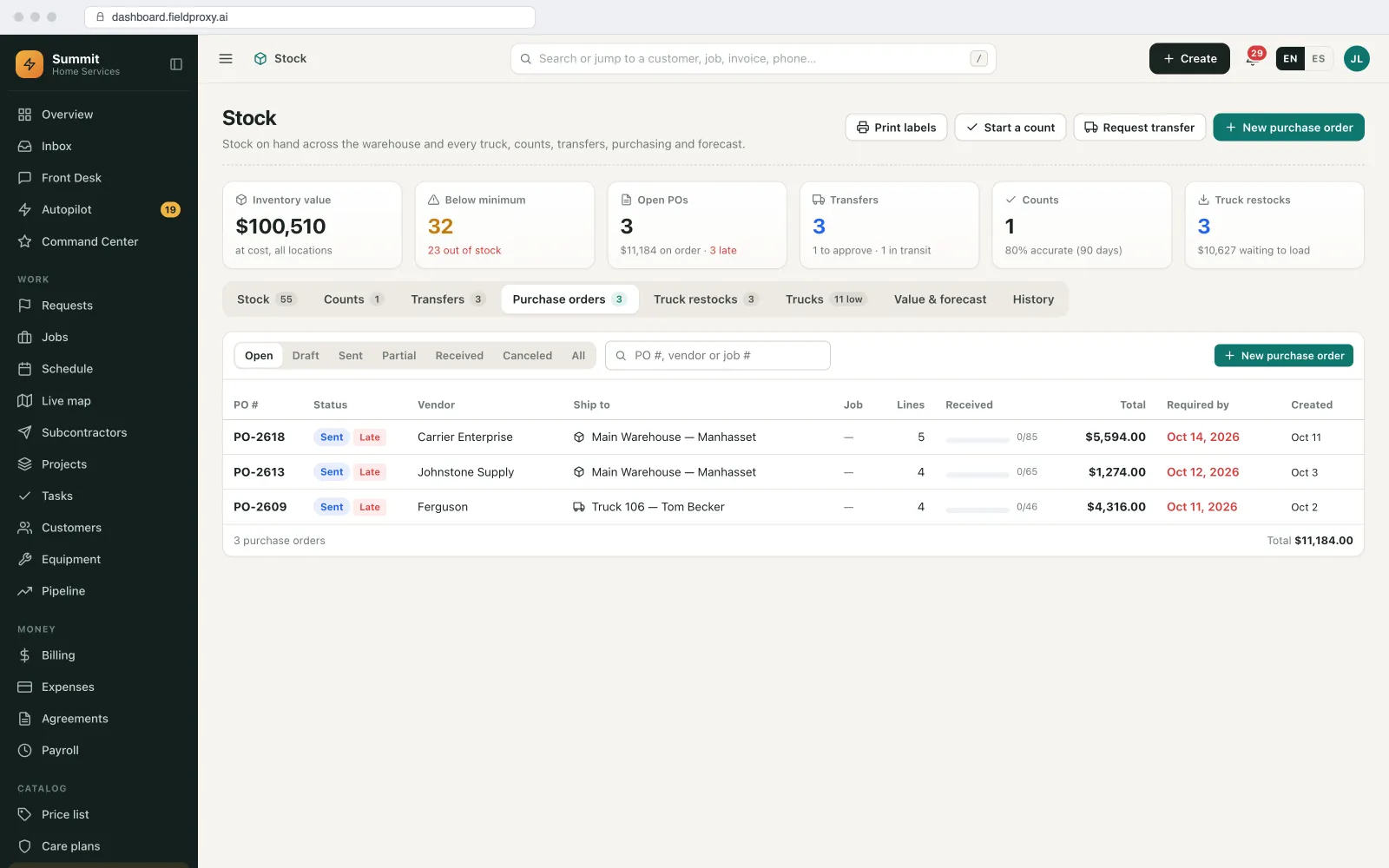
Purchase orders list with vendor, ship-to, received progress, total and required-by date
Control
What runs on its own, and what waits for you
| Task | Who acts | Detail |
|---|---|---|
| Reading the document | Runs on its own | PDF, email body, scan or photo. |
| Creating the job | Your rule decides | Automatic when your checks pass; otherwise it waits with the reason. |
| Uncertain fields | A person does it | Highlighted for a person to confirm. |
| Matching supplier invoices to POs | Runs on its own | Price differences against the PO are flagged. |
Getting started
Setup, connections and fit
How it is set up
- A 30-minute call to walk through how your office runs today: job types, who approves what, and where work comes in from.
- Send us a sample of the work orders and supplier invoices you receive, in each layout.
- Connect the inbox they arrive in.
- We set it up on your own data and rules, and it is live within a day.
What it connects to
- Outlook or Google mailbox: work orders, replies and reminders
- Freshdesk, Zendesk, ServiceNow: when requests arrive as tickets
- QuickBooks, Xero, Sage or NetSuite: invoices and payments sync to your accounting
When it is not a fit
- Your work orders mostly arrive by phone, not as documents. Start with the receptionist instead.
- Documents are handwritten and illegible.
Questions
Straight answers.
Can AI turn facilities work order PDFs into jobs?
Yes. It reads the customer, site, problem, priority, NTE, PO number and SLA deadline into a job, and creates and dispatches it when your checks pass.
Does it work with different work order layouts from different clients?
Yes. It reads the content rather than relying on a fixed template, and we test it on samples of each client's layout during setup.
Can it read supplier invoices as well?
Yes. Supplier invoices are matched to purchase orders and jobs, with price differences flagged, so job costs stay current.
Ready to Automate Document Processing?
See how Document Intelligence can turn incoming work orders into dispatched jobs in seconds.
Also works from ChatGPT, Claude and Copilot in Teams
Fieldproxy's MCP server lets your team run the day and change the software itself from the AI assistant they already use, with a confirm step before anything changes.
Pair this agent with
Most teams adopt one agent first, then layer in two or three more in the same week.
Works in every trade
Which industry are you running today?
Evaluating Fieldproxy against another platform?
Try it yourself, free
Don't take our word for it. Run this AI on your own job, right now.
These free tools run the same AI capability on whatever you throw at them, no signup, no sales call.