
Helpdesk to Field Dispatch
Dispatch field technicians from helpdesk tickets, and write every step back to the ticket.
Your helpdesk is where customers and staff raise tickets, and it stays that way. When a ticket needs someone on site, it becomes a job in Fieldproxy with the site and the asset attached. Dispatch picks the technician, the technician works it on the phone with GPS check-in, photos and a checklist, and the status, notes, time on site and resolution go back to the ticket. The spreadsheets, mileage sheets and separate field app go away. Freshservice, Zendesk, Zoho Desk, Freshdesk, ServiceNow and NetSuite are covered, set up around your queues and live within a day.
 Tickets needing a visit · todayLive
Synced from the helpdesk · 4 new
4 records
Ticket
Site and asset
Field status
#48213 Printer offline, showroom
Priority high · SLA 4 h
Northwind Motors · PRN-07
#48207 Server room cleanup
Priority normal
Harbour Point · Rack B
#48199 Wi-Fi drops in service bay
Priority normal
Elm Street · AP-12
#48188 Password reset
Priority low
No visit needed
The ticket knows what the field knows.
Assigned, on the way, on site and resolved, each written back.
Dispatch Agent
Watching
Task
What it checked
Action
Sam suggested for #48213
Approved by dispatch. The ticket gets a note: assigned, ETA 11:40.
In buyers' own words
The ticket is in one place. The technician is somewhere else.
Lines from our own sales calls with field service companies, lightly trimmed. Names and identifying details are left out.
“We're trying to find a way to connect the two of, like, the tickets and the travel for our field techs, and just have more visibility of where everyone is.”
Field IT support team
In Fieldproxy: the ticket becomes a job on the dispatch map, and GPS check-in and trips sit on the same job.“If we can get it to integrate with Freshservice smoothly, and they can use it to update their tickets, then it's one-stop shop for them.”
Field IT support team
In Fieldproxy: technicians work in one app. Each step they take lands on the ticket as a note, with time on site as a time entry.“In Zoho Desk, we are not able to do... schedule job... They have, but it's in a higher version.”
Equipment maker's service team on Zoho Desk
In Fieldproxy: scheduling, dispatch, preventive maintenance and job cards run in Fieldproxy, with notes and status synced back to Zoho Desk.“NetSuite doesn't have this kind of application, so we want to add another application to dispatch.”
Equipment maker's service team on NetSuite
In Fieldproxy: work orders are created from NetSuite cases and status flows back, so NetSuite stays where cases and part orders live.“If an integration was live, the [ticket] tag would flow through from the ticket to Fieldproxy and then back anyway.”
EV charger maintenance team on Zendesk
In Fieldproxy: every job keeps the ticket ID, so updates find the same job and results find the same ticket.“Being able to provide the dealerships with access to reports of being like, hey, our guys were there, let's say, 12 times this month.”
Field IT support team
In Fieldproxy: visits and time on site roll up per site, so the monthly proof of presence is a report, not a spreadsheet.
Ticket to job
A ticket that needs a visit becomes a job with its site and asset.
Not every ticket needs a truck. The ones that do arrive ready to dispatch, with nothing retyped.
Pulled in, not copied
Does it need a visit?
Matched to the site
Matched to the asset
Priority and SLA carried over
Your own stages
Dispatch, visit, report
The field work runs in Fieldproxy, start to finish.
This is the part a helpdesk was never built for, and the reason buyers end up with spreadsheets beside it.
Dispatch on one map
The technician app
A report the customer can read
Parts and follow-ups
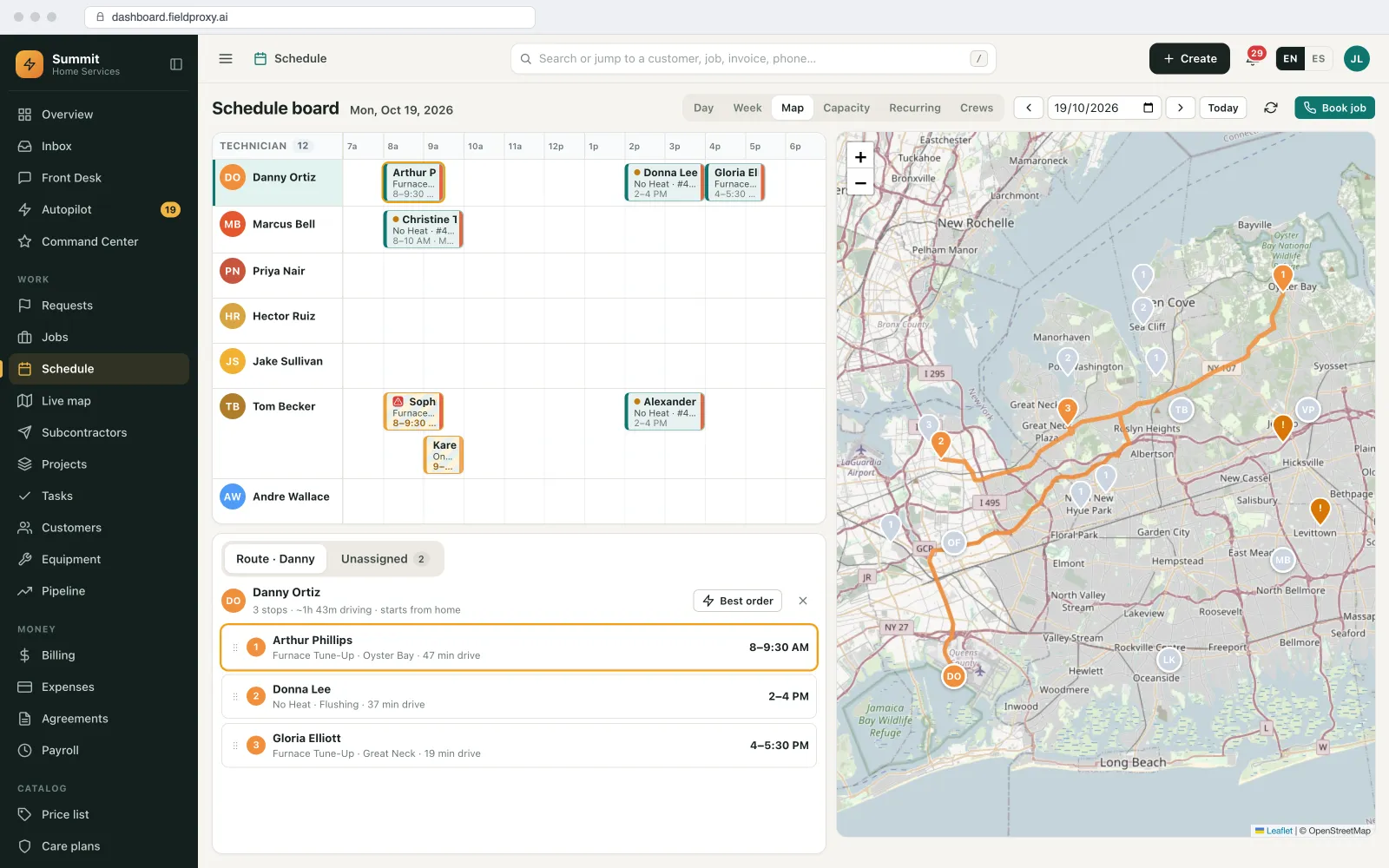
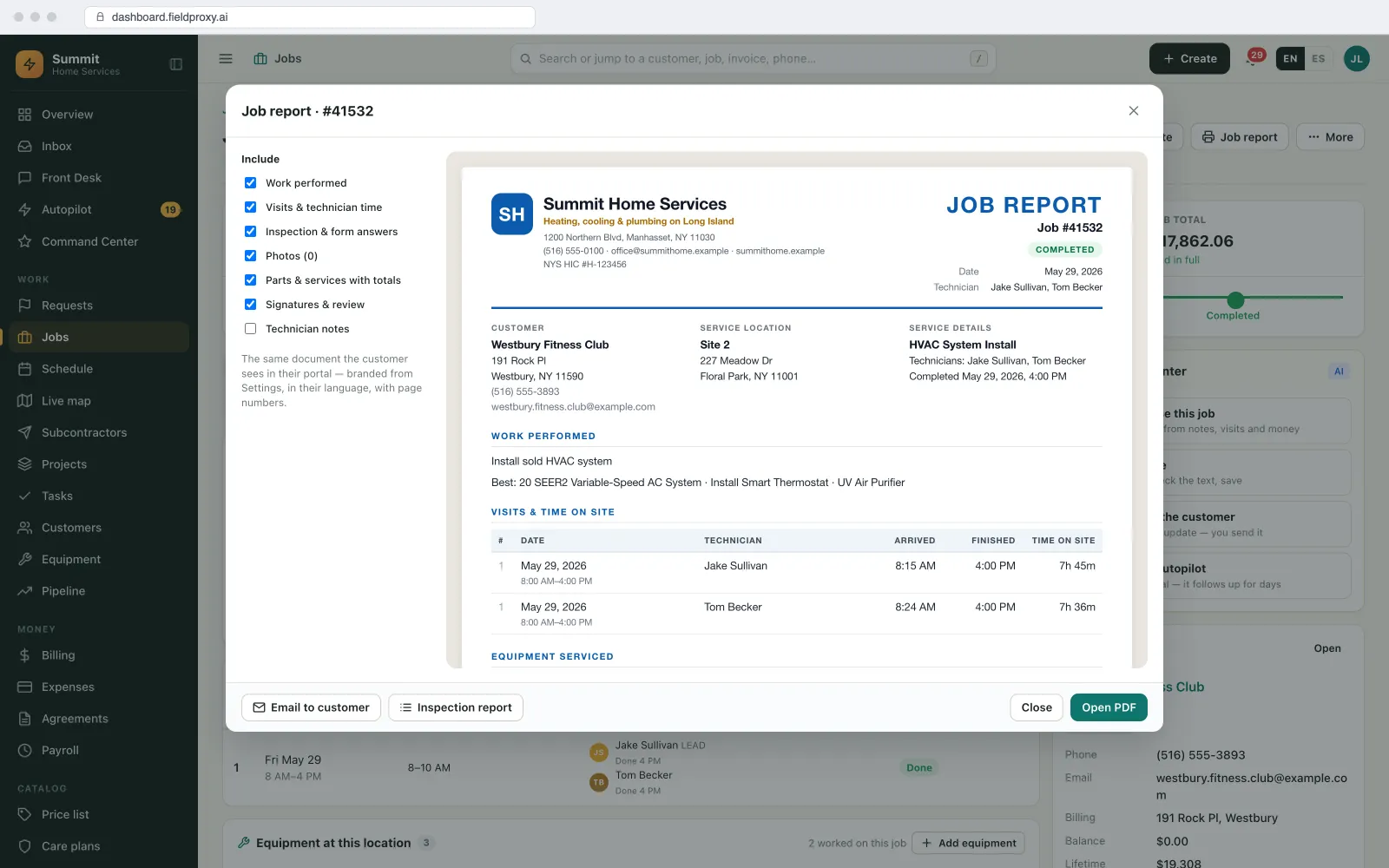
Written back to the ticket
Support never has to ask the field what happened.
The ticket stays the record your support team and your customer look at. Fieldproxy keeps it current.
A note at each step
Time on site
Resolved with the resolution
A sync log
Mileage and visit proof
Mileage and proof of visit on the same job.
Teams that work from tickets usually also keep a mileage sheet and answer 'were you actually there?'. Both come from the job.
GPS check-in at the site
Trips as mileage claims
Proof of presence per customer
Which helpdesks
The helpdesks covered, and what each one does.
Each integration page lists exactly what moves in each direction. Anything else with an API is connected during setup.
Freshservice
Zendesk
Zoho Desk
Freshdesk
ServiceNow
NetSuite
Plain English
Describe the change. It goes live.
Triage rule set
Two categories create jobs
Other tickets untouched
They stay in the helpdesk
Live on the next sync
Existing jobs unchanged
Live in
Built your way
Everything the field needs, without moving the helpdesk.
Your helpdesk keeps the conversation. Fieldproxy runs the visit and keeps the ticket up to date.
Ticket sync
Visit triage
Site match
Asset on the job
Dispatch with approval
Technician app
Job report
Written back
Mileage and proof
See it built around how your team already works.
Get DemoOne ID
Ticket and job, both ways
Every step
Written back to the ticket
Unlimited
Users, technicians included
Platform
Everything you need, in one platform
A complete field service suite, explore what's included.
Dispatching & Scheduling
Mobile App
Work Orders
Asset Management
Preventive Maintenance & Agreements
Inventory & Purchase Orders
Want it running on your jobs? We set it up around them.
Get DemoIntegrations
The helpdesks and systems it connects to
Freshservice
Tickets in, notes, time entries and Resolved back.
Zendesk
Tickets to work orders, status synced back.
Zoho Desk
Two-way comments, notes and status mapping.
Freshdesk
Tickets that need a visit become jobs.
ServiceNow
Incidents to work orders, status and resolution synced.
NetSuite
Work orders from cases, status back to NetSuite.
QuickBooks, Xero and Sage
Billable visits invoiced and synced two-way.
Open API and webhooks
For a helpdesk or ERP not listed here.
MCP server
Ask Claude, ChatGPT or Copilot which tickets are waiting on a visit.
AI agents
The AI agents between the ticket and the truck
They suggest and flag. A dispatcher still decides who goes.
Dispatch Agent
Suggests the technician who can reach the site inside the ticket's SLA, by distance and skills, and a dispatcher approves before the ticket is updated.
Watcher Agent
Flags tickets whose job has not moved toward the SLA due time, and jobs closed without the photos or checklist your customer needs.
Scheduler Agent
Emails each customer or account manager a monthly list of visits and time on site per location.
See it built around how your team already works.
Get DemoWorked example
How a helpdesk ticket becomes a site visit and comes back resolved
A field IT team supports retail showrooms. Store staff raise tickets in the helpdesk. Some need a technician on site; most do not. Here is one that does.
- 1
The ticket arrives
Ticket #48213, 'Printer offline in the showroom', is raised at Northwind Motors with high priority and a 4-hour SLA. The sync brings it in with its ticket ID.
- 2
It is matched and triaged
The location is matched to the Northwind Motors site, with its access notes, and the printer PRN-07 is attached from the site's asset list. The category says it needs a visit, so a job is created in To dispatch.
- 3
Dispatch approves a technician
The Dispatch agent suggests Sam, 6 miles away and finishing at Elm Street, who can arrive inside the SLA. The dispatcher approves. The ticket gets a note: assigned, ETA 11:40.
- 4
The visit is worked on the phone
Sam checks in inside the site's fence, scans the QR code on the printer to open its history, replaces the fuser, takes photos and gets the store manager's signature.
- 5
The ticket is resolved from the job
When Sam closes the job, the ticket gets the resolution note and the time on site, and is set to resolved. The drive is added to Sam's mileage for the month.
The store sees progress on the ticket without calling, support never has to chase the field, and the monthly visit report for Northwind comes from the check-ins, not a spreadsheet.
Names and figures in this example are demo data.
What you can change, and how
Which tickets become jobs
By category, group, tag or any field the helpdesk sends.
Site and asset matching
Which ticket fields identify the site and the asset, and what happens when there is no match.
Stages and rules
Your own job stages, and which of them write to the ticket.
What is written back
Private or public notes, time on site, photos, the report and the resolution, as far as the helpdesk allows.
Checklists per job type
What the technician must capture before the job, and the ticket, can close.
How it connects to the rest of Fieldproxy
Tickets in, notes, time entries and Resolved back.
Tickets to work orders, status synced back.
Two-way comments, notes and status mapping.
Incidents to work orders, status and resolution synced.
Dispatch from Freshservice tickets, step by step
GPS tracking and km mileage for a Freshservice team.
When this is not the right fit
- If your technicians only ever fix things remotely, your helpdesk already does the job. This is for teams that send people on site.
- What can be written back depends on the helpdesk's own API and plan. Each integration page lists what moves; we confirm it with your instance during setup.
- If two systems both try to own the same status, they fight. Decide at setup which side owns which field.
Questions
Straight answers.
How do I dispatch field technicians from helpdesk tickets?
Connect the helpdesk so tickets that need a visit become jobs with the ticket ID, the site and the asset attached. Dispatch from a map, let the technician work the job in a mobile app, and write each step and the resolution back to the ticket. In Fieldproxy this is set up for Freshservice, Zendesk, Zoho Desk, Freshdesk, ServiceNow and NetSuite.
Do we have to move off our helpdesk?
No. Customers and staff keep raising tickets in the helpdesk, and support keeps answering there. Fieldproxy replaces the field side: the dispatch spreadsheet, the mileage sheet and any separate field app.
What gets written back to the ticket?
Notes at each step (assigned, on the way, on site, resolved), the time on site where the helpdesk tracks time, and the resolution note when the job closes. What exactly is written depends on the helpdesk; each integration page lists it.
Does every ticket become a job?
No. Only tickets that need someone on site. You set the rule, for example by category or group, and the rest stay in the helpdesk.
Can technicians log mileage on helpdesk jobs?
Yes. GPS check-in at the site and GPS trips between jobs are on the same job, and trips roll up into a monthly mileage claim per technician.
Our helpdesk is not listed. Can it still work?
If it has an API or can send a webhook, the same flow is connected during setup through Fieldproxy's open API and automations. Tell us which one and we will say plainly what it can and cannot sync.
Do helpdesk agents need a Fieldproxy seat?
Fieldproxy is one price per company with unlimited users, so support agents, dispatchers and technicians can all log in.
Which helpdesks does Fieldproxy dispatch from?
Freshservice, Zendesk, Zoho Desk, Freshdesk and ServiceNow, plus NetSuite cases, each with its own integration page. Others with an API or webhooks are connected during setup.
Does the helpdesk ticket ID stay with the job?
Yes. The job keeps the ticket ID, so later updates find the same job and results go back to the same ticket.
Can customers see field progress in the helpdesk?
Yes, if you choose public notes. Each step, such as on the way with an ETA, can be written to the ticket where the customer already looks.
Keep the helpdesk. Fix the field side.
Show us a week of tickets that needed a visit. We connect your helpdesk, set up the sites, assets and stages, and run that week with you, live within a day.
Also works from ChatGPT, Claude and Copilot in Teams
Fieldproxy's MCP server lets your team run the day and change the software itself from the AI assistant they already use, with a confirm step before anything changes.