
Subcontractor Claims & Payments
Subcontractor claims software that pays subs against the job card.
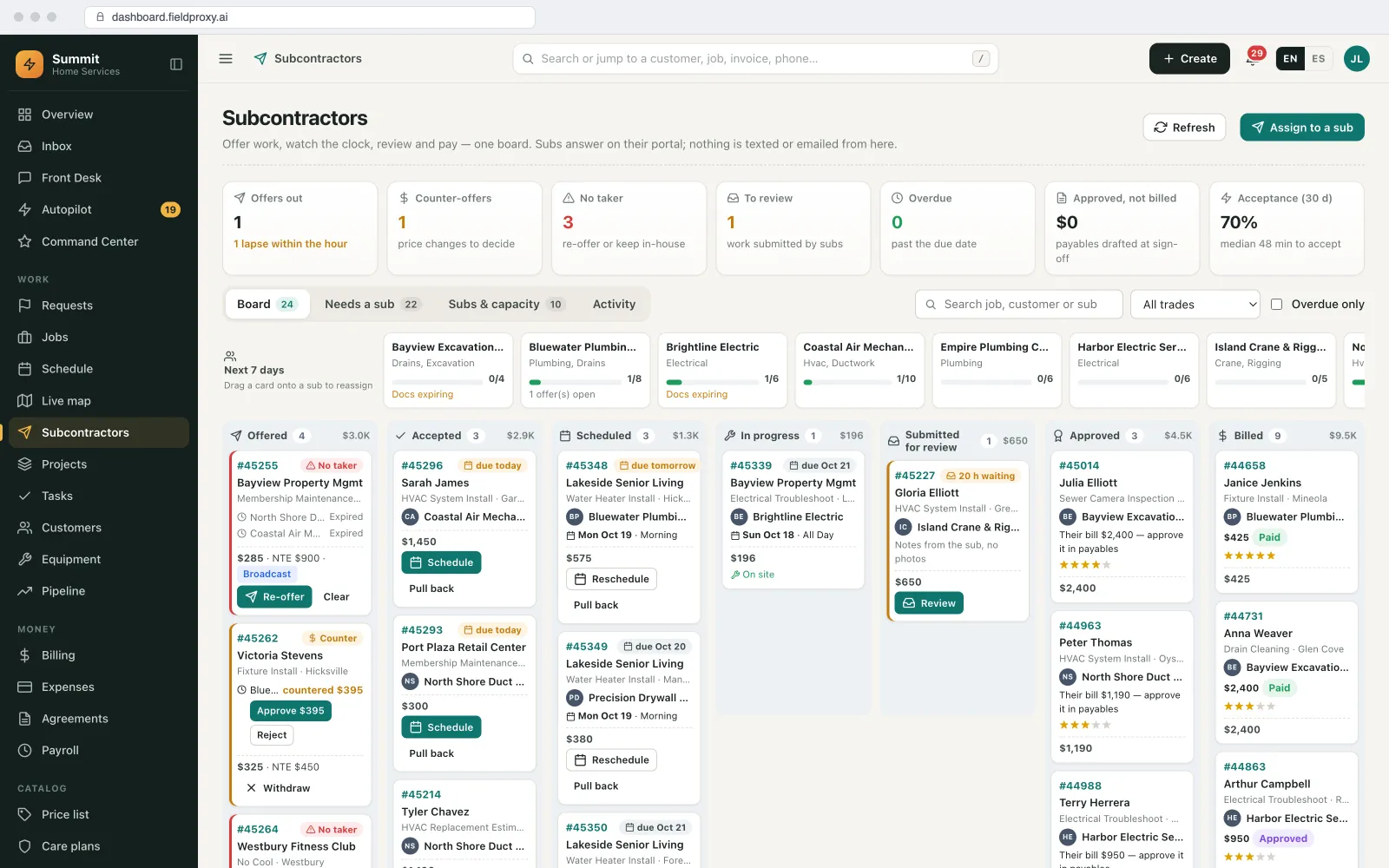
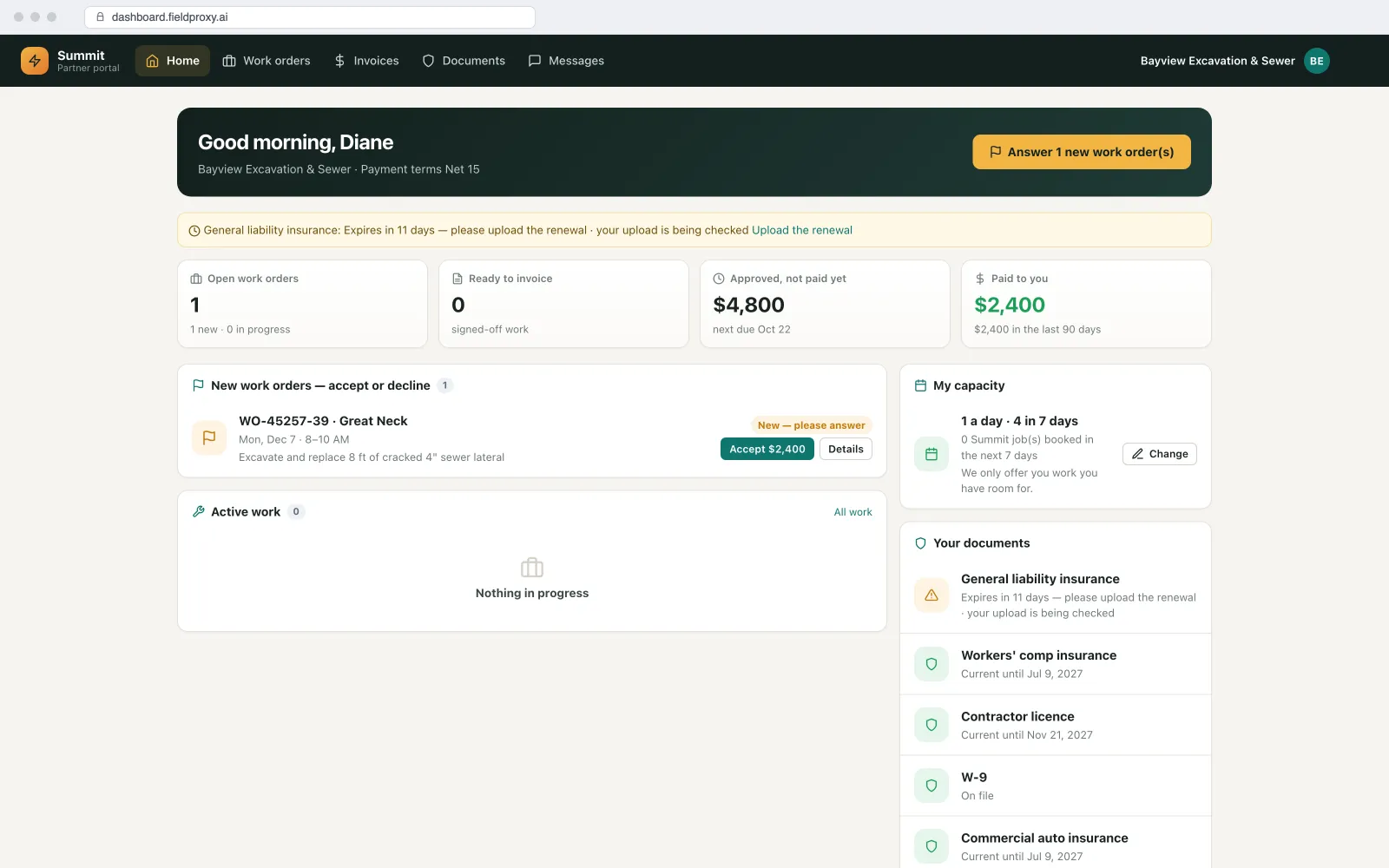
Stop paying from the sub's invoice and then spending days checking it. In Fieldproxy each job card carries the quantities and the sub's rate. Subs claim what they did against those lines from their portal or a job link, with the photos or sign-off you require. Claims close at a weekly cutoff, are matched against the job and the bill, and approved claims go to QuickBooks, Xero or Sage as bills for your normal pay run. What you pay the sub and what you charge your client stay separate, and the sub never sees your price. Set up around your claim rules and live within a day.
In buyers' own words
Checking sub invoices takes days, and still misses things.
Lines from our own sales calls with field service companies, lightly trimmed. Names and identifying details are left out.
“There's 50 posts to install, and they only install 22. They put in 22, they only get paid for 22.”
Fencing contractor using subcontractor crews
In Fieldproxy: the claim is made against the job card line, so 22 of 50 is 22, and the remaining 28 stay on the card for whoever finishes the job.“At the end of the week, they invoice us. We want to eliminate them invoicing us.”
Fencing contractor
In Fieldproxy: the approved claim is the bill. It goes to your accounting as a bill against the sub, with the job number on each line.“Four days. And then we pay them at the end of the week.”
Fencing contractor, on checking sub invoices
In Fieldproxy: the checking is done as claims come in: quantities against the card, evidence present, amounts against the agreed rate. People look only at what is held.“Some clients, you cannot invoice without photos or a sign-off, and if the vendor hasn't provided that, their payment terms don't start.”
Facility maintenance contractor with a vendor network
In Fieldproxy: the claim cannot be approved until the required photos or sign-off are on the job, and the sub sees exactly what is missing.“They just text me their receipts and put the job number on it, and it's not being tracked properly.”
Fencing contractor
In Fieldproxy: subs photograph receipts on the job; supplier, date and amount are read into the job's costs the same day.“They claim what they've done, and it also leaves us with the balance for the next person to claim.”
Fencing contractor
In Fieldproxy: every line shows its remaining balance, and a claim above it is refused.
Claims against the job card
The job card sets the limit. The claim fills it in.
The job card is an ordinary job with sub lines on it: the work, the quantity and the sub's rate.
Lines with quantities and rates
Claim by ticking off what was done
Capped at what is left
Variations go through you
A not-to-exceed amount
Queries on the line
Proof before payment
No photos or sign-off, no approval.
You decide the evidence per job type or per client. The claim waits until it is there.
Required photos
Sign-off
Your forms
Compliance current
Weekly cutoff and three-way match
One cutoff, one check: job, claim and bill.
Claims close at a time you set, are checked three ways, and only the matches move on.
A weekly cutoff
The job
The claim
The bill
Matched, or held with a reason
To your accounting
Payout versus your price
What you pay the sub is not what you charge the client.
Two prices on every job, and only one of them is visible to the sub.
Two fields, two sides
Hidden from the sub
Margin per job
Plain English
Describe the change. It goes live.
Weekly cutoff set
Thursdays, 5 pm
Subs told the run date
On every claim
Live from this week
Earlier runs unchanged
Live in
Built your way
Claims, proof and payment, set up to your rules.
Your rate cards, your evidence rules, your cutoff, and your accounting.
Job-card claims
Remaining balance
Variations
Evidence required
Weekly cutoff
Three-way match
Receipts from a photo
Bills to accounting
Payout hidden from price
See it built around how your team already works.
Get DemoPer line
Claims against the job card
Three ways
Job, claim and bill matched
Never
Does a sub see your client price
Platform
Everything you need, in one platform
A complete field service suite, explore what's included.
Subcontractor Management
Work Orders
Approval Workflows
Projects
Invoices & Payments
Reporting & Dashboards
Want it running on your jobs? We set it up around them.
Get DemoIntegrations
Plays nicely with the tools you already use
QuickBooks Online, Desktop and Enterprise
Approved claims as bills, two-way.
Xero
Approved claims as bills against the sub's contact.
Sage
Two-way sync including bills and suppliers.
Partner portal and job links
Regular subs log in; one-off subs use a link.
Open API and Zapier
Approved claims to any other payables system.
MCP server
Ask Claude, ChatGPT or Copilot what is held and why.
AI agents
The AI agents checking claims
They check and hold. A person approves anything that gets paid.
Watcher Agent
Checks each claim against the job card balance, the required evidence and the bill before the cutoff, and holds the ones that do not match with the reason.
Vision Agent
Reads a photographed receipt's supplier, date and amount into the job's costs, so job cost is right the day it is spent.
Document Intelligence
Reads a sub's or supplier's PDF invoice into lines and compares them with the approved claim and the PO.
See it built around how your team already works.
Get DemoWorked example
How a week of subcontractor claims goes from job card to bill
A fencing contractor uses subcontractor crews paid per unit, not by the day. Here is one job and one weekly cutoff.
- 1
The job card is created
Job J-2204 is booked with 50 posts to set and 48 panels to install at the sub's rates. The client's price sits on the client side of the job; the crew never sees it.
- 2
The crew claims what it did
On Wednesday, Ridge Fencing claims 22 posts from its portal, with photos. The line now shows 28 posts left. A rock-hole variation goes in with photos and an amount and waits for approval.
- 3
The cutoff closes the week
At 5 pm Thursday the week's claims close. A claim for 30 panels on another job, where only 18 are left, is held with the reason on the line.
- 4
Job, claim and bill are matched
J-2204's claim matches the job card, the photos are there and the variation was approved, so the claim is approved and a bill is created with the job number on each line.
- 5
The bill goes to accounting
The bill syncs to Xero against Ridge Fencing. Friday's payment run pays it, and the job's cost and margin update the same day.
The crew is paid for 22 posts, not a day rate. The remaining 28 are still on the card for whoever finishes the job, and nobody spent days checking an invoice.
Names and figures in this example are demo data.
What you can change, and how
Rate cards
Unit lines and rates per sub or trade, and fixed-price items where that is how you pay.
Evidence
Photos, sign-off, forms or check-ins required before approval, per job type or client.
Cutoff and run
When claims close, when the pay run is, and what happens to late claims.
Approvals
Who approves claims and variations, with not-to-exceed amounts that need a manager.
Accounting
Which accounting system, how bills are coded, and whether a sub's own invoice is still collected.
What subs see
Payout, scope, site and contacts; never the client price.
How it connects to the rest of Fieldproxy
Offering jobs, compliance and the partner portal.
Progress claims against the job card
A fencing example on ServiceM8 and Xero, step by step.
Variations and claims over the limit wait for the right person.
Multi-visit work with progress billing to your client.
When this is not the right fit
- If your subs are paid a day rate and you do not need quantities, claims per line add steps. A simple timesheet may be enough.
- In construction, payment claims can carry legal weight and deadlines under local security-of-payment rules. Fieldproxy keeps the dates; get advice on the rules.
- Fieldproxy creates the bill; it does not move money. Payment runs stay in your accounting system or bank.
Questions
Straight answers.
What is subcontractor claims software?
It lets subcontractors claim payment for the work they did against the job, line by line, and lets you check each claim against what was agreed and what was done before it is paid. In Fieldproxy, claims are made against job-card quantities, need the evidence you set, close at a weekly cutoff and go to accounting as bills.
How do I pay subcontractors against the job card instead of their invoice?
Put the sub's work on the job card as lines with quantities and rates, let the sub claim quantities against those lines, cap each line at what is left, and turn the approved claim into the bill. The sub no longer sends an invoice for you to check.
Can a claim be blocked until there are photos or a sign-off?
Yes. You choose the evidence per job type or client, such as before and after photos or a site contact's signature, and the claim cannot be approved until it is on the job.
What is a three-way match for subcontractor claims?
Checking three records agree before paying: the job (what was on the card, approved variations and evidence), the claim (what the sub says they did, at the agreed rate) and the bill (what goes to accounting, or the sub's own invoice). Only matches are approved.
Can subcontractors see what we charge the client?
No. The client price and the sub payout are separate fields, and the sub's portal or job link shows only the payout, scope and site.
Does Fieldproxy pay the subcontractors?
Approved claims go to QuickBooks, Xero or Sage as bills against the sub, with the job number on each line. Your usual payment run in accounting or your bank pays them.
Do subcontractors need a paid seat?
No. Fieldproxy is one price per company with unlimited users, so regular subs get a portal login and one-off subs a job link.
Can a subcontractor make partial claims?
Yes. A sub claims the quantity done so far on each line, and the remaining balance stays on the job card for the next claim or the next crew.
Can we still accept a sub's own invoice?
Yes. A PDF invoice can be read into lines and compared with the approved claim, so it becomes the third leg of the match instead of the thing you check by hand.
How do variations work?
The sub submits the variation with photos, a reason and an amount. Once approved, it becomes a claimable line on that job only.
Pay subs for what the job card shows.
Send us a job card, a sub's claim or invoice, and the bill that went to accounting. We set up the rate cards, evidence rules, cutoff and accounting, and run last week's claims through it, live within a day.
Also works from ChatGPT, Claude and Copilot in Teams
Fieldproxy's MCP server lets your team run the day and change the software itself from the AI assistant they already use, with a confirm step before anything changes.