
Vision Agent
AI photo checks and nameplate reading for field service
Three jobs buyers asked us for: make sure the required photos are there before a job can close, flag only the problems in a large photo report, and read equipment nameplates and data tags straight into the asset record. A person signs off on anything that matters.
 WO-90412 · Northwind · Riverside PlazaPhoto received
Rooftop unit PPM inspection
Northwind Property Group · Q4 visit
Tech: Luis M. · filled from 1 photo
Follow-up WO-90413 raised: replace disconnect cover at RTU-03. Photo attached, supervisor notified.
One photo filled the form, and caught what the eye skipped.
Serial read, reading logged, missing cover flagged before the tech left the roof.
Short answer
The Vision agent reads photos taken in the Fieldproxy technician app and fills or checks the job record. On the phone, it checks each required shot against your rules and holds the job open until a missing or failed photo is retaken or a supervisor approves an override. In the office, it reviews large photo reports item by item and lists only the exceptions for an analyst to confirm. On a new site, one photo of a nameplate or data tag fills the make, model, serial and ratings on the equipment record, for the technician to check before saving.
What buyers asked
Photo proof came up again and again on our sales calls
Between August and November 2026, prospects in very different trades asked for the same thing: photos they can trust without opening every one. These are their words, by trade.
“We are talking about 300 pages of photos related and only one table added up with the information of the relationship between these photos and the information about the device.”
Analysts check every photo against what the engineer entered, under a 24 to 48 hour report deadline, and the engineers on the tower can't be held up waiting for an answer.
“Can we make those, those questions or those parts of the checklist mandatory so that they can't pass…”
Required photos and answers on the checklist, so a visit can't be passed without the evidence.
“Some clients, you cannot invoice without photos or a sign-off.”
The photos have to be there before the job moves to billing, or the payment terms never start.
“We don't have records of our equipment in the locations… the information is non-existent.”
Build the equipment list as technicians visit, from a photo of each unit's data tag.
What it does
Three jobs, one agent
Shot names, rules and statuses are set up with you for each job type. The ones below are examples.
1. Check the photos before the job can close
On the technician's phone
- Each job type gets a shot list on its checklist: e.g. two before and two after, the meter face, the serial plate, the panel. Before shots sit on the arrival step, after shots on the completion step.
- The Vision agent reads each photo into the record (the serial, the reading, the model) and your rules compare it with the job: the serial must match the asset, the reading must be higher than last time.
- A missing or failed shot holds the job at its current status, and the technician is asked for a retake while still on site. An override needs a reason and goes to a supervisor.
2. Review a large photo report and flag only the problems
In the office, after upload
- A report with hundreds of photos and one device table is split into small checks: one row of the table with its photos, against written yes or no rules (is this the device the row names, does the label match, is the required view there).
- The analyst gets a short list of exceptions with the page, the item and the reason, not 300 pages to read. Items that pass are not listed.
- The analyst clears or confirms every flag and signs the report. The AI never approves a report on its own, and the field engineer is never blocked while working.
3. Read a nameplate or data tag into the asset record
On the Add equipment screen
- The technician taps Read the nameplate and takes one photo. Make, model, serial number and ratings fill the equipment fields.
- The technician checks the fields and saves. A field it can't read confidently, on a worn or painted plate, is left blank for the technician rather than guessed.
- The unit joins the site's equipment list with its age, warranty status and next maintenance date, and every later job on it adds to its history. An existing equipment list can be imported, so photos only fill the gaps.
One photo, field by field
What one site photo fills and checks
Illustrative demo data: the rooftop unit from the film above.
IMG_2291.jpg · rooftop unit, Riverside Plaza
Demo data
Send us twenty good and twenty bad photos. We'll show you the checks on your own jobs.
Get DemoWho decides
What runs on its own, and what waits for a person
| Task | Who decides | How |
|---|---|---|
| Reading text and values from a photo | Runs on its own | Nameplates, labels, gauges, error screens. |
| Checking a required shot against your rules | Runs on its own | The technician sees the result and retakes on site. |
| Closing a job with a missing or failed photo | Waits for a person | An override needs a reason and a supervisor's approval. |
| Saving fields read from a nameplate | Waits for a person | The technician checks them first. |
| Flags on a large photo report | Waits for a person | An analyst confirms or clears each one and signs the report. |
| Judging the quality of the work | Stays with a person | Photos are kept on the job for a person to review. |
Unsure results and overrides land in one office list. The Watcher agent flags jobs closed with an override, technicians whose photos fail more often than the rest, and readings out of range.
Setup
Live within a day, tested on your own photos
Send us real photos
Twenty good and twenty bad photos for one job type, and what was wrong with each bad one. For report review, two or three old reports with known mistakes.We build the shot list and rules
Required shots and instructions on the job checklist, the values to read, the rules to compare them with, the close gate, and who reviews flags.Test on last month's jobs
The checks run on photos you already have and are tuned until the flags match what your reviewers would flag. Then technicians start getting retake prompts on site.
Photos are taken in the Android or iOS app with GPS check-in and the capture time, and the app works offline. Before and after photos come out side by side on the job report and the customer link. Fieldproxy is one price per company with unlimited users, so subcontractors take the same photos without extra licences. See pricing.
Limits
Where photo AI needs help
Small, blurry or rotated text
Model makers publish these limits themselves. Anthropic says Claude may make mistakes on low-quality, rotated or very small images, and OpenAI lists rotated images and small text among its vision limits. A serial shot from the ground or at an angle needs a close-up of the plate. Sources: Anthropic vision docs, OpenAI vision guide.
Plates that aren't there
If your equipment's nameplates are usually missing, painted over or unreadable, there is little to read. The agent leaves those fields for the technician.
Rules have to be written down
"Does the photo look right?" is not a rule. "Is the disconnect cover fitted, yes or no?" is. Rules come from your reviewers' own reasons for rejecting photos, and are tested on old jobs before they go live.
It doesn't sign anything
The agent flags and fills. Approving a report, passing an override or deciding a repair stays with a person.
Go deeper
Answers to the photo questions buyers ask
Can AI review photo inspection reports?
AI photo checks before a job closes
Require before and after photos
Prove a technician was on site
Job checklists
Telecom tower maintenance
Worked example
From one photo of a nameplate to an equipment record
Demo data. A technician is at a site for the first time and the unit is not in the system yet.
Step 1
Photograph the nameplate
On the Add equipment screen the technician taps Read the nameplate and takes one photo.
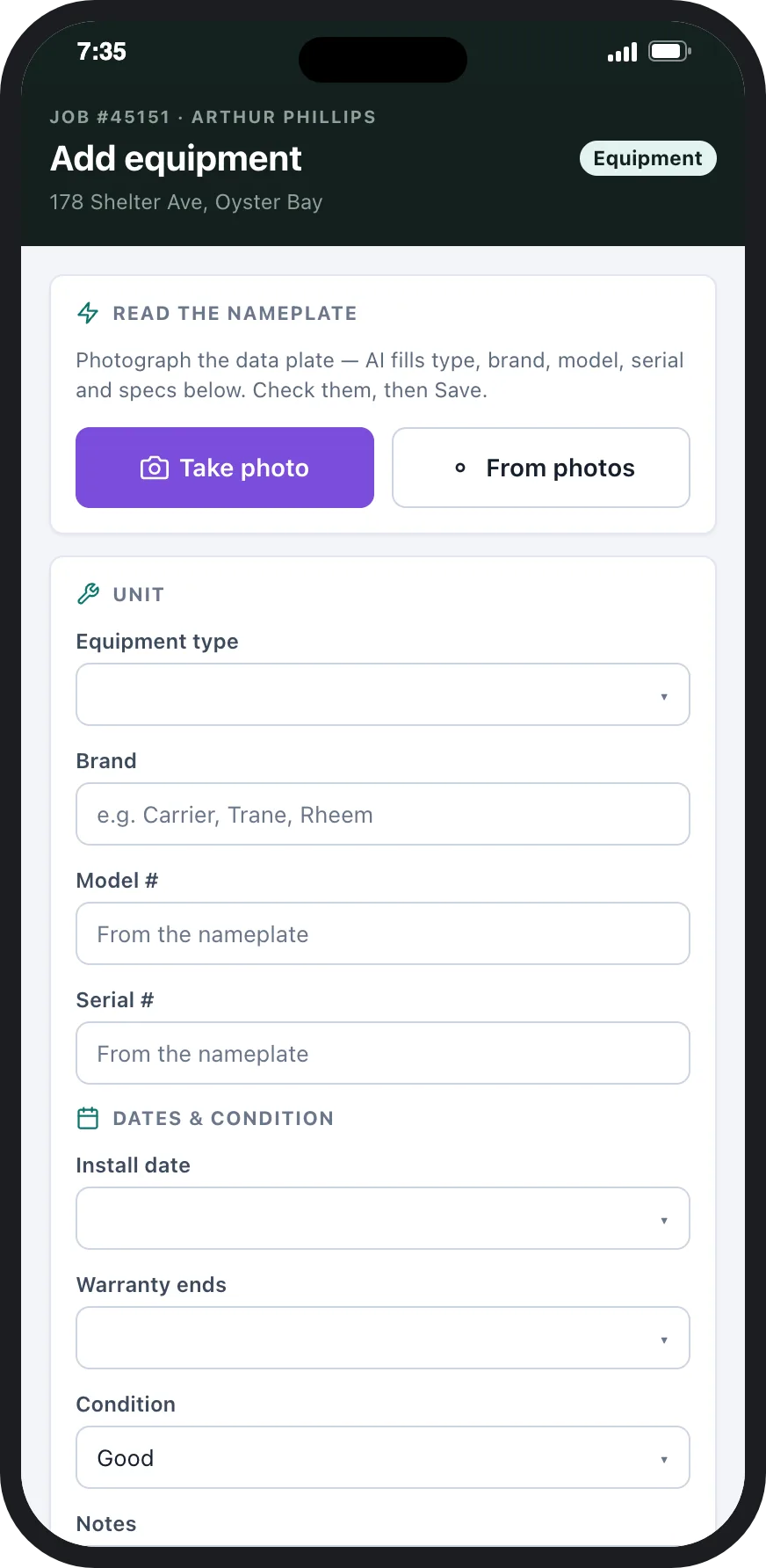
Technician app: Read the nameplate and the equipment fields it fills.
Step 2
The fields fill themselves
Make, model, serial number and ratings go into the right fields. The technician checks them and saves.
Step 3
The unit joins the site's equipment list
The equipment now has its age, warranty status and next maintenance date on the customer's equipment list, and every future job on it builds its history.
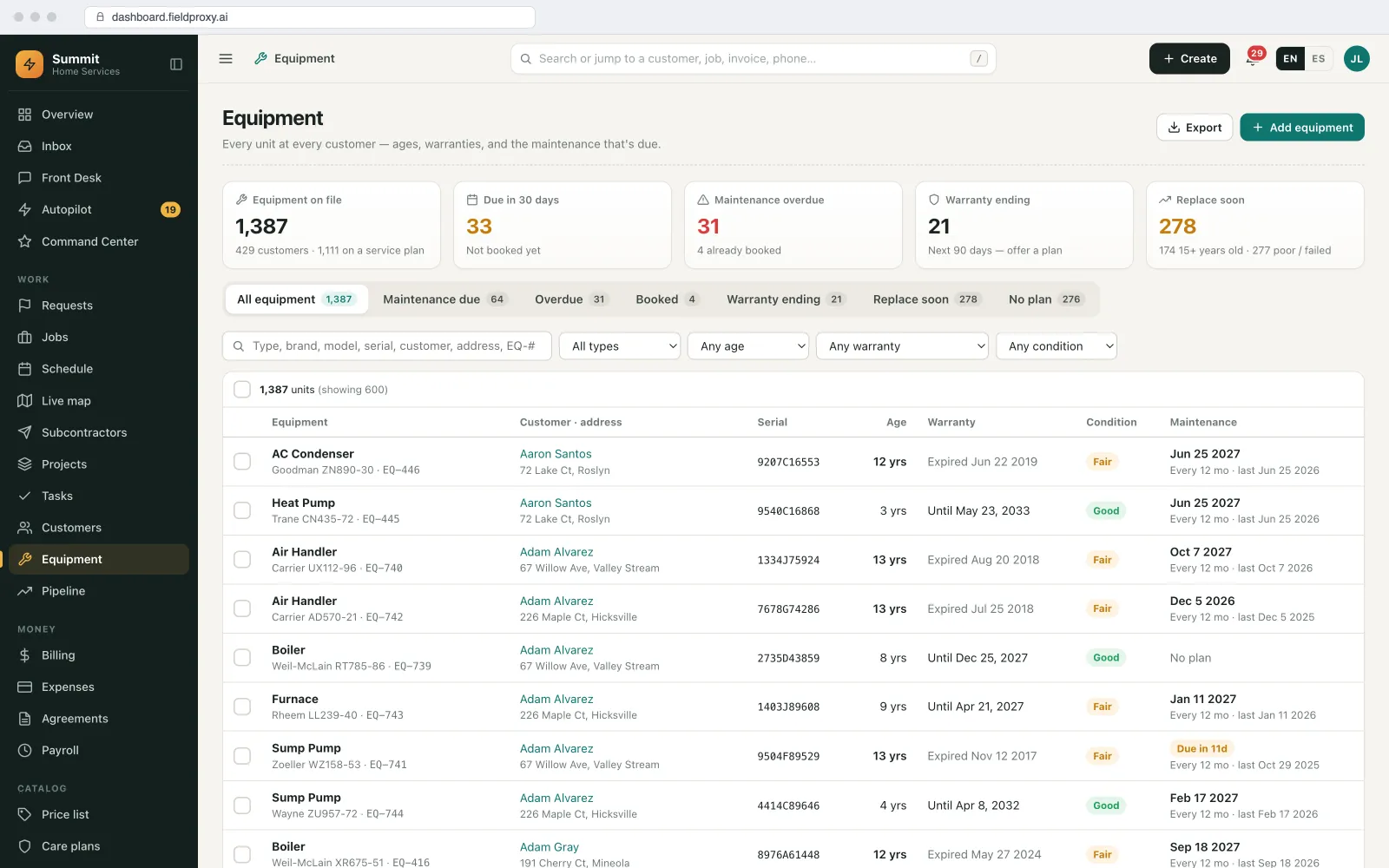
Equipment list with age, warranty, condition and next maintenance for every unit.
Names, sites and amounts in this example are demo data. Screens are from the Fieldproxy demo account.
Control
What runs on its own, and what waits for you
| Task | Who acts | Detail |
|---|---|---|
| Reading text from a photo | Runs on its own | Plates, labels and error screens. |
| Saving to the equipment record | Waits for your OK | The technician checks the fields first. |
| Judging the quality of an installation | A person does it | Photos are stored on the job for a person to review. |
Getting started
Setup, connections and fit
How it is set up
- A 30-minute call to walk through how your office runs today: job types, who approves what, and where work comes in from.
- We set it up on your own data and rules, and it is live within a day.
- Your existing equipment list can be imported, so photos only fill gaps.
What it connects to
- Technician mobile app
- Equipment and asset records
When it is not a fit
- Nameplates on your equipment are usually missing, painted over or unreadable, so there is little to read.
Questions
AI photo checks and nameplate reading, answered
Can AI check that technicians took the required photos before closing a job?
Yes. In Fieldproxy each job type has a shot list on its checklist, and the job can't move to Completed while a required photo is missing or fails your rule. The technician is asked for a retake on site, and an override needs a reason and a supervisor's approval.
Can AI review a 300-page photo inspection report?
Yes, if the report is split into small checks: each row of the device table with its photos, against written rules. The output is a list of exceptions with the page, item and reason, and an analyst confirms each flag and signs the report. The AI never approves it.
Can I require before and after photos on every job?
Yes. Before shots sit on the arrival step, so the job can't move to In progress without them, and after shots sit on the completion step. Minimum counts can be set, for example at least two of each.
Can a photo of an equipment data tag create the asset record?
Yes. The technician photographs the nameplate or data tag and the make, model, serial and ratings fill the equipment fields, to check before saving. The unit then appears on the site's equipment list and builds its own service history.
Will the AI block field engineers while they work?
Office review of a finished report doesn't block anyone. Checks on the phone run on the step you choose, for the shots most often missed, so a technician gets a retake prompt before leaving site rather than a call the next day.
Do subcontractors need a paid seat to take the required photos?
No. Fieldproxy is one price per company with unlimited users, so contractors and subcontractors take photos in the same Android or iOS app. See the pricing page.
How long does it take to set up?
You're live within a day. Send real examples of good and bad photos for one job type and the reasons the bad ones were rejected; that becomes the first shot list and rules, tested on photos you already have.
Can AI read equipment nameplates from a photo?
Yes. The technician photographs the plate and the make, model, serial and ratings fill the equipment fields, to check before saving.
What happens if a nameplate is worn?
The fields it can read are filled and the rest are left for the technician, rather than guessed.
Stop reading every photo by hand
Show us the photos you reject today. We'll set up the checks on your own jobs, and you're live within a day.
Also works from ChatGPT, Claude and Copilot in Teams
Fieldproxy's MCP server lets your team run the day and change the software itself from the AI assistant they already use, with a confirm step before anything changes.
Pair this agent with
Most teams adopt one agent first, then layer in two or three more in the same week.
Works in every trade
Which industry are you running today?
Evaluating Fieldproxy against another platform?
Try it yourself, free
Don't take our word for it. Run this AI on your own job, right now.
These free tools run the same AI capability on whatever you throw at them, no signup, no sales call.