
Command Center
Command Center: the AI that runs and rebuilds your exact field workflow
Voice. Chat. A photo from the field. A PDF in your inbox. The Command Center turns every input into action, jobs, dispatch, answers, invoices. And the same AI lives in every screen too. No clicks. No forms. No tab-hopping. When the workflow needs to change, you describe it and Fieldproxy rebuilds it live.
 Command Center · Meridian Facility Services0 handled · 6 agents on
Agents
Marcus is out sick today. Move his jobs to Priya.
Today · North region board
Skills, certs, drive time and SLA checked
WO-7719 needs an EPA 608 cert Priya doesn't hold, so it went to Devon (12 min away). 7 site contacts get new ETAs on approval.
Approve 7 changes4+ hrs
Saved Daily
30 sec
vs 10 min Manual
Zero
Data Entry Errors
3-in-1
Actions Per Command
How every change works
Ask. Check the preview. Approve.
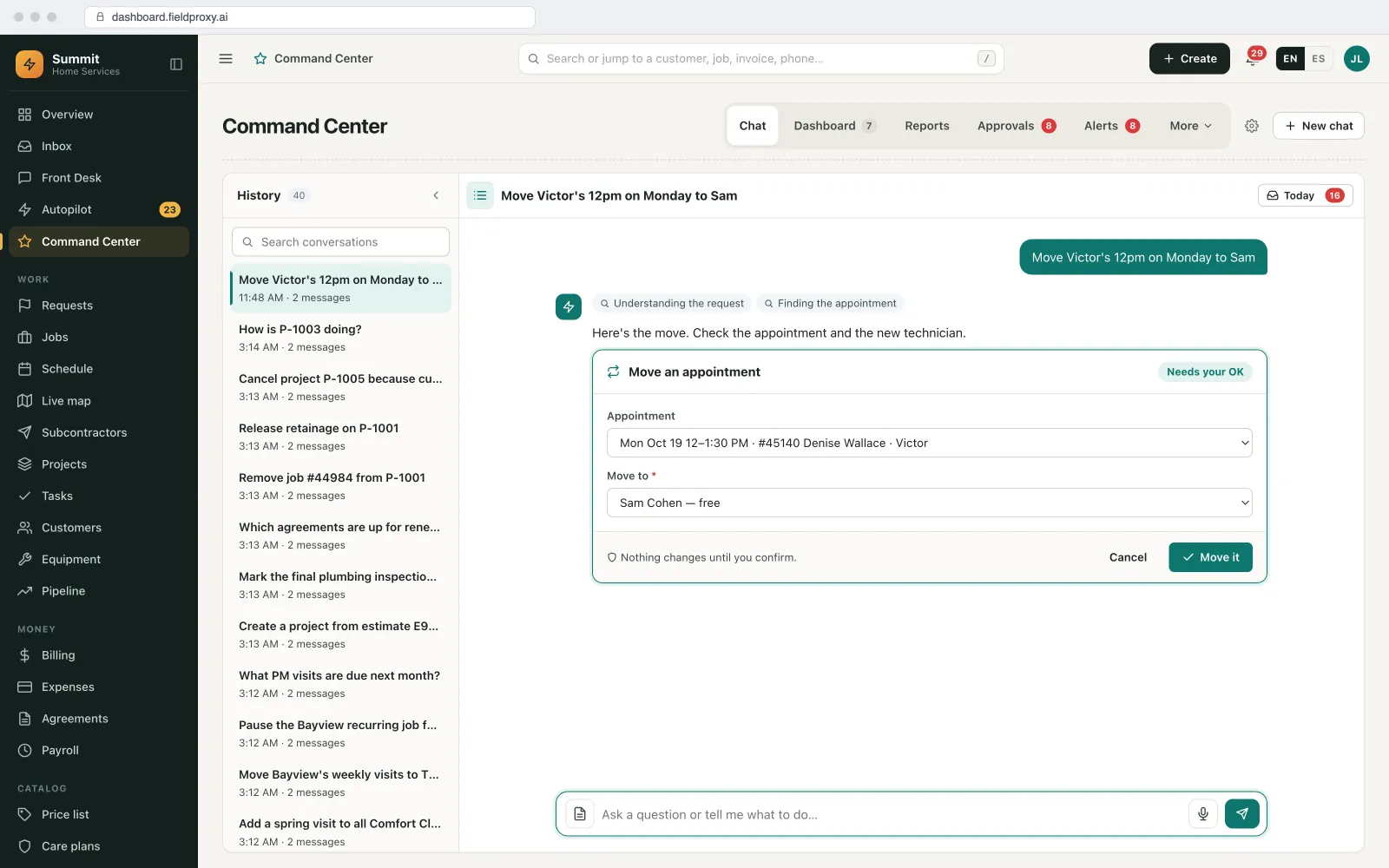
Command Center answers, does the work and sets up your system, and nothing changes until you say so. Every change comes back as a confirm card showing before and after.
Ask
Type or say it: “Move Victor's 12pm on Monday to Sam”.Check the confirm card
See exactly what changes, before and after, and confirm it.Undo with one click
Changed your mind? Undo puts it back. Big changes wait for an approver first.
What Command Center does
Answers, does the work, sets up your system.
It also looks things up on the web with sources, and the same work runs from Claude, ChatGPT or Copilot through Fieldproxy's MCP server. For work that runs in the background, see Autopilot.
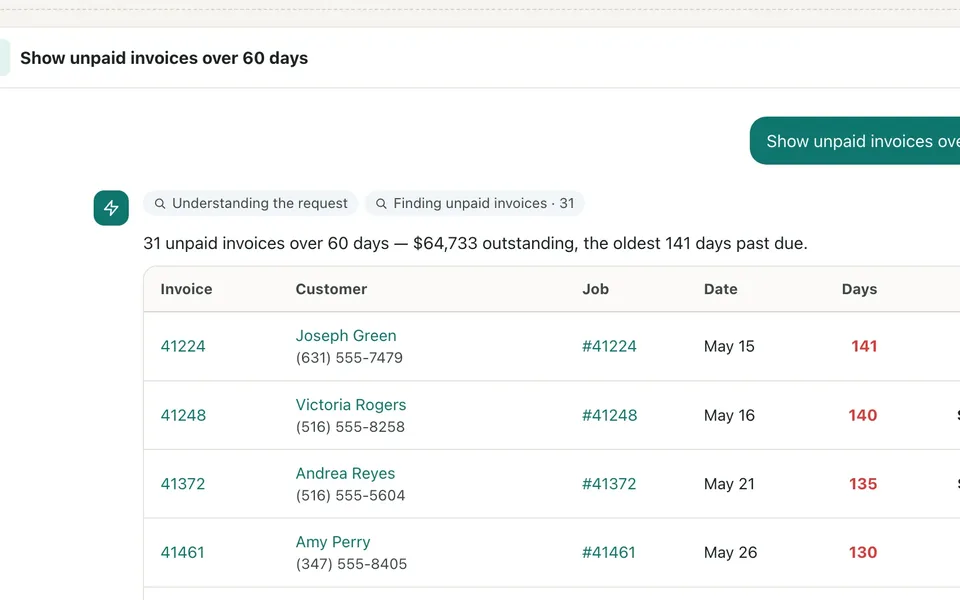
Answers from live data
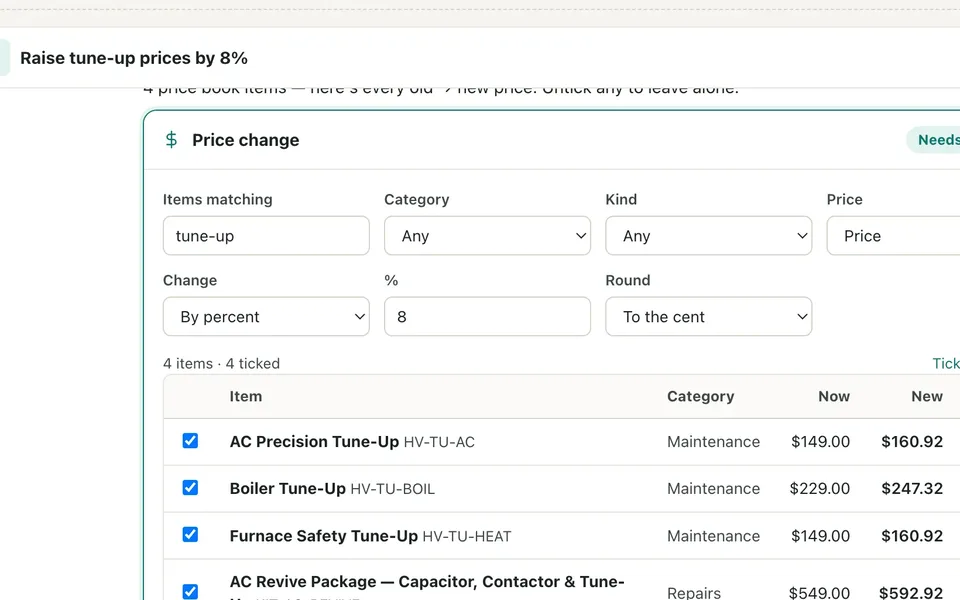
Does the work
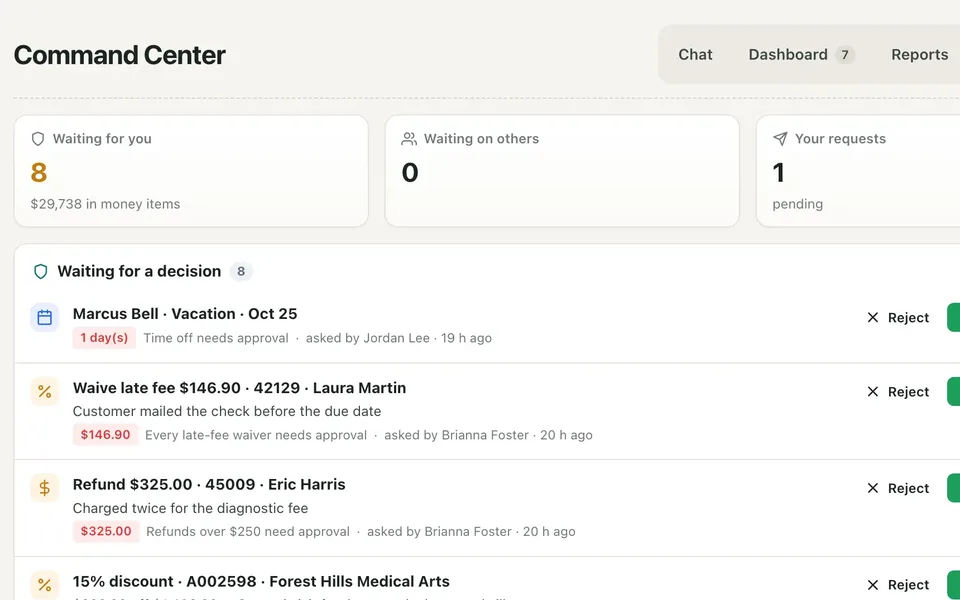
Approvals
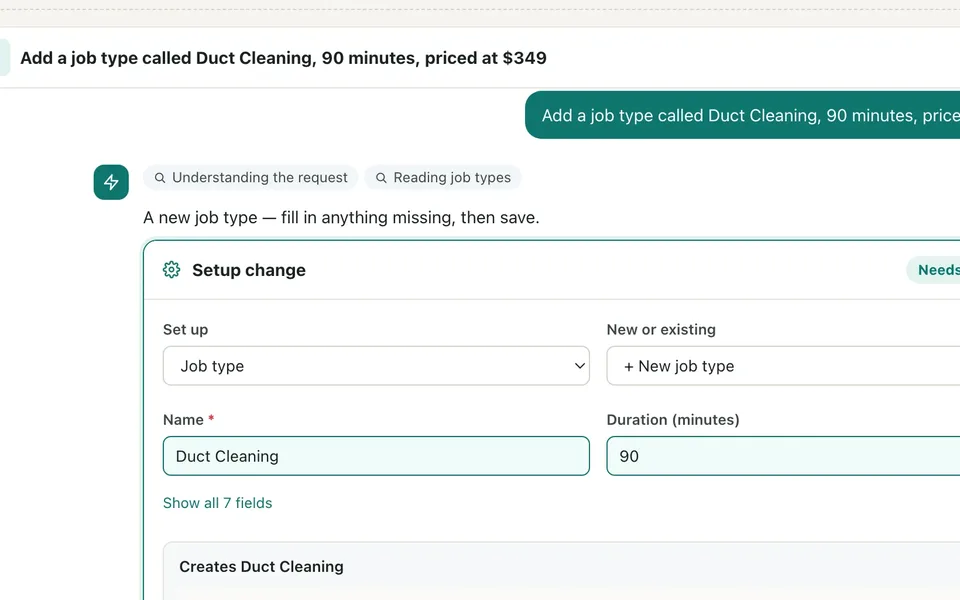
Sets up your system
The problem
Complex Tasks Shouldn't Require Complex Steps
Every multi-site operation means navigating multiple systems. Open one tool, copy data, switch to another, paste, configure settings, switch again, send notifications. Repeat endlessly.
That's hours every day spent on repetitive manual work, time your team could spend on high-value activities.
Traditional Process
For every new service request...
Per workflow execution
Voice & chat
One sentence. Multiple actions.
Type it, speak it, or trigger it automatically. The Command Center handles the complexity, you just say what needs to happen.
Type Commands
Voice Commands
Auto-Triggers
"New site on the Northwind Property Group contract: Harbor Point, 4210 Ridgewood Trail, Austin TX 78731, site contact Dana Ortiz, 512-555-0847. Rooftop unit 3 stopped cooling since yesterday, P2 under the contract, PO 4471. Create an estimate for AC diagnostic at $185 and R-410A refrigerant recharge at $350. Schedule Mike Rivera for Thursday 9 AM, 2 hours, high priority."
Site Created
Northwind: Harbor Point
512-555-0847 • Austin, TX
Estimate Ready
$535 Total
Diagnostic + R-410A Recharge
Job Scheduled
Thursday 9 AM
Mike Rivera • High Priority
Same result, 20x faster
What you can ask
One Command Executes Everything
From a one-line ask to a multi-step workflow, your agents handle it. And AI is built into every screen too, summaries and reports, data extraction from photos and PDFs, quote help, smart replies, transcription, anomaly flags, next-step suggestions, all on your live records.
Create Records
Generate Documents
Schedule & Dispatch
Bulk Operations
Process Payments
Query & Search
Send Communications
Update Status
Multi-Step Workflows
Reschedule & Adjust
Approve & Review
Trigger Automations
Skills
One slash. A whole workflow.
Skills are pre-built superpowers your whole team can fire from any AI agent. Each one chains tools, rules, and data together so a single command runs what used to take a meeting.
> /dailyschedule
Plan tomorrow in one shot
Pulls every open job + tech availability
Optimizes routes by drive time + zone
Matches skills, certs & parts on truck
Bunches recurring customers same day
Flags SLA risk & suggests overflow
Done. Saves your dispatcher 90 min/day
Build your own. Every Fieldproxy workspace ships with a skill builder, no code required.
Browse all skillsScheduler
Set it once. Land in inboxes forever.
Turn any chat command into a recurring email. The Command Center re-runs the query live each time, so the briefing your team opens at 8 AM is always current, not yesterday's cached PDF. No one has to log in.
Set up a schedule in chat
Talk to it like a teammate
You
Awaiting your request…
Your schedules
3 activeDaily standup brief
ops@acme.com·Weekdays · 8:00 AM
Tomorrow 8:00 AM
Open quotes report
finance@acme.com·Monthly · 1st at 9 AM
May 1, 9:00 AM
Tomorrow's job schedule
you·Daily · 6:00 PM
Today 6:00 PM
Lands in your inbox, fresh every time
Re-runs the query live, not a cached PDF
inbox.acme.com
Fieldproxy
9:00 AM
Weekly overdue-invoices brief
Overdue invoices, Monday, week 17
You have 8 invoices past due, totaling $24,310. Three are 60+ days out. Top customer to chase: Greenfield HVAC ($9,200, 74 days).
8
Past due
$24.3k
Total $
3
60+ days
EXAMPLE ASKS
- ›"Send the daily standup to ops@acme.com every weekday at 8am"
- ›"Every Friday at 5pm, email me the week's revenue and top 5 customers"
- ›"Email me tomorrow's job schedule each evening at 6pm"
Live, not stale
Re-runs the query at send time.
Anyone, anywhere
Regional managers, dispatchers, finance, clients.
Plain-English setup
Pause, resume, modify in chat.
Daily, weekly, one-off
Or any custom cadence you describe.
See it built around how your team already works.
Get DemoWatchers
Most software shows you problems. Fieldproxy tells you about them.
Silent agents watching your data minute by minute. The second a lead lands, an invoice ages past 30 days, a tech runs late, or stock dips below reorder, you get a ping. You stop having to remember to check. They check for you.
Watchers running 24/7
Re-checks every 60 seconds · only speaks up when something is new
Overdue invoices
Any invoice 30+ days past due
New leads
New lead added to CRM
Stock below reorder
Inventory dips below threshold
Tech running late
30+ minutes late to a job
Quote sitting unaccepted
No movement for 7+ days
SMART BY DEFAULT
- Only fires on truly new conditions: no spam from rows that already existed.
- Per-entity cooldown: you hear about each invoice once, not every minute.
- Alerts can land in chat, email, or both.
Alerts as they happen
Within 60 seconds of the data condition
All quiet.
Nothing needs your attention. Watchers are checking the data right now.
EXAMPLE ASKS
- ›"Email sales@acme.com whenever a new lead is added"
- ›"Alert me when any invoice goes 30+ days overdue"
- ›"Ping me when a job's spend gets within 10% of its NTE"
One-tap, built-in watchers
Or describe any condition in English. The AI builds the watcher; cooldowns and de-duplication keep your inbox sane.
When to use which
Schedules are for things that should happen on a clock. Watchers are for things that should happen the moment they happen.
Vision
Snap a photo. Form fills itself.
Serial numbers, model info, asset tags, before/after proof, pulled out of the photo and dropped into the right fields. One tap replaces twenty minutes of typing.
Image Capture
One photo does it all
Take After Photo
Tap to capture installed part
Auto-Fill Form
AI extracts and populates
Waiting for image...
One photo replaces 6 form fields
OCR + object detection
Reads serial numbers, model plates, gauges, meters.
Auto field mapping
Drops values straight into your job/asset records.
Visual proof of work
Before/after attached to the job timeline automatically.
See it built around how your team already works.
Get DemoSmart dispatch
The right tech. Every time.
Tell the Command Center the job, it scores every available technician on SLA window, skills, distance, parts on truck, labor cost and overtime, then picks the one who meets the SLA and contract priority first, and protects margin second.
Available Technicians
AI evaluating 3 candidates
Steve M.
Mike R.
Sarah K.
Decision Engine
Multi-variable optimization
Awaiting job assignment...
WHY THIS MATTERS
- •Steve rejected: Would require second truck roll
- •Mike rejected: Double-time would eat profit
- •Sarah selected: First-time fix at lowest cost
Skills + certifications
Live route + ETA
Truck inventory match
Labor + overtime cost
Knowledge
Ask anything. Get a grounded answer.
500-page OEM PDFs, SOPs, past service history, your dispatcher's tribal knowledge, all searchable in plain English. Every answer cites where it came from. No hallucinations.
Knowledge Assistant
Ask anything about your equipment
Tech Jason - 2:34 PM
AI Response
Grounded in your data - no hallucinations
Waiting for query...
RAG over your data
Manuals, SOPs, past tickets, customer notes.
Source citations
Every answer links back to the exact page or job.
First-time fix boost
Techs in the field get answers in seconds, not callbacks.
Document intelligence
PDFs in. Jobs out.
Work orders land in your inbox by email, fax or portal. The Command Center reads them, pulls customer info, problem, SLA and price ceiling, then accepts, escalates, or flags for review. Zero re-typing.
Incoming Work Order
PDF Attachment
Work Order
Walmart FM #9921
Location
Walmart Store #402, Dallas, TX
Description
Bakery Freezer leaking water. Slip hazard. Requires immediate attention.
Commercial Terms
Contact: John Martinez (Store Manager)
Phone: (214) 555-0142
Smart Extraction
Commercial Logic Check
Workflow Triggered
Email + portal ingest
Pulls work orders from any inbox or client portal.
Field extraction
Customer, asset, SLA, price cap, all parsed and validated.
Auto-route to dispatch
Accepted jobs feed straight into smart dispatch.
The Numbers Don't Lie
Real time and cost savings from Command Center users
4+ hrs
Saved per team member daily
20x
Faster workflow execution
$2,400
Monthly labor savings
99.5%
Execution accuracy rate
FAQ
Command Center questions
Can Command Center change things without me?
No. Every change it prepares comes back as a confirm card showing what will change, before and after. Nothing is saved until a person confirms it.
Can I undo a change?
Yes. Every confirmed change comes with one click to Undo, including bulk changes and price changes.
Who can approve big changes?
You set the limits and the approvers. Changes over a limit, for example a change order over a set amount or a discount above a set percentage, wait for an approver before they apply.
Can it set up my system as well as run it?
Yes. Ask for new job types, prices, forms, custom fields, stages or workflow rules and it prepares them for you to confirm. New workflow rules start paused until you switch them on, and bigger screen changes are written up for our team to build, usually the same day.
Does it work inside Claude, ChatGPT or Copilot?
Yes. The same Command Center work runs from Claude, ChatGPT or Microsoft Copilot through Fieldproxy's MCP server, with the same confirm step before anything changes.
Stop Clicking Through Menus. Start Commanding.
See Command Center on your own workflows: it answers, does the work and sets up your system, and every change comes back as a confirm card you approve, with one click to Undo.
Also works from ChatGPT, Claude and Copilot in Teams
Fieldproxy's MCP server lets your team run the day and change the software itself from the AI assistant they already use, with a confirm step before anything changes.
Pair this agent with
Most teams adopt one agent first, then layer in two or three more in the same week.
Works in every trade
Which industry are you running today?
Evaluating Fieldproxy against another platform?
Try it yourself, free
Don't take our word for it. Run this AI on your own job, right now.
These free tools run the same AI capability on whatever you throw at them, no signup, no sales call.