
AI Dispatch Agent
AI dispatch agent: the right technician on every job, with your approval.
When a job comes in, the AI dispatch agent weighs SLA windows, contract priority, distance, skills, van stock, labor rates and overtime across every region, picks the technician who meets the contract first and protects margin second, and shows you why. You approve the assignment, and any change can be undone. It works on the same board as Fieldproxy's AI scheduling and dispatch software, so your dispatchers and the agent never work from two different plans.
 Dispatch board · Meridian Facility ServicesThu · 7:40 AMDispatch Agent working
Roof leak over the server room
Candidates
Marcus T.
North · 8 min
No roofing cert
Ana R.
North · 14 min
Roofing cert · van stock checked
Dev P.
Central · 26 min
Overtime after 2 PM
Kim L.
Central · 31 min
Board full
North region
Central region
South region
Approved subcontractor
Unassigned
Decision logged
Ana R. over Marcus T. (closer, no roofing cert). PM at Site 9 moves to 10:15, still inside its contract window. Gutter job to Apex Roofing, an approved sub.
P1 assigned in 4 seconds. SLA at risk: 0.
Ana on site by 8:00, two jobs re-sequenced, overflow with an approved sub, site contact sent the ETA.
Live demo
See It In Action
Watch AI analyze and select the optimal technician in real-time
Available Technicians
AI evaluating 3 candidates
Steve M.
Mike R.
Sarah K.
Decision Engine
Multi-variable optimization
Awaiting job assignment...
WHY THIS MATTERS
- •Steve rejected: Would require second truck roll
- •Mike rejected: Double-time would eat profit
- •Sarah selected: First-time fix at lowest cost
Walkthrough
What Happens When a Field Tech Calls In Sick? 14 Jobs Reassigned in 1 Minute
The Problem With Manual Dispatching
- Dispatchers send the closest tech, who lacks the required part
- Overtime costs eat into profit when cheaper options exist
- Return visits kill margins and SLA performance: wrong skill match, missing equipment
- Too many factors to weigh by hand on a busy day
The Dispatch Agent Solution
- AI checks inventory before assigning - ensures first-time fix
- Calculates true cost including travel, labor, and overtime
- Matches skills and certifications to job requirements
- Optimizes across all variables simultaneously, instantly
See it built around how your team already works.
Get DemoHow it works
How the AI Dispatch Agent Works
Every factor weighed for each job, with the reason shown
Scan All Technicians
When a job comes in, AI instantly scans every available technician. Location, current workload, skills, certifications, and van inventory, all checked in parallel.Calculate True Costs
For each candidate, AI calculates total job cost: travel time, mileage, labor rate, overtime premiums, and probability of first-time fix. Hidden costs become visible.Propose, Approve & Dispatch
AI proposes the tech with its reasoning. Once you approve, the route goes to the mobile app, the site contact is told the ETA, and the decision is logged for the operations team. Any change can be undone.
The variables
What Dispatch Agent Optimizes
What it weighs for every assignment
Distance & Travel Time
Van Inventory
Labor Rates & Overtime
Skills & Certifications
Current Workload
First-Time Fix Rate
See it built around how your team already works.
Get DemoResults
Dispatch Agent Results
Skills
Matched to the job
Location
Nearest qualified tech
Live
Reassigns when the day changes
Approve
Nothing moves without your OK
Scenarios
Real Dispatch Scenarios
See how AI makes smarter decisions than humans
Emergency After-Hours Call
A client site's cooling is down at 9pm. AI considers: on-call rates, current tech locations, the contract's SLA commitment, and next-day alternatives. Dispatches tech with shortest drive time who isn't already on overtime.
Commercial Equipment Failure
Restaurant walk-in cooler down. AI identifies techs with refrigeration certs and the likely replacement part in van stock. Picks tech 20 miles away over closer tech without the part.
Multi-Region Morning Surge
Forty jobs land across three regions before 8am, some on contracts with four-hour SLAs. AI fills in-house crews in each region first, routes overflow to approved subcontractors where coverage is thin, and sequences every route so each tech has parts for their assigned jobs.
Priority Customer Request
A key contract client logs a non-urgent issue. AI recognizes account status, checks SLA terms, and assigns their preferred technician while reshuffling other jobs to maintain everyone's schedule.
Also works from ChatGPT, Claude and Copilot in Teams
Fieldproxy's MCP server lets your team run the day and change the software itself from the AI assistant they already use, with a confirm step before anything changes.
Pair this agent with
Most teams adopt one agent first, then layer in two or three more in the same week.
Works in every trade
Which industry are you running today?
Evaluating Fieldproxy against another platform?
Try it yourself, free
Don't take our word for it. Run this AI on your own job, right now.
These free tools run the same AI capability on whatever you throw at them, no signup, no sales call.
Worked example
An emergency call dropped into a full day
Demo data. At 1:20 pm a commercial customer reports a walk-in freezer failing, with a 4-hour response SLA.
Step 1
The job arrives as an emergency
It comes in by phone or email and is created with emergency priority and the SLA deadline.
Step 2
The best technician is suggested
Only technicians with refrigeration skills are considered. The board ranks them on where they will be, free time and how moving their next job affects its own window.
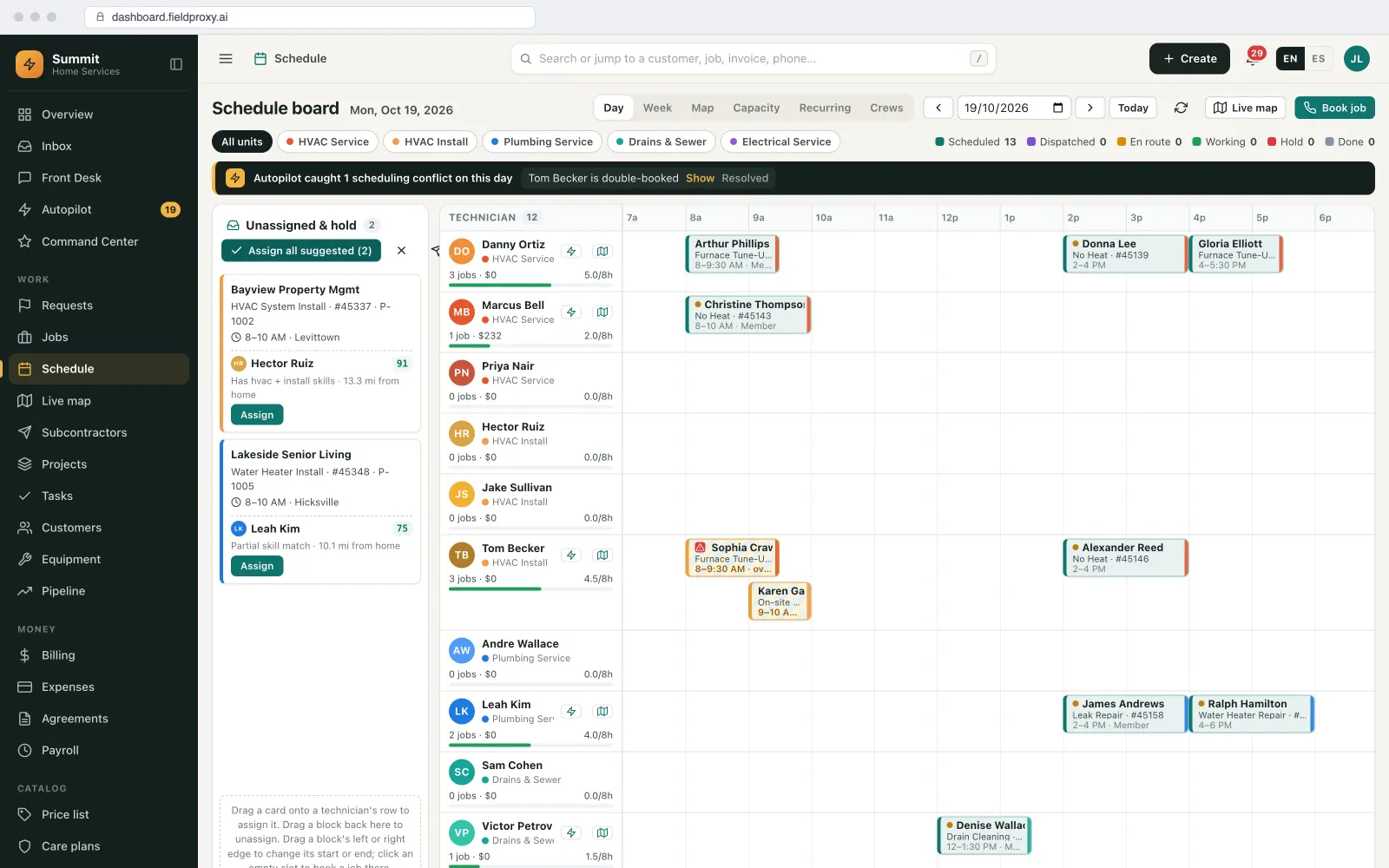
Suggested technicians with scores for unassigned visits.
Step 3
The knock-on change is shown
Assigning the emergency to the nearest technician pushes their 3 pm job. The preview shows the new times and the job that could go to someone else, before anything is applied.
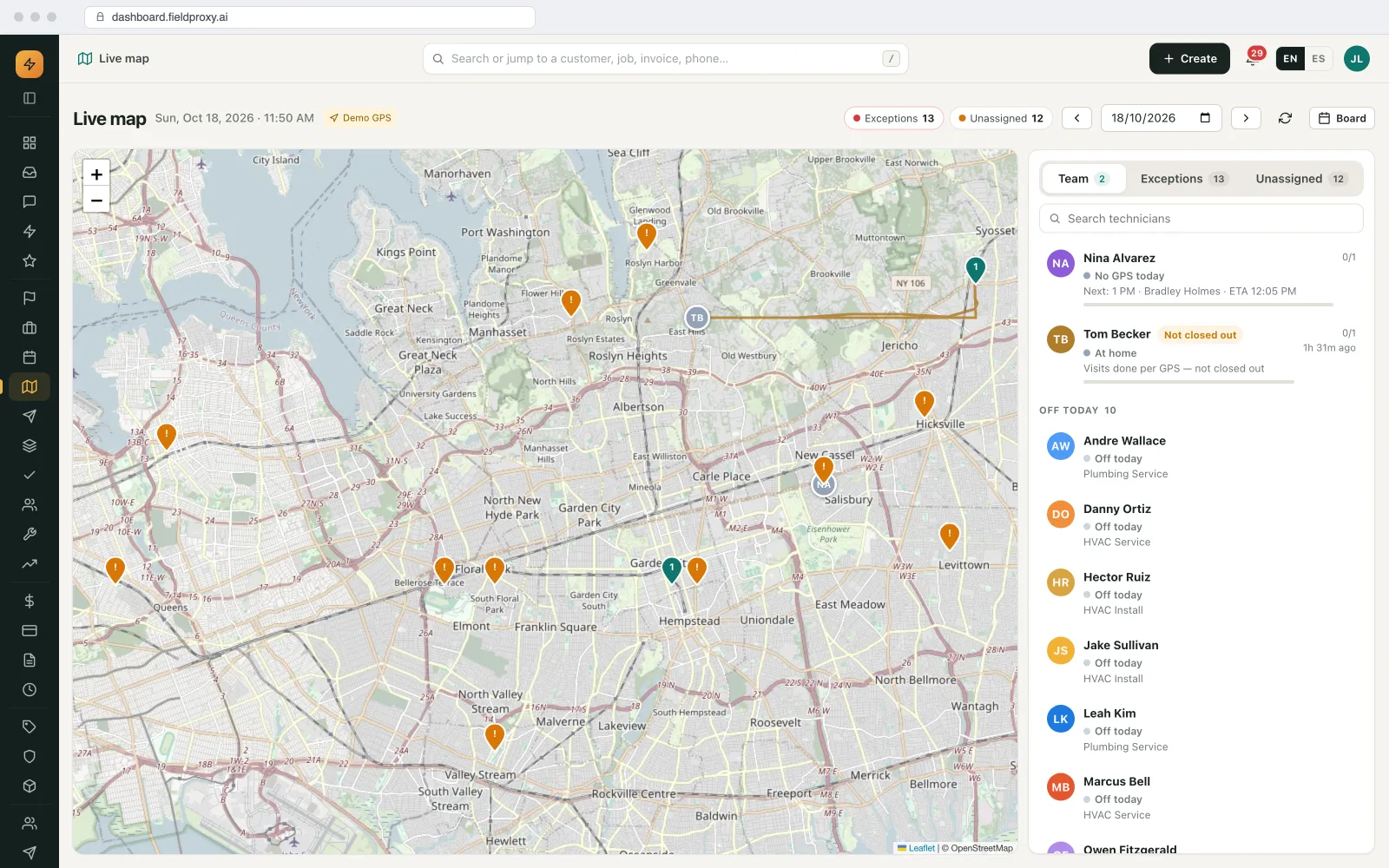
Live map with technician positions, unassigned visits and the team panel.
Names, sites and amounts in this example are demo data. Screens are from the Fieldproxy demo account.
Control
What runs on its own, and what waits for you
| Task | Who acts | Detail |
|---|---|---|
| Ranking technicians for a job | Runs on its own | Skills, location, availability and SLA. |
| Assigning and moving jobs | Waits for your OK | Preview first; automatic only for job types you choose. |
| Customer notifications | Your rule decides | Sent by the rules you switch on. |
Getting started
Setup, connections and fit
How it is set up
- A 30-minute call to walk through how your office runs today: job types, who approves what, and where work comes in from.
- Load technicians' skills, certifications and working hours.
- We set it up on your own data and rules, and it is live within a day.
What it connects to
- Technician mobile app: live location and status
- Customer messages: new windows and tracking links
When it is not a fit
- Every job can go to any technician and the day rarely changes.
Questions
Straight answers.
How does AI dispatch decide which technician to send?
It ranks technicians on the skills the job needs, where they will be, their free time and the SLA, and shows why. The dispatcher assigns.
Can AI dispatch handle emergencies in a full schedule?
Yes. It suggests who should go and previews the knock-on changes to the rest of the day before anything is applied.