How do you turn web forms and emails into booked jobs?
Bring every request into one board, from web forms, emails, calls and texts. Each request is checked against your customers, and booking it pre-fills the job with the customer, job type, problem and best-matched technician. AI can also fill a request from a pasted email.
This walkthrough opens the requests board at Summit Home Services, a demo home services company: requests from every source, a web form and an email request, a pre-filled booking with the suggested technician, and AI filling a request from a pasted message.
Chapters
Summit Home Services is a demo company with fictional customers. Every screen is the real Fieldproxy product; some sequences are sped up.
Step by step
Collect every request on one board
Web forms, emails, calls, texts and technician leads appear as cards with their source, value and age.
Open a request
See the customer's own message and contact details, checked against existing customers.
Create or link the customer
If there is no match, create the customer from the request in one click.
Book the job
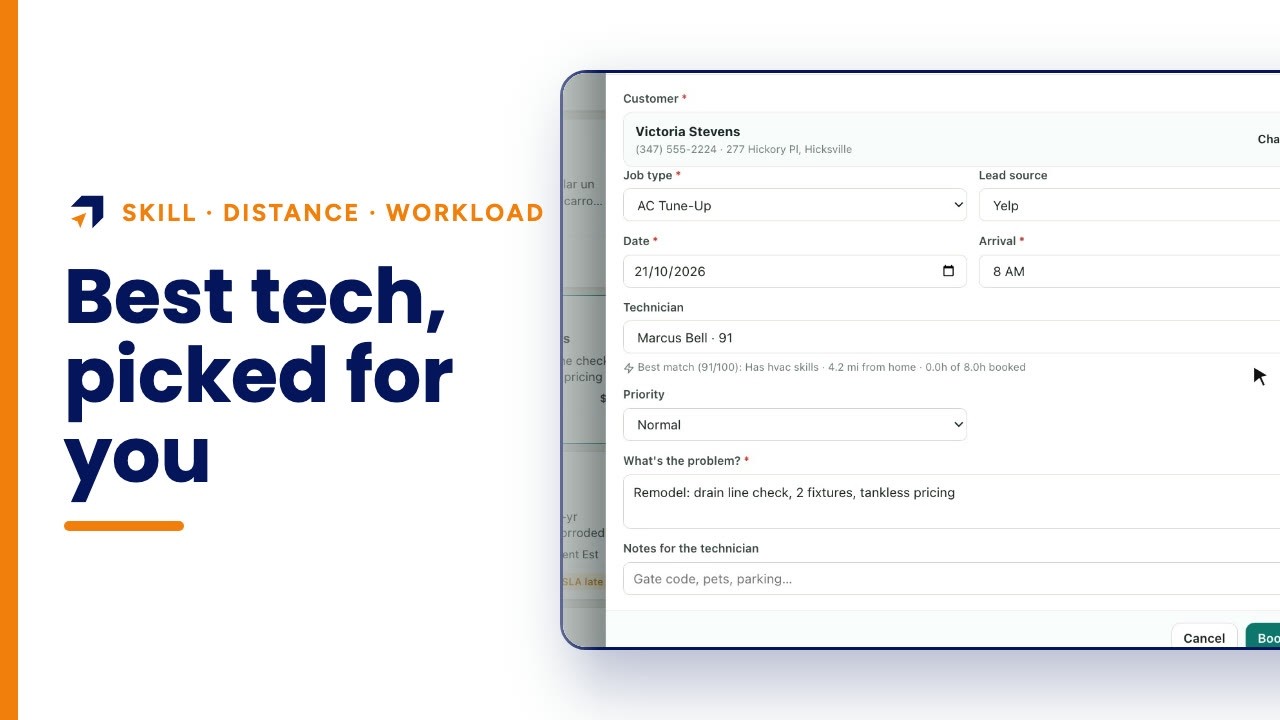
The booking form fills in the customer, location, job type, problem and the best-matched technician.
Paste anything else
For a message that isn't on the board yet, paste it and AI fills the request form for a person to check and save.
Questions people ask
- Can web form submissions become jobs automatically?
- Web forms land as requests on the board with the customer's message and details; booking turns one into a job with the form pre-filled.
- Do emails show up as requests too?
- Yes. Here an email from a commercial customer appears on the same board, tagged Email, next to web forms, calls and texts.
- How is the technician chosen?
- The booking form suggests the best match, scored on skills, distance and how much of the day is already booked.
- Can AI read a customer's message?
- Yes. Paste an email or text and AI fills the name, phone, address, job type and summary; nothing is saved until a person checks it.
- How long does it take to set up?
- Fieldproxy builds your own field service management system around your workflows, and it can be live within a day.
- Is Summit Home Services a real company?
- No. Summit is a demo company with fictional customers. The screens are the real Fieldproxy product, recorded live and sped up.
Transcript
Show
- 0:00How do you turn web forms and emails into booked jobs? Put every request in one place, whatever it came from, check it against your customer list, and book it with the best technician already suggested. Here's how it works.
- 0:18Requests from every source land on one board: web forms, emails, calls, texts, even work a technician spotted on site. Eight are new, the oldest has waited six days, and every card shows what the job is worth.
- 0:32Over the last thirty days, three were won and one was lost, and the median first reply took nine minutes.
- 0:40Open a web form request, and the customer's own words are right there, with their phone, email and address. It's already checked against your customer list: no match, so it's a new customer, one click to create.
- 0:57An email from a gym's facilities manager lands the same way: two failing seventy-five-gallon water heaters, and a purchase order required.
- 1:05It's already linked to the customer, with their past jobs and lifetime value beside it.
- 1:12Book the job, and the form is already filled: the customer, the location, the job type, the problem, and the best-matched technician, Andre, with plumbing and install skills, five miles away, and nothing booked yet that day.
- 1:27Got a request by email that isn't on the board yet? Paste it in.
- 1:33AI fills seven fields: the name, phone, address, a no-cool job type and a one-line summary, and checks for an existing customer. Nothing is saved until a person presses create.
- 1:48Every request, one board, ready to book. Get your own custom field service management within a day, tailored to your workflows. Start at fieldproxy dot ai.