
Estimates, Invoices & Job Costing
Estimating, quoting and invoicing software for field service, from first quote to paid.
Quote from your own price book with good, better and best options and a margin floor, get the quote signed by link, and turn it into a scheduled job in one click. When the work is done, the invoice is drafted from the job and sent with a payment link, then synced to your books, and the job's costs show its real margin. One flow, set up around how you price and bill, and live within a day.
The whole topic
Everything between the quote and the paid invoice
The sections above cover the main flow. These are the cases buyers ask about most often on calls, each with a page that goes deeper.
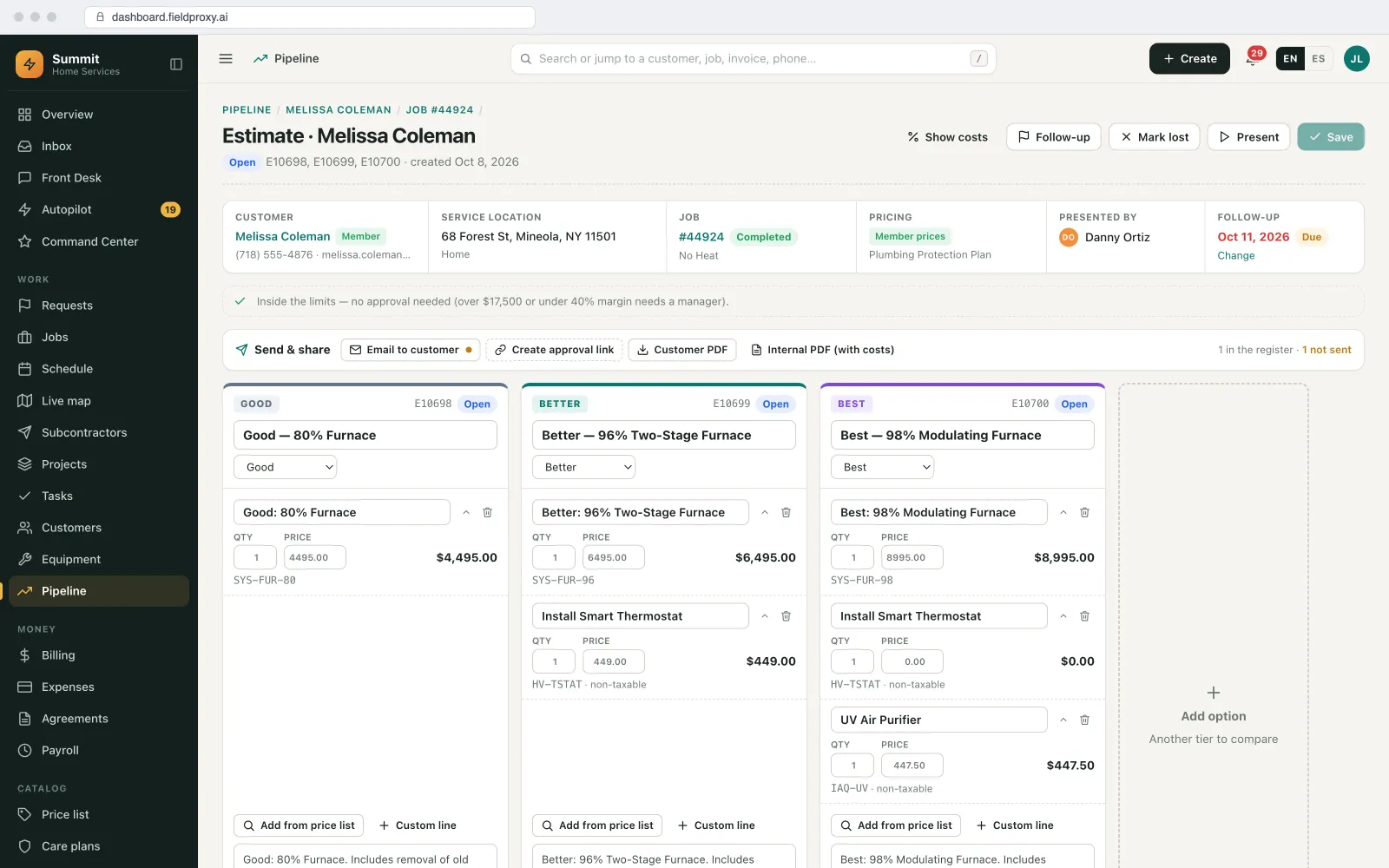
Good, better, best options
Three options on one quote, built from your price book, with the customer choosing on a link. The good, better, best estimate video shows one built from start to finish.
Supplier prices on quotes
Parts priced from your supplier's current cost with your markup, so a quote does not go out on last year's price. See supplier parts and prices on quotes.
Flat-rate and per-customer pricing
Price books carry your items, labour rates, markups and flat-rate prices, and loyalty or member pricing per customer. Companies that run more than one business keep a price book per company (multi-company).
Hiding prices in the field
Technicians can work without seeing prices or costs, by role. See hide prices from technicians.
Not-to-exceed amounts
Client work orders with an NTE stop at the limit until the extra is approved. See tracking not-to-exceed work orders.
Change orders and progress billing
Extra work on a project goes on a change order that waits for approval over your threshold, and billing runs on deposits, milestones and retainage (projects). The change order approval video shows the approval step.
One invoice for many sites
Commercial clients can get one invoice per period across their sites, with each line linked to that site's work. See one invoice for many sites.
Margin on every job
Labour, parts, subcontractor and expense costs against each job. The job costing video shows the margin view, and invoicing and payment challenges for field teams covers why invoices slip.
Quote to paid
One record from the first quote to the paid invoice.
Estimating, quoting and invoicing are one flow in Fieldproxy, not three tools. The lines you quote are the lines you schedule, and the lines you schedule are the lines you invoice, so nothing is retyped between them.
1. Quote
2. Approve
3. Schedule
4. Invoice
5. Get paid
Invoicing and payments
Field service invoicing that matches how you actually bill.
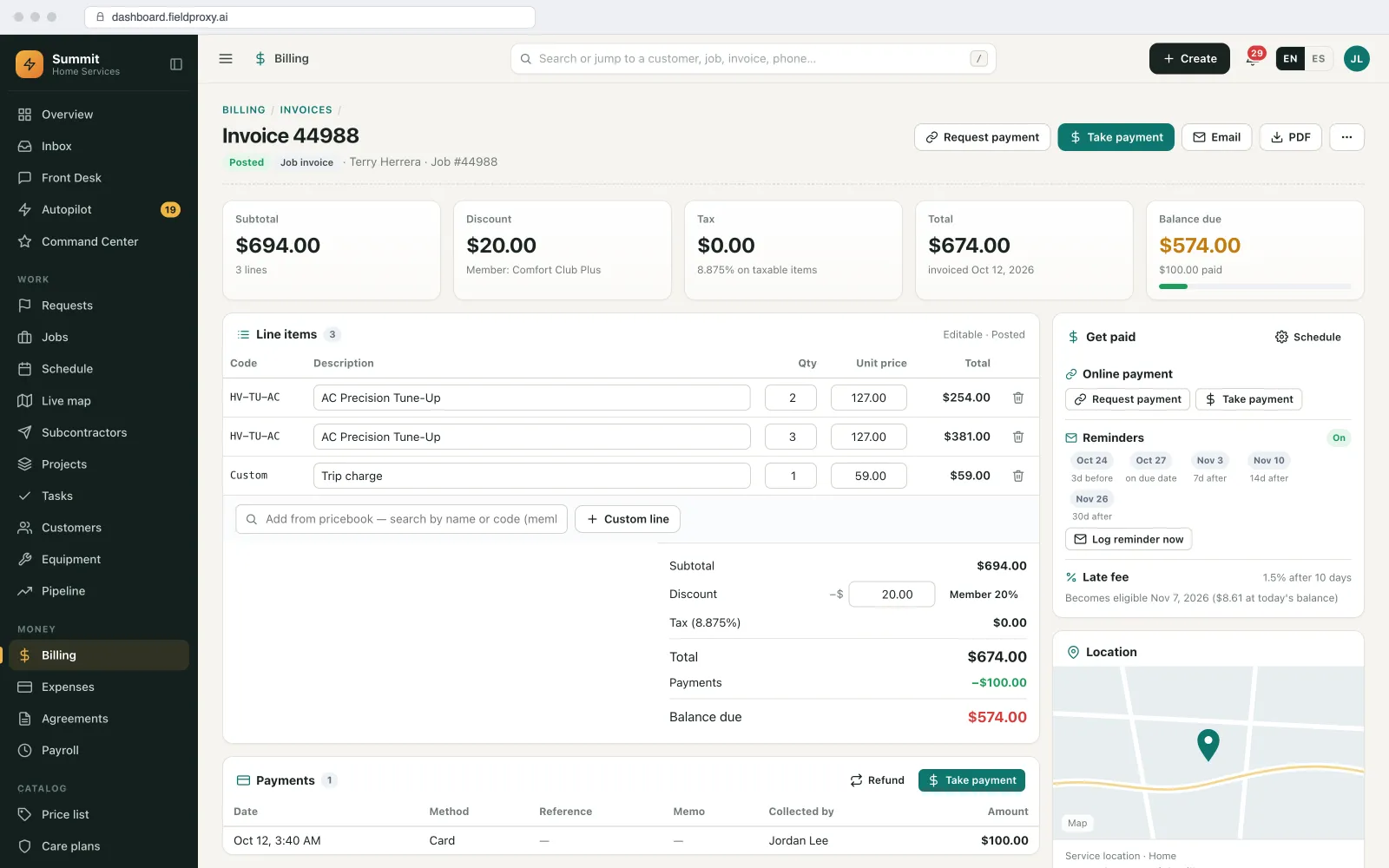
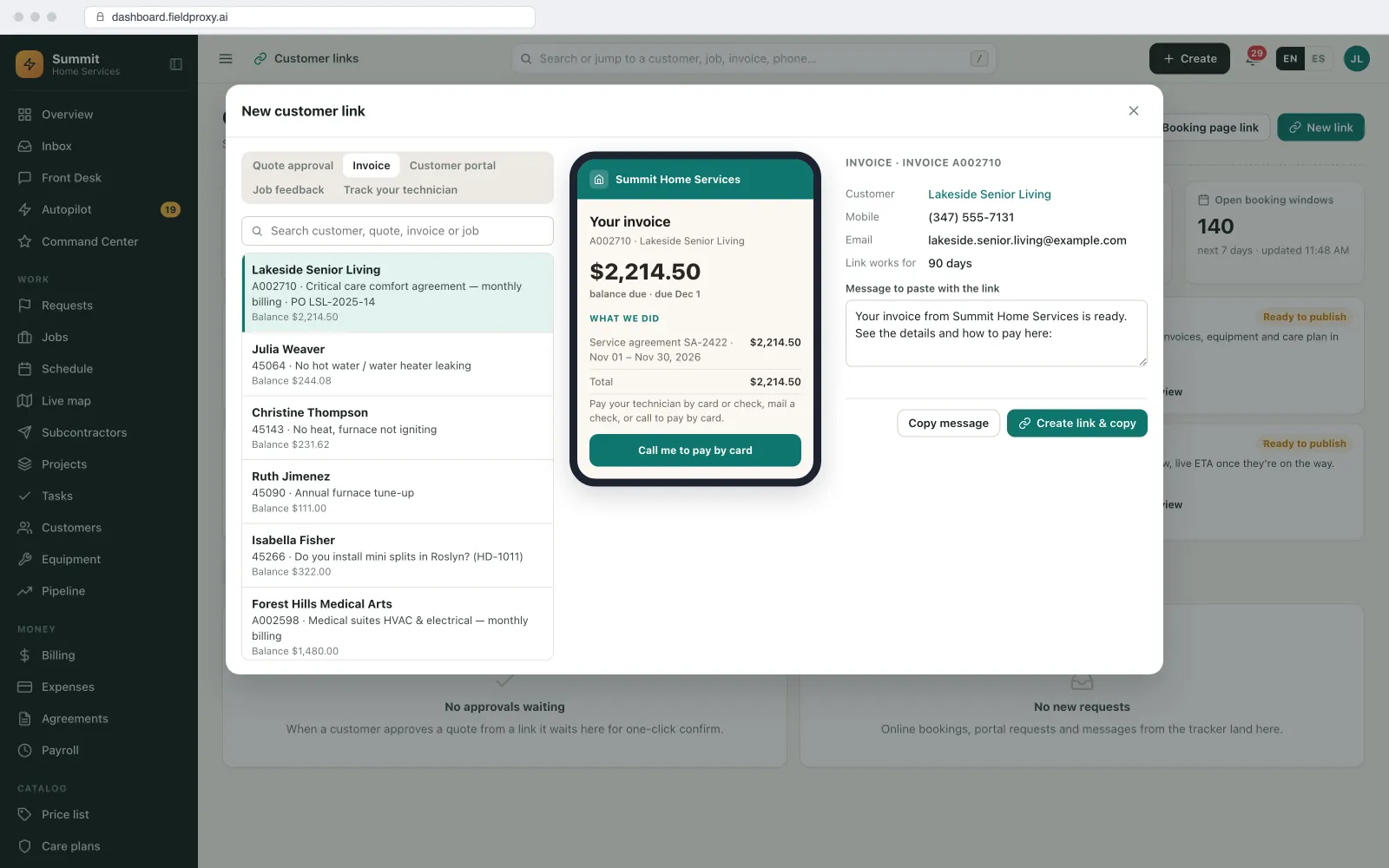
Invoices from completed jobs, recurring contract billing, Tap to Pay on the technician's phone, payment links and reminders, set up around how you bill: per visit, by contract, or deposit and balance.
Invoice from the job
Recurring contract billing
Tap to Pay on the job
Payment links
A reminder ladder that stops on payment
Late fees and service holds
Credits and discounts
Paid in your books means paid here
Receivables, live
Audit trail
Job costing
Job costing on every job, not at month end.
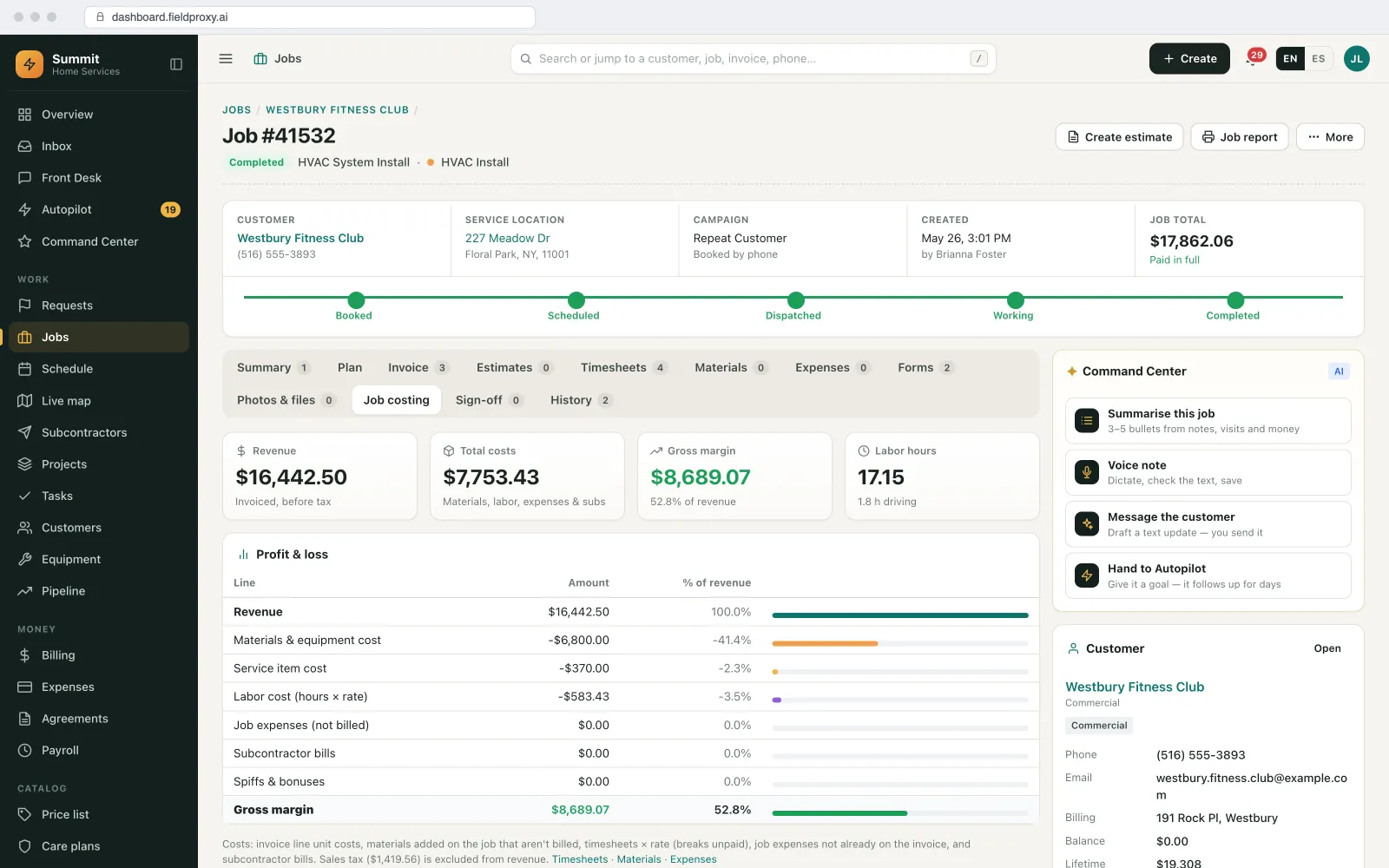
The price came from the quote. The costs come from the work: the hours your technicians logged, the parts that came off the van, what the subcontractor is owed and anything bought for the job. Fieldproxy puts them against the same job, so you see the margin on each one while there is still time to do something about it.
Labour from real hours
Parts at cost
Subcontractor costs
Expenses
Margin per job
Estimate vs actual
Branded PDFs and quote approval
Your documents, your brand, approved with a signature.
Every document goes out as a PDF with your logo and layout, and quotes come back approved and signed by link.
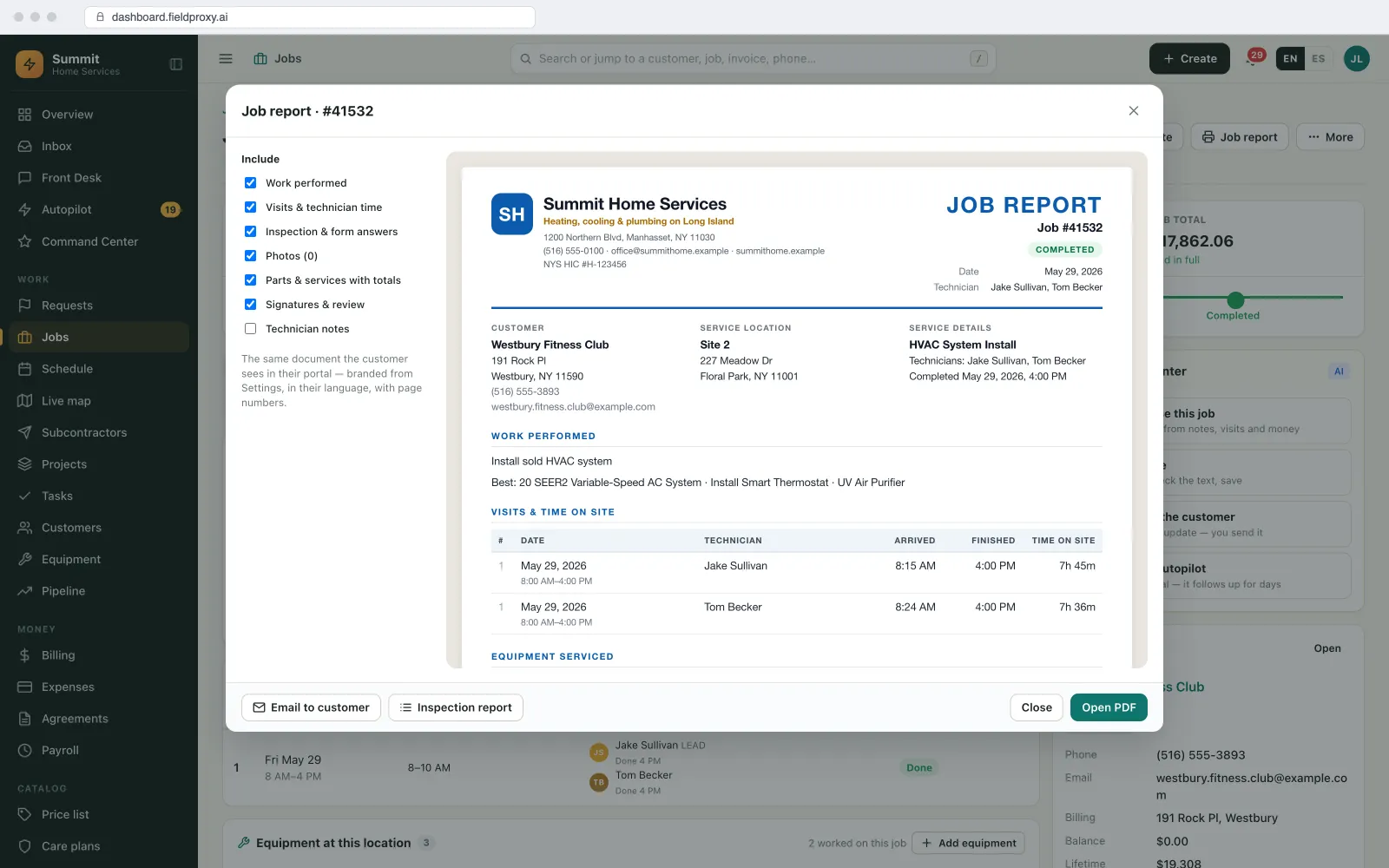
Job reports
Invoices
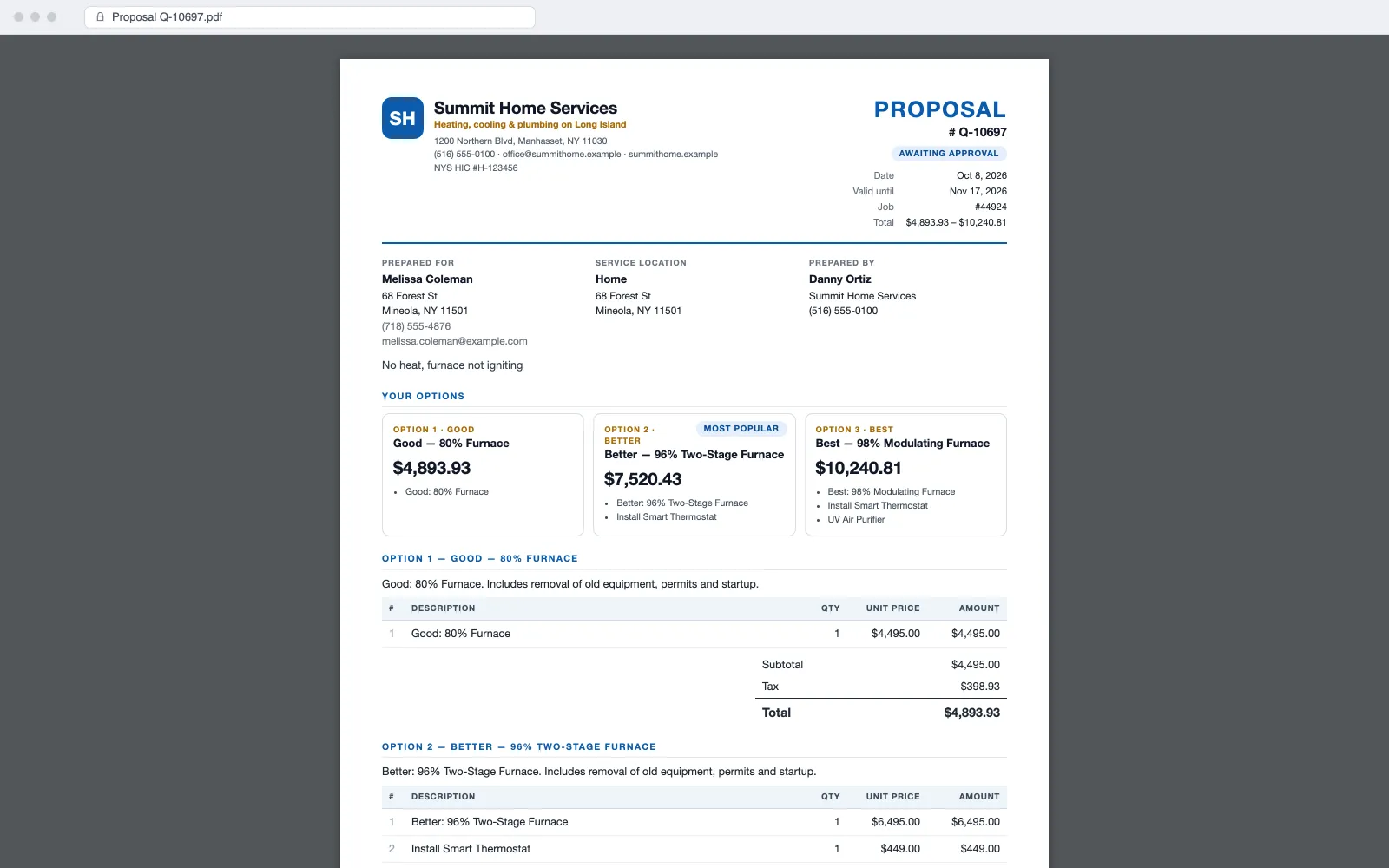
Proposals
Statements
Certificates
Good, Better, Best
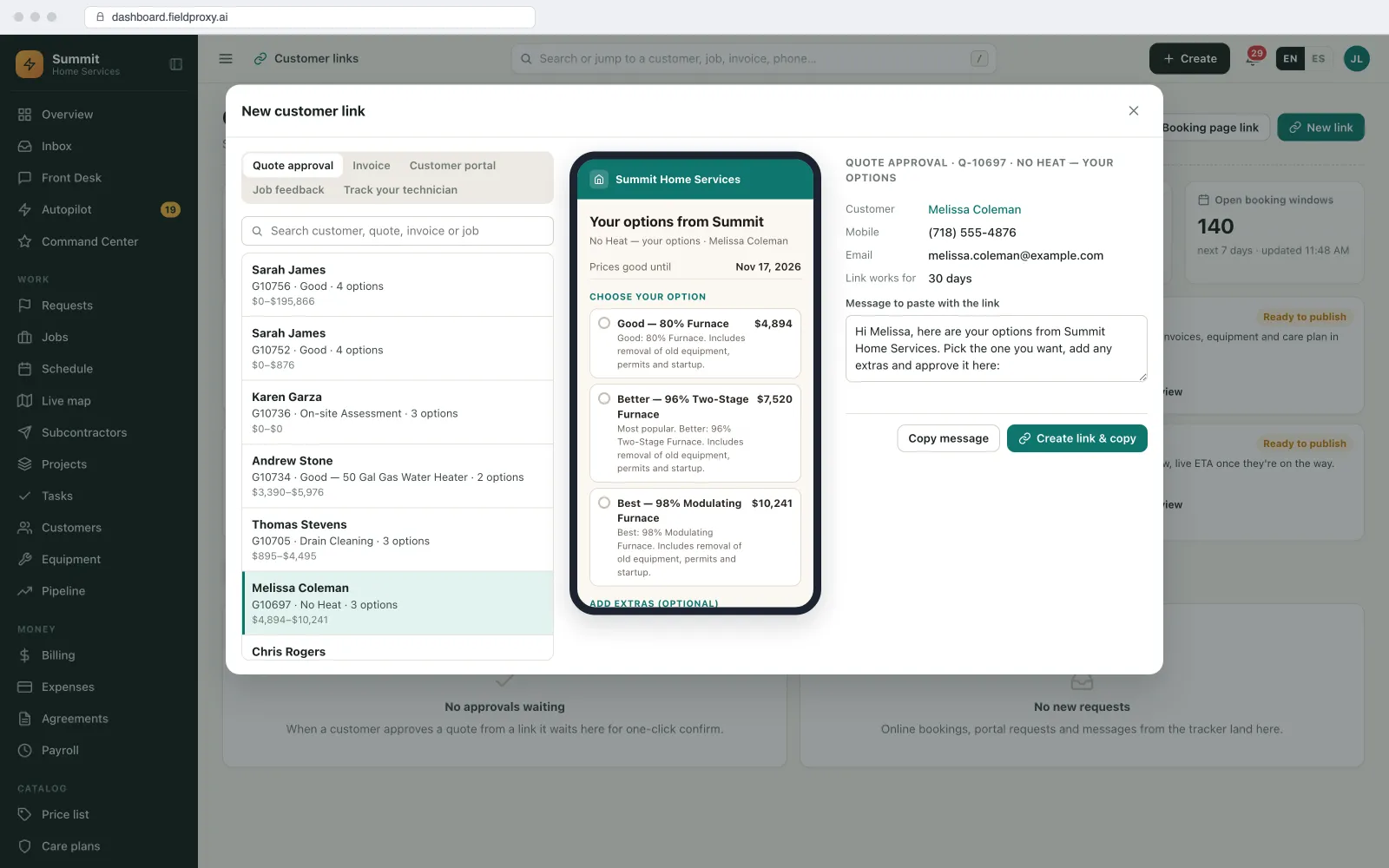
Quote approval with signature
On the phone too
Your layout
Plain English
Describe the change. It goes live.
2 fields added
Deposit % + preferred install date
Pushed to all reps
Live on every new estimate
History preserved
Sent quotes untouched, new ones capture it
Live in
Built your way
Everything from the first quote to the last payment.
Estimates, quotes, invoices and payments in one place, with no jumping between tools and no re-entry.
Your Word document, filled in
Line items & good-better-best
E-signatures
Deposits on approval
Parts-aware pricing
You see when they open it
Auto-expiry & nudges
Verified sign-off
One-click to job
Win-rate reporting
Invoice from the completed job
Tap to Pay and payment links
Job costing and margin per job
Two-way with your books
See it built around how your team already works.
Get DemoGood-better-best
On every quote
One click
From quote to job
Same day
Invoice from the job
Stops on payment
Reminder ladder
Shaped to your trade
Your business doesn't run like the template. Neither does Fieldproxy.
HVAC
Plumbing
Facilities
Want it running on your jobs? We set it up around them.
Get DemoIntegrations
Connected to your books and payments
Stripe
Tap to Pay on the technician's phone, deposits on approval, invoice payments and AutoPay.
QuickBooks
Two-way with Online, Desktop and Enterprise: customers, items, invoices, payments and bills stay in step.
Xero
The same, for Xero shops.
Sage
A deep two-way sync: customers, products, invoices, credit notes, payments and bills.
Native e-sign
Signed on the device in front of the customer. No third-party seat to buy.
Gmail / Outlook
Quotes and invoices sent from your domain.
AI agents
The AI agents that help you win the quote and get paid
From the photos on site to the follow-up nobody has time to make, under your approval rules.
Vision Agent
Reads the site photos into a scope (what's there, what's failed, what it's going to take), so the first draft of the quote exists before the tech is back in the van.
Document Intelligence
Turns a supplier quote, spec sheet or incoming PO into priced line items, including the terms that decide when you're allowed to bill.
Calling Agent
Works the unsigned quotes that went quiet after opening, and runs the reminder calls on your dunning ladder, stopping the moment the payment clears.
Watcher Agent
Surfaces the expensive silences: a completed job never invoiced, an invoice aging past terms, a contract renewing next month that nobody has priced.
See it built around how your team already works.
Get DemoWorked example
How a good, better, best quote goes from site visit to paid invoice
A homeowner needs a furnace replaced. Here is the work from the technician's first look to the signed approval, the install and the paid invoice, without anyone retyping it.
- 1
Options built on site
The technician builds three options for Melissa Coleman: repair, a standard replacement and a high-efficiency replacement, each with its own lines, priced from your cost book.
- 2
The margin floor holds
Each option is priced from your own costs, with a margin floor the quote cannot drop below. A discount above your limit waits for a manager.
- 3
Presented and sent
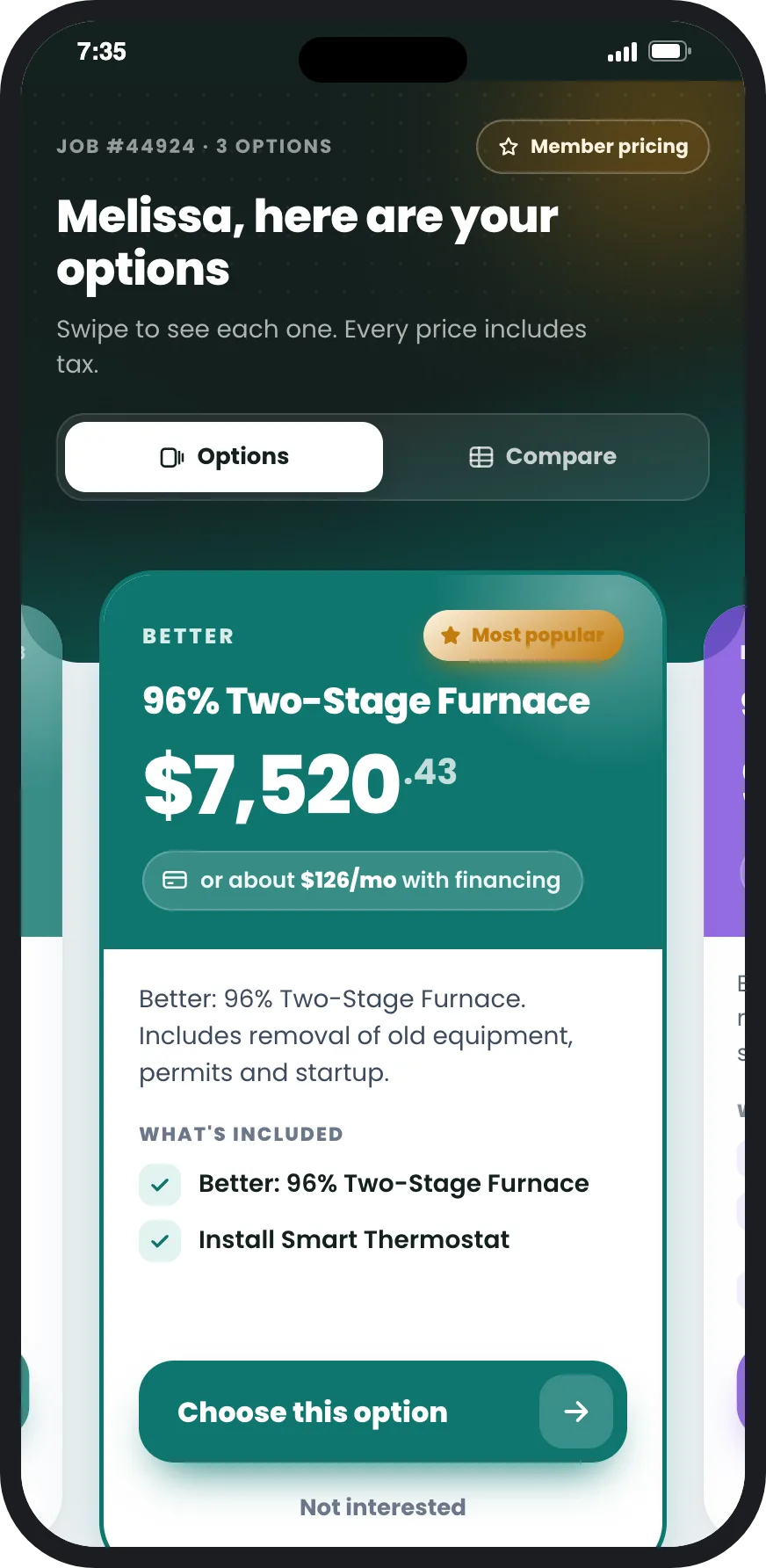
The options are shown on the phone, then sent as a branded proposal PDF and a link the customer can open at home.
- 4
Opened and followed up
You can see when the quote is opened. If it goes quiet after opening, a follow-up goes out automatically; the quote expires on the date you set.
- 5
Approved, signed and booked
Melissa picks the better option, signs on the link and pays the deposit. The quote becomes a scheduled job with the same lines, parts and price.
- 6
The invoice is drafted from the job
When the install is complete, the invoice is drafted from what was actually done: labour, parts, line items and photos, with the deposit already taken off.
- 7
Paid on the spot or by link, chased if not
The technician can take the balance there and then with Tap to Pay on their phone, or the invoice goes out with a payment link for card, ACH, Apple Pay or Google Pay. If it is not paid, a reminder ladder runs on your intervals and cancels the moment payment lands.
- 8
Your books stay in step
The invoice and payment sync to QuickBooks (Online, Desktop or Enterprise, two-way), Xero or Sage. If your accountant marks it paid there, it shows as paid on the job here, so nobody chases a paid invoice.
The quote, the signature, the deposit, the job and the invoice are one record, so nothing is retyped, the install team sees exactly what was sold, and the invoice goes out the same day as the work.
Names and figures in this example are demo data.
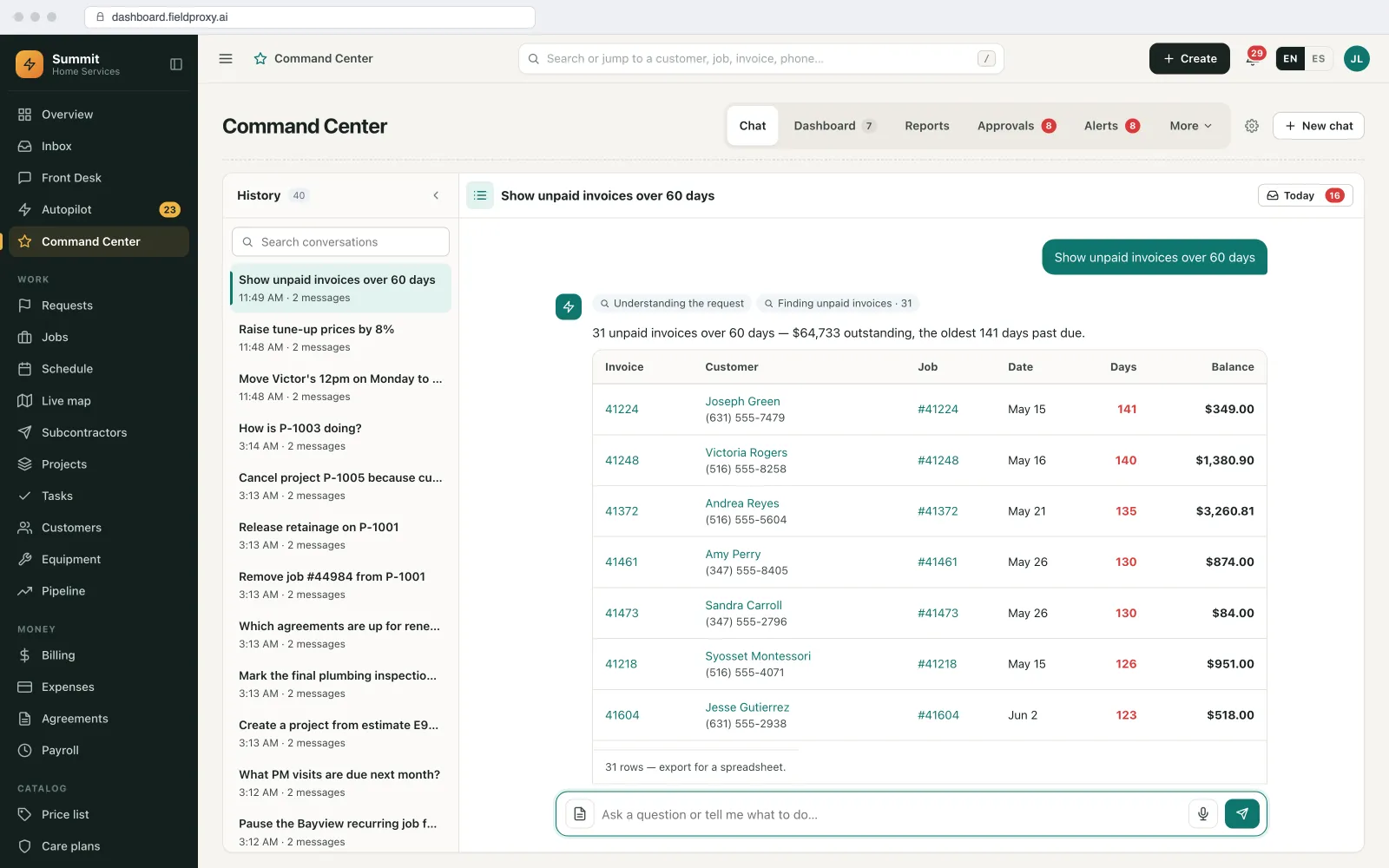
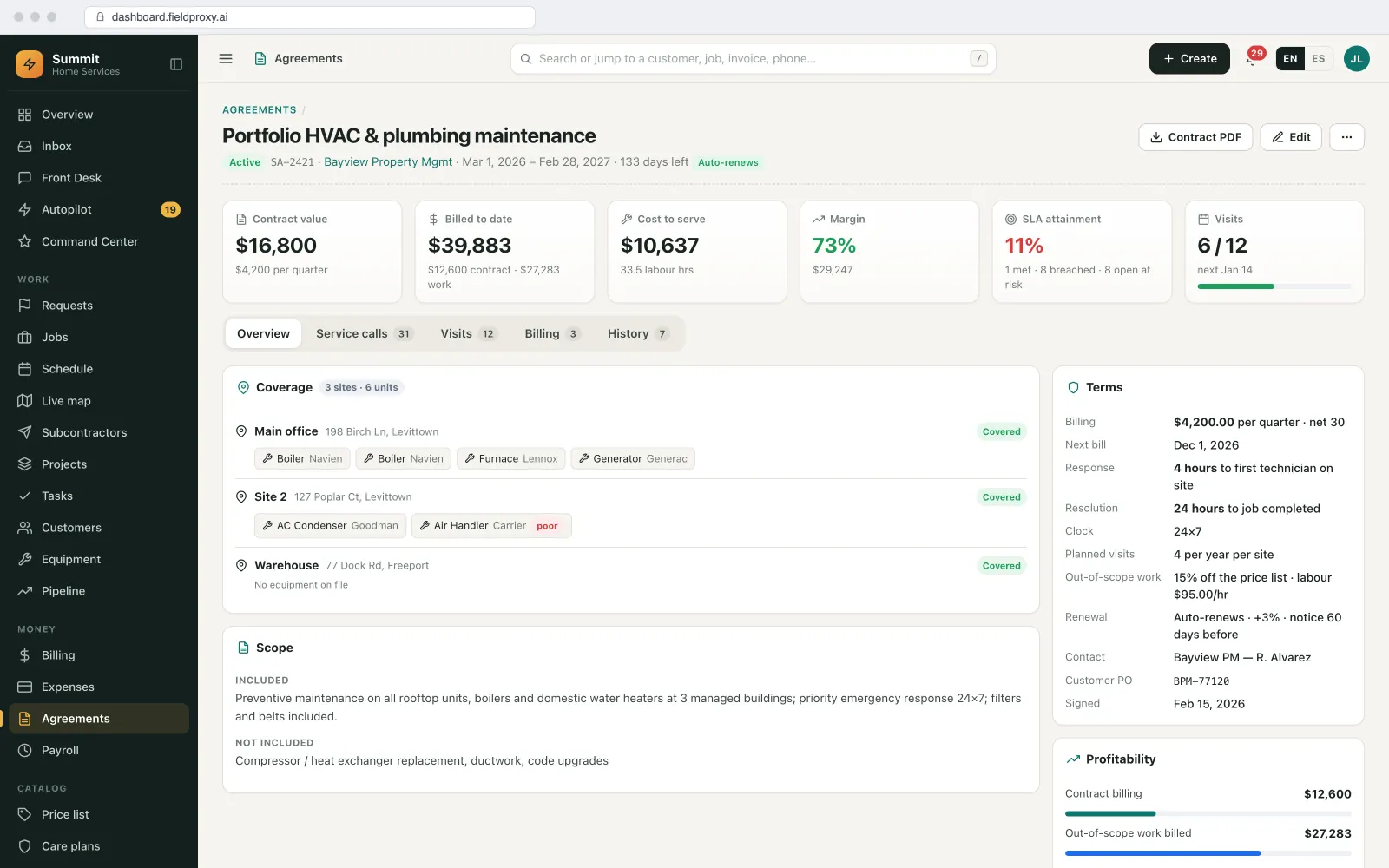
Screens from our demo account
What you can change, and how
Price book
Your own items, costs, markups and kits, by trade.
Options
Good, better, best tiers, or any number of options.
Rules
Margin floors, discount limits that need approval, loyalty pricing per customer, expiry dates.
Fields
Deposit percentage, preferred install date, financing notes; add one in plain English.
Templates
Your own proposal and invoice layout, including your existing Word document filled in.
Payment methods
Card, ACH, AutoPay and wallets through Stripe.
Reminder ladder
The steps, the wording, the intervals and when service holds apply.
Contract terms
Billing frequency, included services, SLA response times, site coverage and renewal dates per agreement.
How it connects to the rest of Fieldproxy
An approved quote becomes a scheduled job in one click.
Larger quotes become projects with phases and a billing schedule.
Agreements drive both the recurring visits and the billing.
Customers approve quotes and pay invoices online.
Prices come from your cost book and stock.
QuickBooks, Xero and Stripe
Two-way sync for invoices, payments and customers.
When this is not the right fit
- If you bid large construction projects from drawings, a takeoff or bid tool is still the right place for the bid. Fieldproxy runs the quote once you know the scope.
- Pricing is only as good as your cost book. Plan to load your real costs at setup.
- Customer financing is shown on the quote; the loan itself comes from your financing partner.
- Fieldproxy is not your accounting system. It syncs with QuickBooks, Xero or Sage, which stay the books of record.
- Card payments go through Stripe; if you need a different payment processor, ask us before you start.
How typical tools handle quote to paid
| Question | Typical tools | Fieldproxy |
|---|---|---|
| Quote to job | The quote is retyped into a job, or converted with lines lost. | One click: the job carries the same lines, parts and price. |
| Options | One total per quote; options mean separate quotes. | Good, better, best on one quote; the customer picks and signs. |
| Margin | Discounts are approved by habit. | A margin floor the quote cannot drop below, and discounts over your limit wait for a manager. |
| Getting paid on site | A card reader to carry, or the office sends the invoice later. | Tap to Pay on the technician's phone, or a payment link the same day. |
| Accounting | One-way export; payments marked in the books are not seen in the job tool. | Two-way with QuickBooks Online, Desktop and Enterprise and Sage, including bills; invoices to Xero. |
Typical tools means the common pattern across the products that rank for these searches, not any one product.
Questions
Straight answers.
What is job costing software?
Job costing software adds up what each job actually cost (labour hours, parts, subcontractors and expenses) and sets it against what the job was sold and invoiced for, so you see the margin per job. In Fieldproxy the costs come from the work itself: technicians' clock-ins, parts taken from stock or bought on a purchase order, sub payouts and logged expenses.
Can I compare the estimate with the actual cost of a job?
Yes. The quote's lines carry into the job when it is signed, so the quoted price sits next to the hours, parts and costs the job actually used. Projects with phases also show budget vs actual on the project page.
Does job costing work with QuickBooks, Xero or Sage?
Invoices, payments and bills sync two-way with QuickBooks Online, Desktop and Enterprise, Xero and Sage, so the books stay the record. The job-level costing lives in Fieldproxy, where the hours, parts and subcontractor costs are captured.
What is estimating, quoting and invoicing software for field service?
It builds priced quotes from your own price book, gets them approved, turns approved quotes into jobs, and invoices the job when it is done. Fieldproxy does all of it on one record, on the phone or in the office, with good, better, best options, e-signature and payment links.
Can customers sign quotes online?
Yes. They open a link, choose an option, sign on any device and can pay a deposit there.
Can we use our own price book?
Yes. Items, costs and markups are yours, and a margin floor stops a quote going below it.
Does it follow up on open quotes?
Yes. You see when a quote is opened, follow-ups go out automatically, and quotes expire on schedule.
Can a quote become a job automatically?
Yes. An approved quote converts to a scheduled job with the same lines, parts and price.
Does it chase overdue invoices?
Yes. A reminder ladder runs at intervals you set and stops as soon as the invoice is paid.
Does it sync with QuickBooks?
Yes. Customers, items, invoices, payments and bills sync two-way with QuickBooks Online, QuickBooks Desktop and QuickBooks Enterprise. Xero is supported, and Sage has a deep two-way integration.
Can technicians take card payments on site?
Yes. Technicians take cards with Tap to Pay on their own phone, with no card reader, and the payment posts against the job and the invoice. Customers can also pay from a link by card, ACH, Apple Pay or Google Pay. Payments run through Stripe.
Can it bill service contracts automatically?
Yes. Monthly, quarterly or annual agreements are invoiced on schedule, with renewals drafted ahead of time.
Can we use flat-rate pricing?
Yes. Price books carry your items, labour rates, markups and flat-rate prices, and member or loyalty pricing can apply per customer.
Can technicians quote without seeing our costs?
Yes. What each role can see is set per role, so technicians can present priced options without seeing costs or margins.
Can we do progress billing on larger jobs?
Yes. Larger work runs as a project with deposit, milestone and retainage invoices from a billing schedule, and change orders over your threshold wait for approval.
Can a commercial client get one invoice for many sites?
Yes. Visits can close per site and bill on one invoice per client and period, with each line linked to that site's work.
Can I create invoices from ChatGPT or Claude?
Yes. Through Fieldproxy's MCP server, anything you can do in the app, including quotes and invoices, can be done from Claude, ChatGPT or Copilot, with a confirm step before it is saved or sent.
Quote on site. Invoice when the job closes.
See quote to paid run on your own pricing, your logo and your billing rules.
Also works from ChatGPT, Claude and Copilot in Teams
Fieldproxy's MCP server lets your team run the day and change the software itself from the AI assistant they already use, with a confirm step before anything changes.