
AI Dispatch Agent
AI dispatch agent: the right technician on every job, with your approval.
When a job comes in, the AI dispatch agent weighs SLA windows, contract priority, distance, skills, van stock, labor rates and overtime across every region, picks the technician who meets the contract first and protects margin second, and shows you why. You approve the assignment, and any change can be undone. It works on the same board as Fieldproxy's AI scheduling and dispatch software, so your dispatchers and the agent never work from two different plans.
 Dispatch board · Meridian Facility ServicesThu · 7:40 AMDispatch Agent working
Roof leak over the server room
Candidates
Marcus T.
North · 8 min
No roofing cert
Ana R.
North · 14 min
Roofing cert · van stock checked
Dev P.
Central · 26 min
Overtime after 2 PM
Kim L.
Central · 31 min
Board full
North region
Central region
South region
Approved subcontractor
Unassigned
Decision logged
Ana R. over Marcus T. (closer, no roofing cert). PM at Site 9 moves to 10:15, still inside its contract window. Gutter job to Apex Roofing, an approved sub.
P1 assigned in 4 seconds. SLA at risk: 0.
Ana on site by 8:00, two jobs re-sequenced, overflow with an approved sub, site contact sent the ETA.
Live demo
See It In Action
Watch AI analyze and select the optimal technician in real-time
Available Technicians
AI evaluating 3 candidates
Steve M.
Mike R.
Sarah K.
Decision Engine
Multi-variable optimization
Awaiting job assignment...
WHY THIS MATTERS
- •Steve rejected: Would require second truck roll
- •Mike rejected: Double-time would eat profit
- •Sarah selected: First-time fix at lowest cost
Walkthrough
What Happens When a Field Tech Calls In Sick? 14 Jobs Reassigned in 1 Minute
The Problem With Manual Dispatching
- Dispatchers send the closest tech, who lacks the required part
- Overtime costs eat into profit when cheaper options exist
- Return visits kill margins and SLA performance: wrong skill match, missing equipment
- Too many factors to weigh by hand on a busy day
The Dispatch Agent Solution
- Checks van stock before assigning, so the technician arrives with the part
- Calculates true cost including travel, labor, and overtime
- Matches skills and certifications to job requirements
- Optimizes across all variables simultaneously, instantly
Where it fits
What an AI dispatch agent does, and what stays with your dispatcher
An AI dispatch agent is software that reads each new job, works out who should go, explains why and, once a person approves, makes the assignment and tells everyone. It is a member of the dispatch team, not a replacement for the board or for the dispatcher's judgement.
It works on your scheduling board
The agent reads and writes the same schedule your dispatchers use, so there is one plan. The board itself (day, week and map views, drag and drop, routes) is covered on AI scheduling and dispatch software and dispatching and scheduling.
It starts when a job arrives
Jobs can come from calls, the customer portal, email, PDF work orders and helpdesk tickets. The Document Intelligence agent reads emailed work orders into jobs, and helpdesk to field dispatch covers tickets.
Planned work is a different agent
Reactive jobs are the dispatch agent's work. Recurring maintenance visits are placed ahead of time by the Scheduler agent, and the Watcher agent flags jobs close to breaching their SLA or stuck in a status.
Your crew first, subcontractors second
The agent fills in-house technicians first and offers overflow to approved subcontractors where coverage is thin. See in-house first, vendor fallback dispatch and subcontractor management.
It only sends people who are allowed to go
Skills and certifications are checked, and a subcontractor whose insurance or W-9 has expired can be blocked from dispatch (how that works).
You can ask it from your AI assistant
Through the MCP server, a dispatcher can ask Claude, ChatGPT or Copilot who should take a job or to move a visit, with the same confirm step before anything changes. The Command Center does the same inside Fieldproxy.
See it built around how your team already works.
Get DemoHow it works
How the AI Dispatch Agent Works
Every factor weighed for each job, with the reason shown
Scan All Technicians
When a job comes in, AI instantly scans every available technician. Location, current workload, skills, certifications, and van inventory, all checked in parallel.Calculate True Costs
For each candidate, AI calculates total job cost: travel time, mileage, labor rate, overtime premiums, and probability of first-time fix. Hidden costs become visible.Propose, Approve & Dispatch
AI proposes the tech with its reasoning. Once you approve, the route goes to the mobile app, the site contact is told the ETA, and the decision is logged for the operations team. Any change can be undone.
The variables
What Dispatch Agent Optimizes
What it weighs for every assignment
Distance & Travel Time
Van Inventory
Labor Rates & Overtime
Skills & Certifications
Current Workload
First-Time Fix Rate
See it built around how your team already works.
Get DemoResults
Dispatch Agent Results
Skills
Matched to the job
Location
Nearest qualified tech
Live
Reassigns when the day changes
Approve
Nothing moves without your OK
Scenarios
Real Dispatch Scenarios
How the agent weighs the factors a dispatcher juggles, and proposes an assignment for approval
Emergency After-Hours Call
A client site's cooling is down at 9pm. AI considers: on-call rates, current tech locations, the contract's SLA commitment, and next-day alternatives. Dispatches tech with shortest drive time who isn't already on overtime.
Commercial Equipment Failure
Restaurant walk-in cooler down. AI identifies techs with refrigeration certs and the likely replacement part in van stock. Picks tech 20 miles away over closer tech without the part.
Multi-Region Morning Surge
Forty jobs land across three regions before 8am, some on contracts with four-hour SLAs. AI fills in-house crews in each region first, routes overflow to approved subcontractors where coverage is thin, and sequences every route so each tech has parts for their assigned jobs.
Priority Customer Request
A key contract client logs a non-urgent issue. AI recognizes account status, checks SLA terms, and assigns their preferred technician while reshuffling other jobs to maintain everyone's schedule.
Also works from ChatGPT, Claude and Copilot in Teams
Fieldproxy's MCP server lets your team run the day and change the software itself from the AI assistant they already use, with a confirm step before anything changes.
Pair this agent with
Most teams adopt one agent first, then layer in two or three more in the same week.
Works in every trade
Which industry are you running today?
Evaluating Fieldproxy against another platform?
Try it yourself, free
Don't take our word for it. Run this AI on your own job, right now.
These free tools run the same AI capability on whatever you throw at them, no signup, no sales call.
Worked example
An emergency call dropped into a full day
Demo data. At 1:20 pm a commercial customer reports a walk-in freezer failing, with a 4-hour response SLA.
Step 1
The job arrives as an emergency
It comes in by phone or email and is created with emergency priority and the SLA deadline.
Step 2
The best technician is suggested
Only technicians with refrigeration skills are considered. The board ranks them on where they will be, free time and how moving their next job affects its own window.
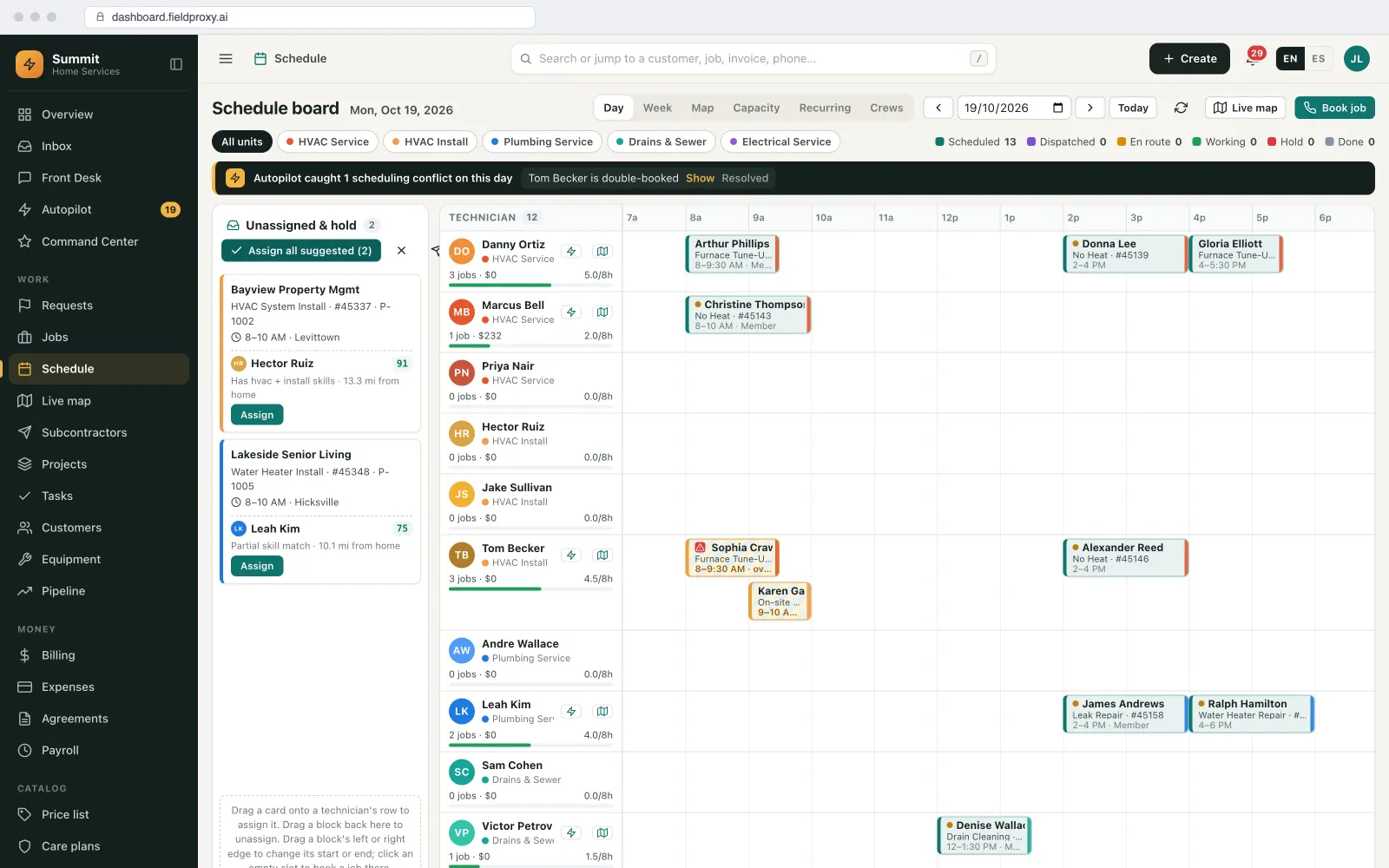
Suggested technicians with scores for unassigned visits.
Step 3
The knock-on change is shown
Assigning the emergency to the nearest technician pushes their 3 pm job. The preview shows the new times and the job that could go to someone else, before anything is applied.
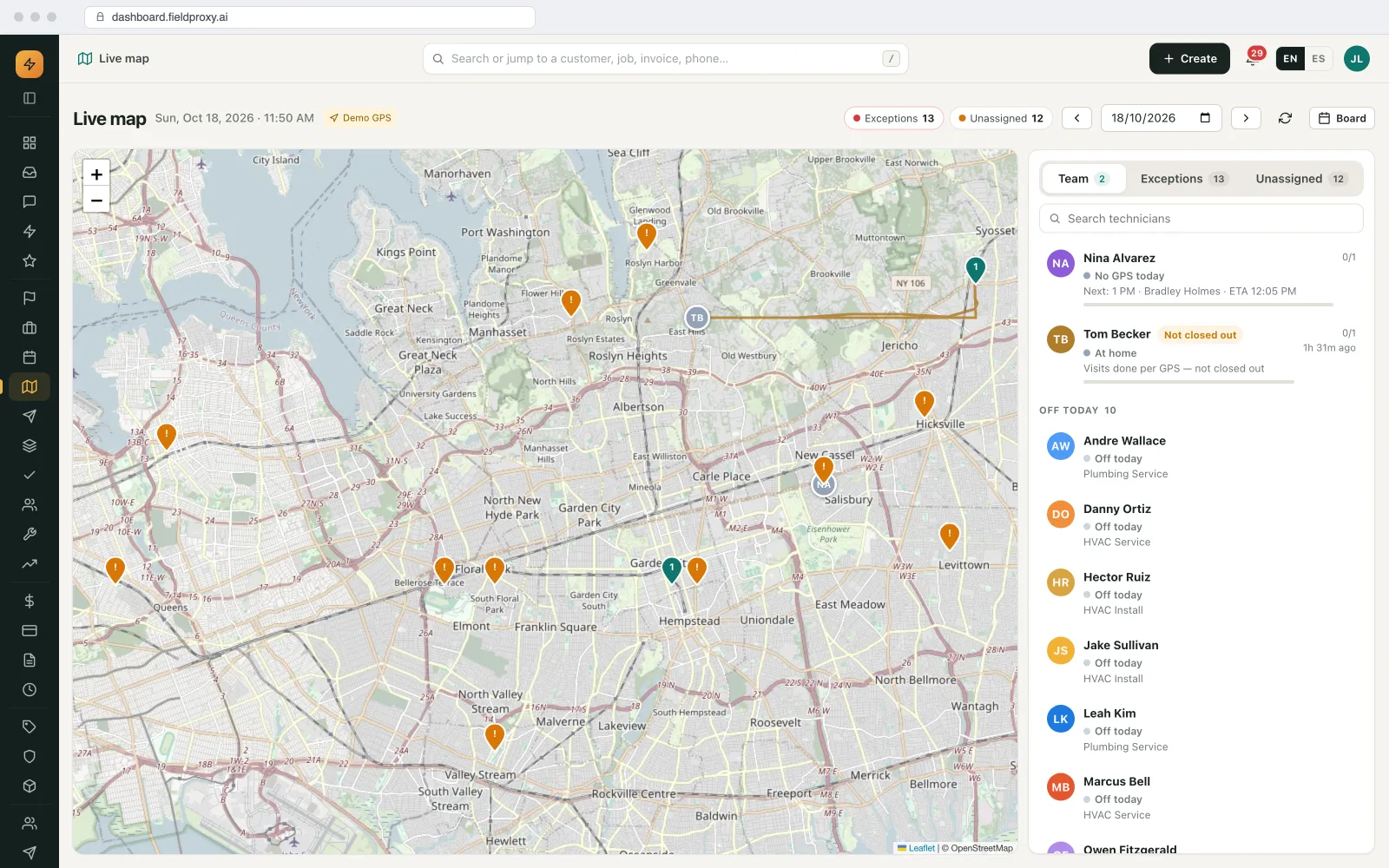
Live map with technician positions, unassigned visits and the team panel.
Names, sites and amounts in this example are demo data. Screens are from the Fieldproxy demo account.
Control
What runs on its own, and what waits for you
| Task | Who acts | Detail |
|---|---|---|
| Ranking technicians for a job | Runs on its own | Skills, location, availability and SLA. |
| Assigning and moving jobs | Waits for your OK | Preview first; automatic only for job types you choose. |
| Customer notifications | Your rule decides | Sent by the rules you switch on. |
Getting started
Setup, connections and fit
How it is set up
- A 30-minute call to walk through how your office runs today: job types, who approves what, and where work comes in from.
- Load technicians' skills, certifications and working hours.
- We set it up on your own data and rules, and it is live within a day.
What it connects to
- Technician mobile app: live location and status
- Customer messages: new windows and tracking links
When it is not a fit
- Every job can go to any technician and the day rarely changes.
Worked example: a morning queue
Twelve jobs in before 8 am, one dispatcher
The worked example above is a single emergency. This one is the more common problem: a pile of new jobs at the start of the day. Demo data for a commercial HVAC and refrigeration contractor with two regions.
- 1
The queue fills overnight
Twelve jobs are waiting at 7:30: four from client emails and PDF work orders read into jobs with their not-to-exceed amounts and deadlines, five from the customer portal, three from calls to the after-hours line. Two are P1 refrigeration calls with a 4-hour response.
- 2
The agent proposes the whole morning
For each job it proposes a technician with the reasons: has the refrigeration certification, will be 14 minutes away after their first stop, has the condenser fan motor on the van, is not on overtime. The two P1s are proposed first.
- 3
The trade-offs are visible
Sending Priya Shah to the second P1 pushes her planned maintenance visit to Thursday, still inside its window. The agent shows that knock-on change before anything is applied.
- 4
One job is held back
A job at a retail site is proposed for a subcontractor because no in-house technician in that region is free before the deadline. It waits for the dispatcher, because it is subcontracted and over the not-to-exceed amount.
- 5
The dispatcher approves
Dana Cole accepts ten proposals as they are, swaps two technicians because she knows one customer prefers Luis, and approves the subcontracted job. Every change can be undone.
- 6
Everyone is told
Jobs reach the technicians' phones with routes. Customers get their arrival windows and tracking links by the rules you have switched on. Each decision is logged with its reasons.
The dispatcher spends the first half hour checking and adjusting proposals instead of building the morning from scratch, and the reasons for every assignment are on record when a client asks why a job went to whom.
Names and figures in this example are demo data.
What you control in the dispatch agent
The agent follows your rules, set at setup and changed later by asking in plain English.
| Setting | What you choose | Example |
|---|---|---|
| What it may do on its own | Which job types it can assign without asking, if any. Everything else waits for approval. | Proposes everything; auto-assigns only routine filter changes. |
| Matching rules | Skills, certifications, zones, preferred technicians per customer, working hours. | Refrigeration calls only to certified technicians; Kingsway Retail prefers Luis. |
| Priorities and SLAs | Priority levels and response targets by contract tier or job type. | P1 within 4 hours; P3 next business day. |
| Cost rules | How overtime and travel are weighed against each other. | Avoid double time unless the SLA would be breached. |
| Subcontractors | When jobs may go to subs, which subs for which work, and which need approval. | Subs only when no in-house technician can make the deadline. |
| Who approves | Which dispatchers and managers approve which proposals. | Subcontracted jobs and anything over the NTE go to the operations manager. |
| Customer messages | Which assignment and arrival messages go out, and when. | Arrival window text on assignment; tracking link when the technician leaves. |
AI dispatch agents compared with the usual approaches
There are three common ways to dispatch: a person with a board, rules-based auto-dispatch, and an AI agent with approval. This is how they compare.
| Question | Manual board or rules-based auto-dispatch | Fieldproxy dispatch agent |
|---|---|---|
| How a technician is picked | The dispatcher's memory, or a fixed rule such as nearest available. | Skills, certifications, location, free time, van stock, overtime and SLA weighed together, with the reasons shown. |
| When the day changes | Re-planned by hand, or the rule fires again without seeing the knock-on effect. | The knock-on changes to other jobs are previewed before anything is applied. |
| Control | Full control but slow, or fast with no review. | Proposals wait for approval; only job types you choose run on their own; every change can be undone. |
| Explaining a decision | Rarely recorded. | Every assignment is logged with its reasons. |
| Setup | Rules built and maintained by an admin. | Set up around your rules with you, live within a day, and changed by asking in plain English. |
Large enterprise platforms also offer AI dispatch features, usually as add-ons to a wider suite. The comparison above is about approach, not any one product.
Before you switch an AI dispatcher on
- Load technicians' skills, certifications and working hours. The agent can only match on what it knows.
- Decide what may run without approval. Most teams start with nothing and widen it later.
- Run it alongside your dispatcher for a few weeks and compare its proposals with their decisions.
- Check that technicians share location from the app, or proposals fall back to the schedule.
- Make sure parts on each van are recorded if you want van stock to count.
- Agree who approves subcontracted jobs and jobs over a not-to-exceed amount.
Questions
Straight answers.
How does AI dispatch decide which technician to send?
It ranks technicians on the skills the job needs, where they will be, their free time and the SLA, and shows why. The dispatcher assigns.
Can AI dispatch handle emergencies in a full schedule?
Yes. It suggests who should go and previews the knock-on changes to the rest of the day before anything is applied.
What is an AI dispatch agent?
It is software that reads each new job, works out which technician should go based on skills, location, free time, parts and SLA, explains its reasoning and makes the assignment once a person approves. In Fieldproxy it works on the same board as your dispatchers.
Will an AI dispatcher replace our dispatcher?
No. It prepares proposals and handles the routine checks, and the dispatcher approves, swaps or overrides them. Teams that want human dispatching keep it; the agent only does what you allow.
Can the AI dispatch agent assign jobs automatically?
Only for the job types you choose. Everything else is proposed and waits for approval, and any change can be undone.
Does it work with subcontractors?
Yes. It can fill your own technicians first and offer overflow to approved subcontractors, and jobs that go to subs can be set to need approval.
What does AI dispatch software need to work well?
Accurate skills, certifications and working hours for each technician, location sharing from the app and, if parts matter, van stock recorded. Setup covers these, and Fieldproxy is live within a day.
Can I dispatch from ChatGPT or Claude?
Yes. Through Fieldproxy's MCP server, a dispatcher can ask Claude, ChatGPT or Copilot who should take a job or to move a visit, with a confirm step before anything changes.