Facilities Management

Facility maintenance software built around how you already work.

Planned preventive maintenance across client portfolios, reactive jobs on SLA timers, multi-trade work split between your own engineers and subcontractors, and the reporting each client asks for, set up the way you actually run it. Change a field, a rule or an SLA queue by asking in plain English, and Fieldproxy AI agents assist your team. Live within a day, with unlimited users.

Plain English

Say how you run it. It goes live.

Each change on the right was made by typing one sentence. No dev ticket, no rebuild, live for every tech.

Facilities ManagementPlain English

Fields added

Asset tag + warranty-expiry now required

Photo step added

Before + after photo required to close

Live across all sites

Open + future work orders updated

Live in

40 secno dev, no ticket

Built your way

Built for facility maintenance contractors

Every client, every site, every trade, in one system.

Client, site and asset hierarchy

Clients, sites, floors and assets in one structure, with QR-coded assets and the full job history on each.

PPM schedules

Planned maintenance by asset and frequency for HVAC, electrical, plumbing, fire and fabric, generated as visits ahead of time.

SLA timers

Response and fix targets per client and priority, with the clock visible on every job and escalation before a breach.

Reactive jobs

Requests from client portals, email or phone become prioritised jobs, dispatched by trade, location and SLA.

Own engineers and subcontractors

Route each job to your engineers or a subcontractor, and let the sub update their own job from a link without a seat.

Subcontractor compliance

Insurance, licences and certificates held per subcontractor with expiry dates, so work is blocked when one lapses.

Client portals

Each client raises requests, approves quotes and sees status and certificates for their own sites only.

Quotes and billing per contract

Fixed PPM fees, reactive work at contract rates and approved quotes, invoiced per site or consolidated per client.

Client reporting

PPM completion, SLA performance and spend per client and per site, ready for the monthly review.

One link, not a login

Send a scoped link to exactly one job: a site manager tracking a request, a sub closing out their work. No access to the rest of the portfolio.

See it built around how your team already works.

Get Demo

Customer stories

Subs, sites and clients, run from one place.

Pronative
“If the AI does something we didn't mean, we hit undo. That's what made us trust it with real work.”

Stephanie Choate, Owner, Pronative

Commercial facility maintenance

Read Pronative’s story
Read all customer stories

How facilities runs on it

How a facilities business runs on Fieldproxy.

The parts of Fieldproxy facilities teams lean on most, set up to your own stages, forms and prices.

Subcontractors in the same system

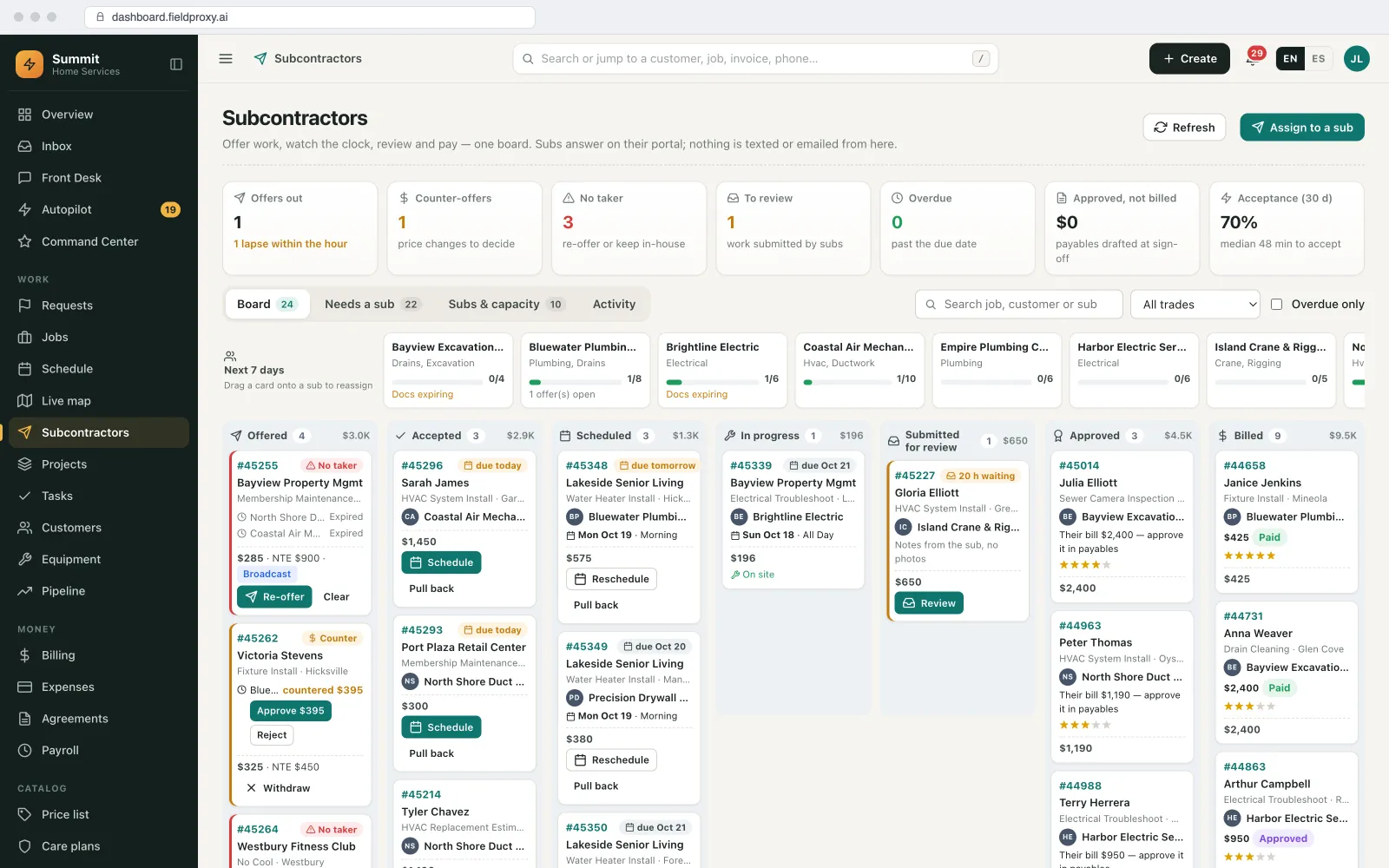
Offer work to subs, track their insurance and licences, and let them update jobs in their own portal.

Service agreements

Agreements per client with planned visits, billing and profitability.

SLA tracking

Response, arrival and completion targets per client or priority, in business hours, with escalation before a breach.

Projects for larger work

Refits and replacements as projects with change orders and progress billing.
Job offered to a ranked shortlist of subcontractors.
Offering a job to subcontractors.

Where the day actually goes

Intake, vendor chasing, compliance and vendor bills, in one work order.

Facility maintenance contractors who self-perform some trades and send the rest to vendors told us the same four things eat their coordinators' days. Here is how each one runs in Fieldproxy.

ServiceChannel, Corrigo and email work orders, without the copy and paste

“Two people who do nothing but just go through those emails... Spend their day clicking away, copy, paste.”
Operations lead, facility maintenance contractor

Work reaches a facility maintenance contractor three ways: the client's portal (ServiceChannel, Corrigo, a national FM's own system), a dispatch email with a PDF attached, or a phone call. Each one carries a client work order number, a priority, an SLA due date and often a not-to-exceed amount, and each client counts the SLA differently. One client's P3 skips weekends and after hours; another simply gives you three days from the time it was raised.

In Fieldproxy the work order is created once. Portal work comes in through the platform's API where the client allows it, or from the dispatch email. The Document intelligence agent reads the email and any attached PDF, picks out the store or site, the trade, the priority, the NTE and the client's reference, and fills the work order. It is matched to the right site and assigned to the work order manager who owns that client or region. A person still decides who goes.

The client's work order number and NTE stay on the job for its whole life, so check-in, the proposal, the invoice and closing it in the client's system all refer back to the same order. A billing view shows jobs that are complete on your side but still open in the client's system, so nothing sits unbilled because one status was never changed.

  • SLA calendars per client and priority, including skip-weekend and after-hours rules
  • Trade and category mapped per client, so a mislabelled trade is caught at intake, not when the sync fails
  • Client work order number, NTE and priority carried onto every visit, proposal and invoice
  • Assignment to a work order manager by client, region or trade
  • Every change on the work order in an audit trail: who, what and when
  • Jobs ready to bill but still open in the client's portal, in one list
ServiceChannel work orders in your own system

AI that chases vendors for acceptance, ETAs, photos and invoices

“Hey, I sent you the approval. Where are you at? ... Hey, you checked in, but you never checked out. What did you find? ... It's just, it's chasing, chasing, chasing, chasing, chasing. Circles of chasing.”
Operations lead, facility maintenance contractor

Once a job goes to a vendor, most of the coordinator's day is follow-up. Has the vendor accepted? When will they be on site? They checked in but never checked out, so what did they find? The quote approval went out yesterday, so when are the materials coming? The job is done, so where are the photos and the invoice? Multiply that by every open work order and the client starts tagging the order with questions before anyone has answered the last one.

Fieldproxy's Watcher agent watches every vendor job against its own clock: not accepted within the window you set, no ETA, checked in without a check-out, quote approved with no date, complete without photos, complete without an invoice. Autopilot drafts the chase for each one, by email or text, in your wording, and a person approves it before it goes out. When the vendor answers, the reply and any ETA land on the work order, so the next person who opens it sees where it stands without reading 70 notes.

Jobs that are not moving at all are flagged too: no update for a set number of days, a client asking for status, an SLA about to breach. The work order manager sees a short list each morning of what needs a human, instead of opening every order to find out.

  • Chase rules per stage, for example no acceptance after 30 minutes, no ETA after 2 hours, no invoice 3 days after completion
  • Drafts in your own wording, approved before anything is sent
  • Vendor replies and ETAs recorded on the work order
  • Stalled work orders flagged before the client asks
  • Vendors update their job, add photos and close out from a secure link, with no login
  • A daily list per work order manager of what is waiting on whom
How Autopilot drafts follow-ups you approve

Vendor compliance documents that block assignment when they lapse

“Most of them are swinging hammers in the field. They are not technology savvy. And getting them to upload compliance documents...”
Operations lead, facility maintenance contractor

A vendor has to be compliant to be sent work and to be paid: a certificate of insurance with general liability and workers' compensation, a W-9, a signed vendor agreement, and for some clients a trade licence or extra cover. Those documents expire on different dates, and most vendors send them by email when chased.

In Fieldproxy each vendor record holds its documents with their expiry dates. A vendor whose insurance or any required document has expired is shown as non-compliant on the dispatch board and cannot be assigned until a current document is on file. The Vision agent reads the expiry date and coverage from a photo or PDF of the certificate, so whoever receives it does not retype it. The Watcher agent flags documents before they lapse, and Autopilot drafts the request to the vendor for you to approve.

The same rule can hold payment: a vendor with a lapsed document, or a job with no photos or sign-off, is not passed for payment until it is fixed. Some clients will not accept an invoice without photos or a sign-off, so the vendor's job is not ready to bill until they are on it.

  • COI, general liability, workers' compensation, W-9, vendor agreement and licences per vendor, each with an expiry date
  • Expired or missing documents block assignment on the dispatch board
  • Certificate details read from a photo or PDF
  • Reminders drafted before expiry, approved before sending
  • Payment held for non-compliant vendors and for jobs missing photos or sign-off
  • Compliance status visible next to distance and skills when picking a vendor
Block dispatch when insurance or a W-9 has expired

Vendor bills, vendor payments and margin per work order

“Some clients, you cannot invoice without photos or a sign-off, and if the vendor hasn't provided that, their payment terms don't start.”
Operations lead, facility maintenance contractor

Every vendor job has two sides: what the vendor bills you and what you bill the client. The vendor's invoice is entered against the work order, checked against the NTE and the approved quote, and the client price is built from it at your markup. Both sit on the same work order, so margin is visible per job, per client and per vendor before anything is billed.

Vendor invoices can be read from the email or PDF by the Document intelligence agent instead of being keyed in. Approved vendor invoices go to QuickBooks Online, Desktop or Enterprise, Xero or Sage as bills through two-way sync, with the vendor, work order and client attached, and client invoices go the same way. Your payment run then happens in your accounting system or bank as it does today, with only compliant, approved bills in it.

Client invoices can be raised per work order or batched per client, for example one invoice for a month of planned maintenance across every store, each line linked to its work order and its photos.

  • Vendor invoice checked against the NTE and approved quote
  • Client price from vendor cost at your markup, margin shown per job
  • Vendor bills and client invoices in two-way sync with QuickBooks, Xero and Sage
  • Batch invoicing per client, with each line linked to its work order
  • Payment holds for non-compliance or missing close-out evidence
  • Rules you set, for example emergency rates only when the job was completed inside the client's window
Tracking not-to-exceed amounts on work orders

Quoted lines are from buyers on our sales calls, with names removed.

Questions buyers ask

Facility maintenance software, the questions buyers ask.

Straight answers to what facilities service providers ask when they shortlist work order and maintenance software.

Which maintenance management platform supports customizable work order workflows and SLA tracking?

Fieldproxy is a maintenance and field service platform where the work order workflow is set up to your own stages, fields and approval rules, and every reactive job carries response and fix targets per client and priority. The SLA clock shows on each job, and the AI escalates before a breach.

  • Your own work order stages, required fields and photo steps, changed by asking in plain English
  • Response and fix targets per client contract and priority
  • Separate queues, for example P1 jobs ordered by time left on the SLA, apart from routine PPM
  • Approval rules, for example jobs over a threshold wait for the client before a subcontractor PO is raised
Work orders and jobs

Which platform can help a facilities service provider manage preventive maintenance, asset history, and technician dispatch in one system?

Fieldproxy holds clients, sites, floors and assets in one structure, generates planned preventive maintenance from each asset's frequency, and dispatches reactive and planned work from the same board. Every job lands on the asset's history, so PPM, breakdowns and repairs sit in one record.

  • QR-coded assets with full job history per asset
  • PPM schedules by asset and frequency across HVAC, electrical, plumbing, fire and fabric
  • Dispatch by trade, location and SLA, to your own engineers or a subcontractor
  • Work orders, assets, PPM and client service requests in the same system
Assets and PPM

What is the best field service management software for a facilities management company handling multiple sites?

For a facilities company covering many sites and clients, the best field service software keeps each client's sites, SLAs, reporting and billing separate while your team works from one board. Fieldproxy is set up that way: a client, site and asset hierarchy, client portals scoped to their own sites, and reporting per client and per site.

  • Client portals where each client raises requests, approves quotes and sees status for their own sites only
  • Billing per site or consolidated per client, at contract rates
  • PPM completion, SLA performance and spend per client and per site
  • One price per company with unlimited users, live within a day
Client portals

What field service software is best for facilities companies managing in-house technicians and subcontractors?

Choose software that routes each job to your own engineer or a subcontractor on the same board, and lets subs update their work without buying them a seat. In Fieldproxy a sub closes out their job from a secure link, and work is blocked for any sub whose insurance or certificate has expired.

  • Subcontractors held with their trades, areas and compliance documents
  • The dispatch agent picks own engineer or sub by trade, location and the site's SLA
  • Subs add photos and close jobs from a scoped link, with no access to the rest of the portfolio
  • The AI chases subcontractors for missing close-out photos and certificates
Subcontractor management

Which field service tools provide real-time visibility into technician workloads, job status, and maintenance backlogs?

Fieldproxy's live operations dashboard shows jobs today, at risk and closed, updated the moment a status changes, alongside technician utilisation and SLA performance by account or region. You can also ask for any number in plain English.

  • Live ops board that refreshes itself, for the screen in dispatch
  • Wrench time, drive time and idle time per team or technician
  • PPM visits slipping behind schedule flagged by the watcher agent
  • Scheduled digests by email, Slack or Teams
Dashboards and reporting

AI for facility maintenance businesses

AI that does the facility maintenance admin, so the office doesn't have to.

Fieldproxy is AI-native field service software. The AI agents work inside your facility maintenance workflow, on your jobs and customers, and you confirm anything that matters before it happens.

Logs and prioritises requests

Calls, texts and emails from client sites get picked up. The agent identifies the site and asset, sets the priority against the contract, and raises the job.

Builds the PPM and reactive schedule

It fits planned visits around reactive work by trade, area and SLA, and rebuilds the day when a P1 lands. You approve the board before anything moves.

Keeps clients and sites updated

Site contacts get an on-the-way text, a completion summary with photos, and an update if an SLA is at risk, before they chase.

Chases paperwork, drafts invoices

It flags jobs closed without photos or certificates, chases subcontractors for their close-out, and drafts invoices per contract.

Switching

Moving from another tool? We move you.

Facility maintenance teams come to us from ServiceTrade, BuildOps, ServiceTitan or simPRO and from spreadsheets. We map how you run on a 30-minute call, configure it within a day, migrate your customers, properties and jobs, and switch you over when your crews are ready. Fieldproxy AI moves it all over from any major tool or custom system in less than a day.

Pricing

Facility maintenance software, one price per company.

  • One price per company, unlimited users
  • Set up to your own stages, forms and checklists
  • Every AI agent included, on the plan's AI credits
  • Live within a day, not months

Shaped to your trade

Your business doesn't run like the template. Neither does Fieldproxy.

Multi-site retail and hospitality

PPM and reactive work across many stores under one contract.

Commercial offices

Building services, tenant requests and planned maintenance per site.

Healthcare and education

Compliance-led PPM with certificates and asset history per building.

Integrations

Plays nicely with the tools you already use

QuickBooks

Invoice + payment sync

Xero

Accounting sync

Stripe

Card + ACH payments

Google Calendar

2-way engineer calendars

Gmail

Client request email + threads

Zapier

Anything else

See it on a demo company

SLA tracking and work order workflows, on the real product.

These screens are Fieldproxy set up for a fictional facilities maintenance contractor, Larkspur Facility Services, with sample clients, sites and vendors. Nothing here is a mock-up.

Chapters

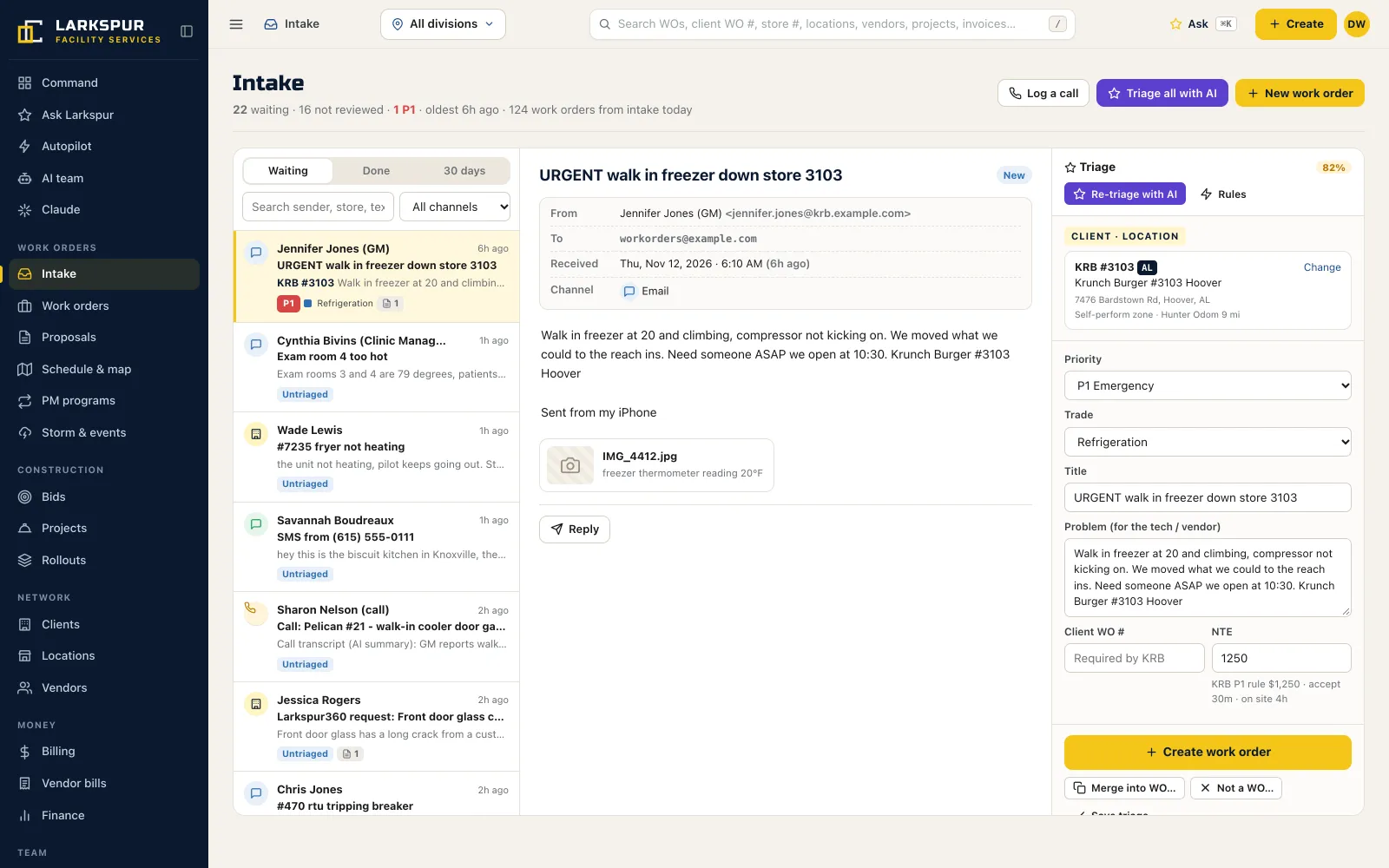
Intake queue with an urgent walk-in freezer email triaged to priority P1, refrigeration, the client location and the client's NTE rule
Work orders in from every channel. Email, client portals such as ServiceChannel and Corrigo, texts and calls land in one queue. AI reads the client, store, trade and priority, and the client's own rule fills in the NTE and the SLA.
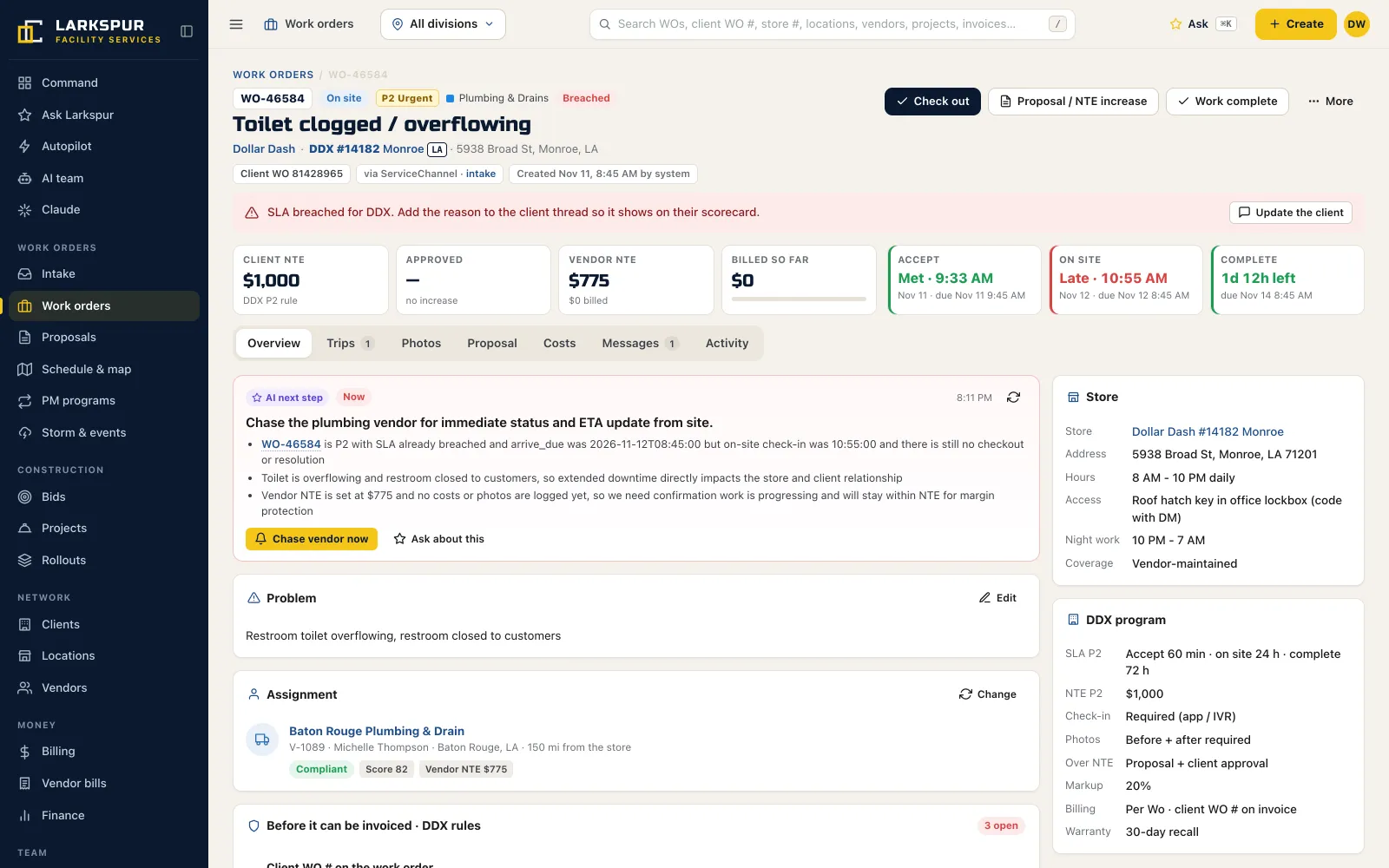
Work order with client NTE, vendor NTE, accept met, on-site late and complete countdown, an SLA breach banner and the client's invoicing rules
SLA clocks and NTE on every work order. The client's work order number, the client and vendor not-to-exceed, and accept, on-site and complete clocks. A missed clock is flagged, and the client's rules list what is still needed before it can be invoiced.
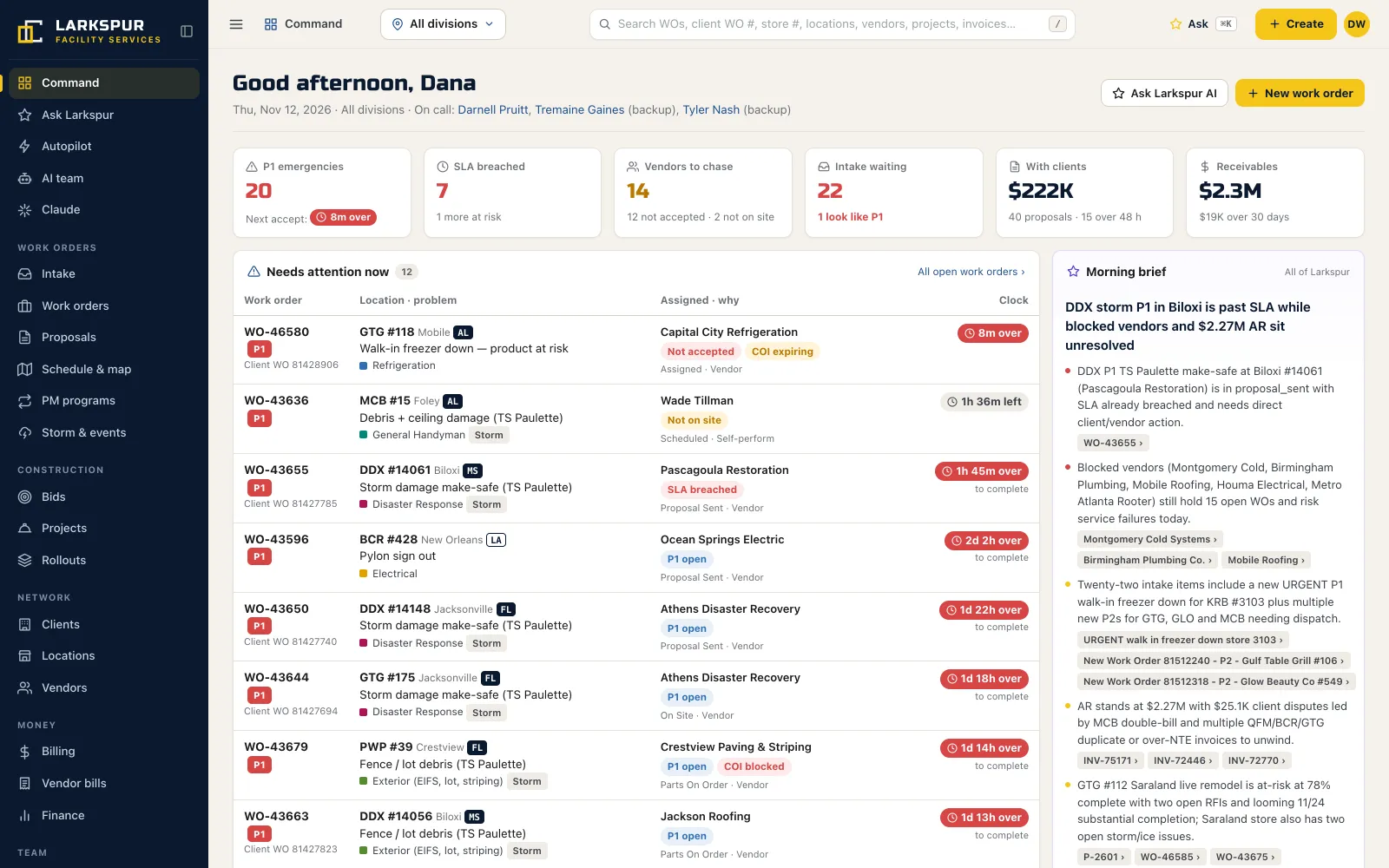
Command screen listing priority work orders across client sites with countdown and overdue clocks, vendor status and SLA breaches
What needs attention now, across every site. Emergencies, breached and at-risk SLAs, vendors who haven't accepted, and intake waiting, sorted by the clock.
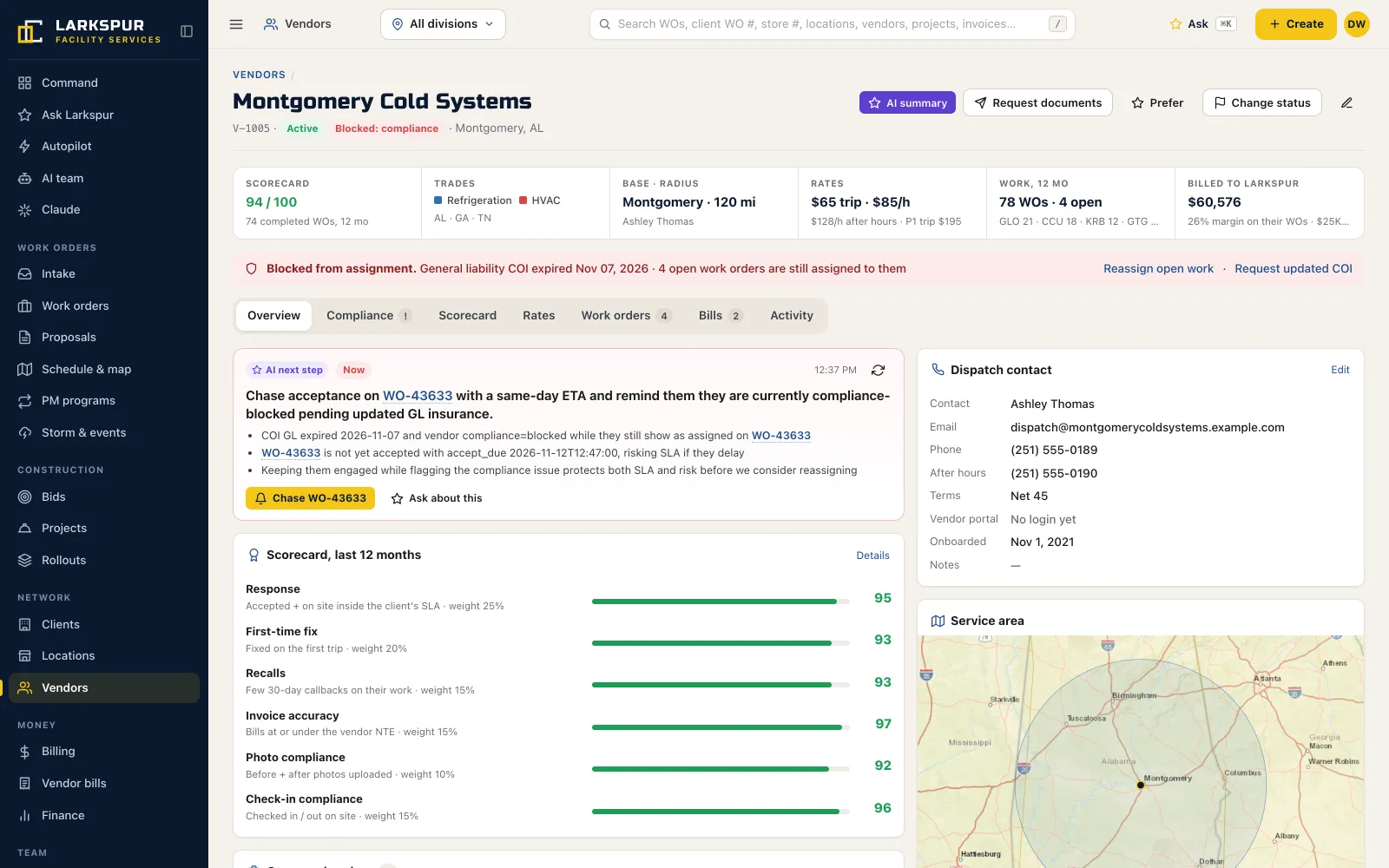
Vendor page blocked from assignment because the general liability certificate expired, with scorecard, trades, rates and service area
Subcontractors, with compliance enforced. Each vendor has trades, coverage, rates and a scorecard. When an insurance certificate expires, the vendor is blocked from new work and their open jobs are flagged for reassignment.
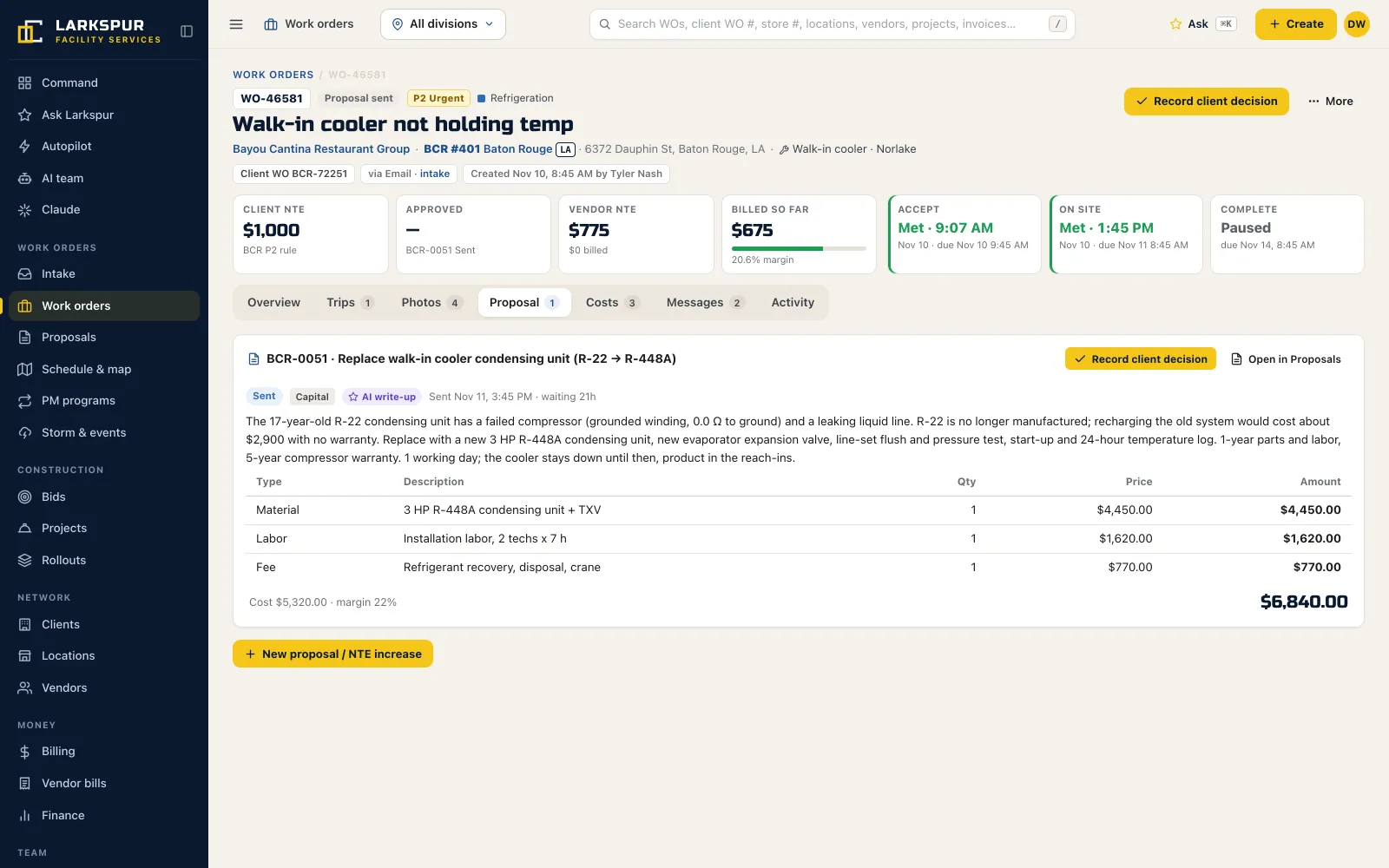
Work order proposal tab with a capital replacement proposal, line items, cost and margin, waiting for the client's decision
Over the NTE, with client approval. When a repair costs more than the not-to-exceed, a proposal is written from the technician's findings, priced, sent, and the client's decision is recorded on the work order.
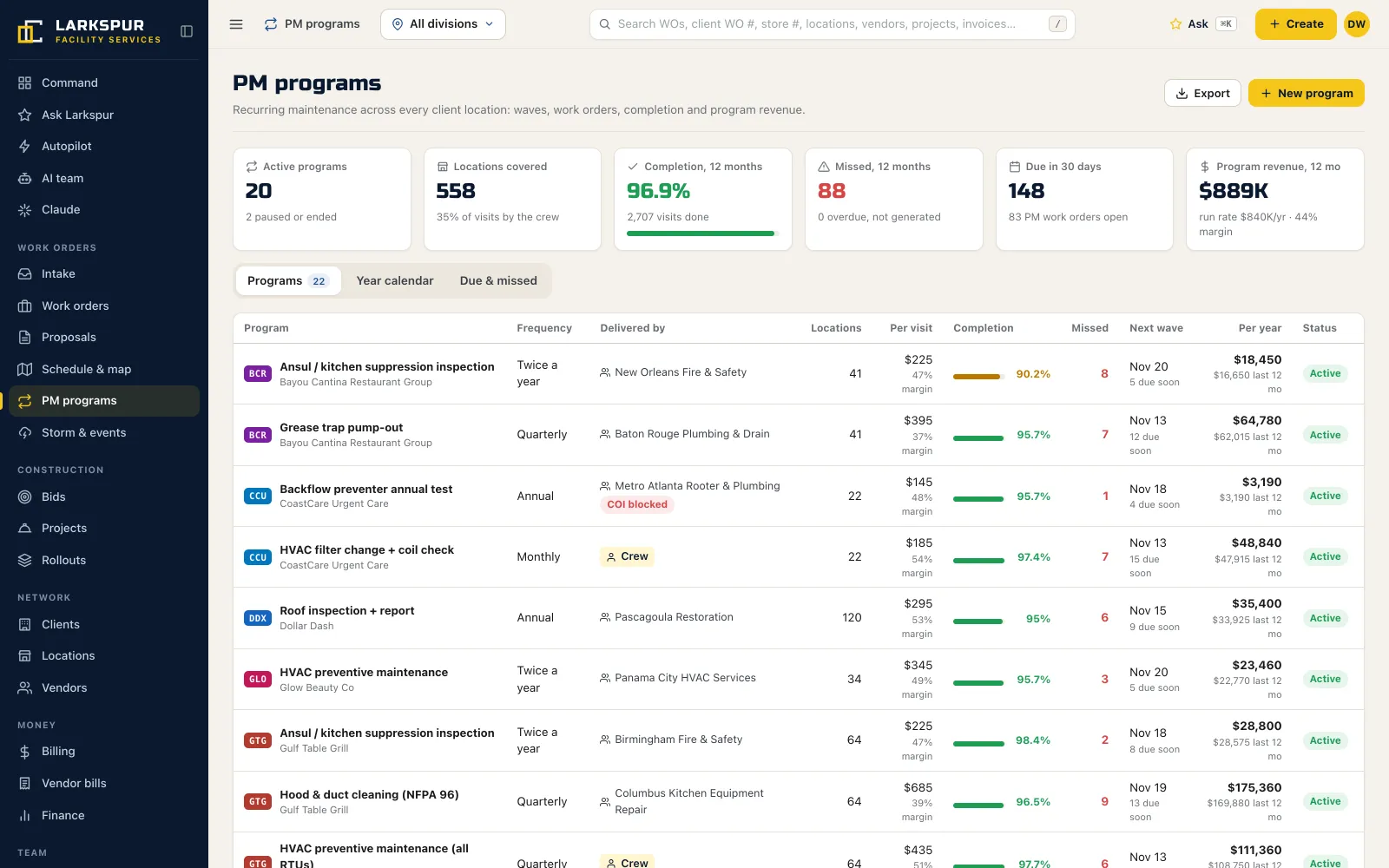
PM programs list with frequency, delivered by crew or vendor, locations, completion, missed visits and next wave per client program
Planned maintenance programs per client. What's done, how often, by your crew or a vendor, at how many locations, with completion, missed visits and the next wave for each program.
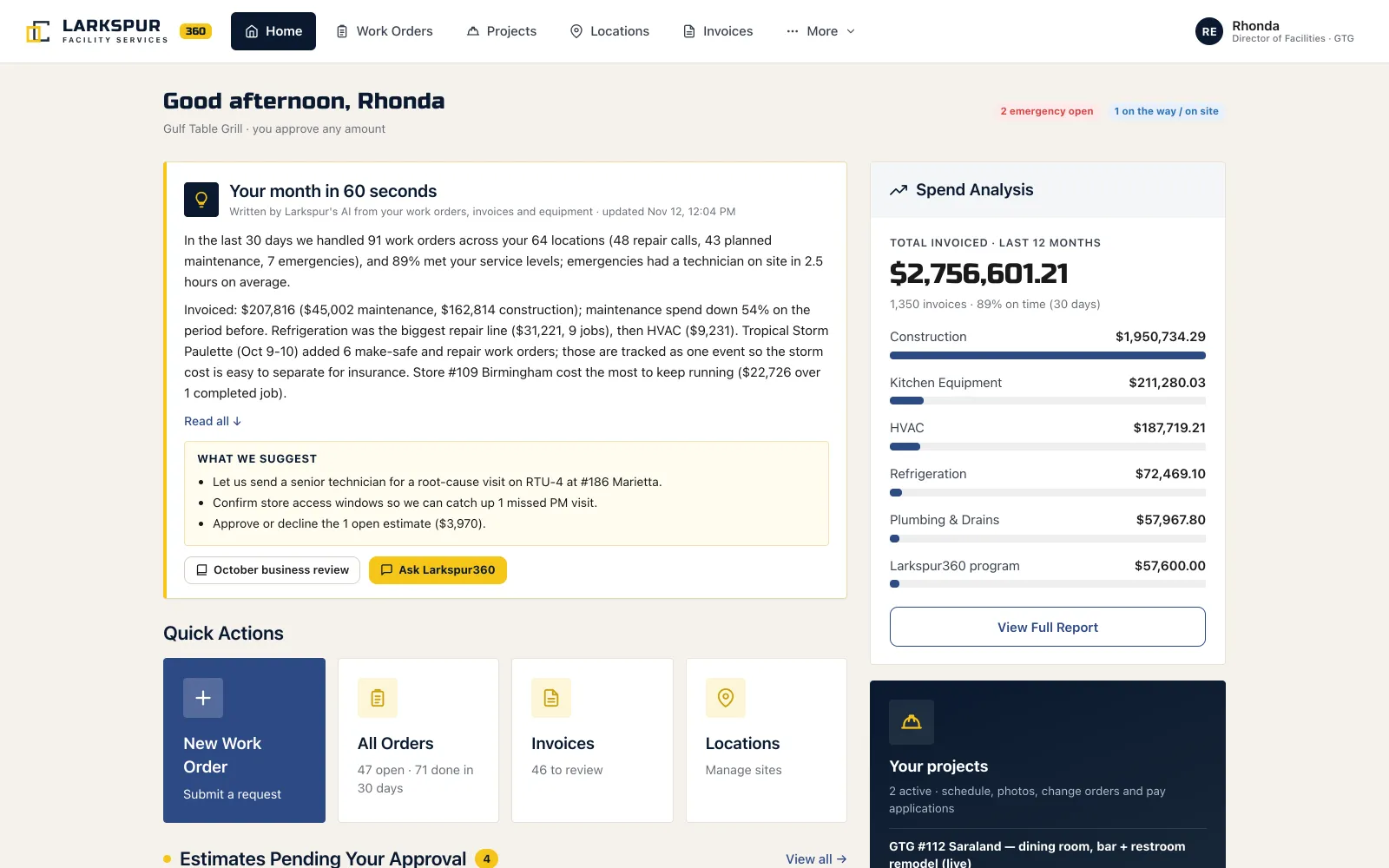
Client portal home with a monthly summary written from work orders and invoices, suggestions, and spend analysis by trade
Clients see their sites live. A branded portal where the client's facilities team sees open work orders, invoices, spend by trade and a plain-English summary of the month.

Want it running on your jobs? We set it up around them.

Get Demo

Specialist guides

Running something more specialised? Read the guide.

How the job really runs, the rules with their sources, exactly what to record, and how it is set up, for businesses close to this trade.

Commercial kitchen repair softwarefrom a warm walk-in to a paid warranty claimFurniture installation softwarejobs, photos and sign-offKitchen exhaust cleaning softwareweekly crew runs from due datesParking lot striping & sealcoating softwaresections, cure windows and ADA countsPallet racking inspection softwarerecorded bay by bay, quoted defect by defectFood plant pest control softwarerun to the auditor's device map, not the route sheetGenerator service softwarerun to NFPA 110, the EPA hour meter and the outageElevator service softwarerun per car, to the MCP, the Category tests and the entrapment clockMedical equipment service softwarerun per device, to the AEM rules, the 100% PM line and the surveyor's sampleFire extinguisher service softwarerun one serial number at a timeFire sprinkler inspection softwareone riser, nine clocksCommercial HVAC service softwarefor PM contracts, portal work orders and every unit on the roofPlayground inspection softwareaudits, surfacing tests and hazard repairsCommercial janitorial softwarebid by the square foot, judged by the inspectionOverhead crane and hoist inspection softwareto replace Service Fusion and SafetyCultureCommercial roofing maintenance softwarefor inspections, leak calls and warrantiesCommercial plumbing service softwarefor interceptors, med gas, eyewashes and water logsGarage door service softwarefor reversal tests, springs, fire doors and PM contractsCommercial locksmith softwarefor master key systems, key control and code-compliant doorsBird control softwarefrom the first droppings photo to the 10-year net warrantyGrease trap pumping softwarethe manifest, the 25% rule and the utilityMold remediation softwarefor protocols, containment and clearanceAsbestos abatement softwarefor notices, crews, air and wasteCommercial door and dock repair softwarefor levelers, restraints, AAADM doors and NTE work ordersSnow removal softwarefor storm logs, salt rates and slip-and-fall proofEpoxy flooring softwaremoisture, profile, dew point and recoatWindow film and tinting softwareevery roll and every tint lawAudio-visual installation softwarefrom rack build to the signed verification listTrade show booth installation softwarecity rules, crews and show deadlinesVending machine service softwareroutes, cash, commissions and service callsSewer camera and hydro jetting softwarethe segment, the PACP code and the city's specBiohazard and trauma cleanup softwarefor waste tracking, OSHA records and claimsCommercial window cleaning softwarethe building, the anchors and the dropRetail fixture rollouts softwareone program, hundreds of store nightsUnderground storage tank testing softwarethe component, the 3-year clock and the state form

Questions

Straight answers.

What is the best software for a facility maintenance business?

The best facility maintenance software is the one that fits how you actually serve your clients: planned preventive maintenance, reactive jobs on SLA timers, multi-trade work split between your engineers and subcontractors, and client reporting. Template tools work if your contracts match theirs. Fieldproxy is facility maintenance software set up to your own clients, SLAs and workflows, with AI agents that handle scheduling, site updates and invoicing, one price per company with unlimited users.

How much does facility maintenance software cost?

Per-user tools often start low and rise with every engineer, coordinator and subcontractor login. Fieldproxy is one price per company with unlimited users, and subcontractors can work from a job link, so growing a contract does not add software cost.

Can it run PPM schedules and SLA timers together?

Yes. PPM visits are generated from each asset's maintenance frequency, and reactive jobs carry response and fix targets per client and priority. Both sit on one board, the SLA clock shows on every reactive job, and the AI escalates before a breach and proposes how to fit planned work around urgent calls.

Does it support customizable work order workflows and SLA tracking?

Yes. Work order stages, fields, photo steps and approval rules are set up to how you run, and each reactive job carries response and fix targets per client and priority. The SLA clock shows on every job and the AI escalates before a breach.

Can it manage preventive maintenance across many client sites?

Yes. Clients, sites and assets sit in one hierarchy, PPM visits are generated from each asset's frequency, and reporting on PPM completion, SLA performance and spend is available per client and per site.

How do subcontractors work in Fieldproxy?

Each subcontractor is held with their trades, areas and compliance documents. A job can go to your own engineer or a sub, and the sub updates it, adds photos and closes it from a secure link without buying a seat. Work is blocked for a sub whose insurance or certificate has expired.

How long does it take to switch from ServiceTrade, BuildOps or simPRO?

We map how you run on a 30-minute call, configure Fieldproxy to it within a day, then migrate your clients, sites, assets, PPM schedules and open jobs. Fieldproxy AI moves it all over from any major tool or custom system in less than a day, and you switch over when your team is ready.

Can Fieldproxy take work orders from ServiceChannel and Corrigo?

Yes. Portal work orders come in through the platform's API where your client allows it, or from the dispatch email, which the Document intelligence agent reads into a work order with the site, trade, priority, NTE and the client's reference. The client's work order number and NTE stay on the job through check-in, proposal, invoice and close-out.

Can the AI chase vendors for acceptance, ETAs, photos and invoices?

Yes. The Watcher agent tracks every vendor job against the rules you set, such as no acceptance, no ETA, checked in without a check-out, or complete without photos or an invoice. Autopilot drafts each chase by email or text, a person approves it before it is sent, and the vendor's reply lands on the work order.

Can an expired certificate of insurance stop a vendor being assigned?

Yes. Each vendor holds its COI, W-9, vendor agreement and licences with expiry dates. A vendor with an expired or missing required document shows as non-compliant and cannot be assigned until a current one is on file, and payment can be held on the same rule.

Does it handle vendor bills and payments?

Vendor invoices are recorded against the work order, checked against the NTE and approved quote, and sent as bills to QuickBooks Online, Desktop or Enterprise, Xero or Sage through two-way sync. The payment run itself stays in your accounting system or bank, with only approved, compliant bills in it.

Is there AI for facility maintenance businesses?

Fieldproxy's AI agents answer calls, texts and emails from client sites, raise and prioritise jobs, build the PPM and reactive schedule, keep site contacts updated, chase missing photos and certificates, and draft invoices. They work inside your own workflow, and you confirm anything that matters before it happens.


See it live

Enter your work email and we draft your setup from your website in about 30 seconds. Shape it by chatting, then the team builds it around how you work.

Also works from ChatGPT, Claude and Copilot in Teams

Fieldproxy's MCP server lets your team run the day and change the software itself from the AI assistant they already use, with a confirm step before anything changes.